PARK ASSIST / MONITORING TELEVISION CAMERA(for Rear) REMOVAL
CAUTION / NOTICE / HINT
The necessary procedures (adjustment, calibration, initialization, or registration) that must be performed after parts are removed and installed, or replaced during rear television camera assembly removal/installation are shown below.
| Replaced Part or Performed Procedure | Necessary Procedure | Effect/Inoperative Function When Necessary Procedures are not Performed | Link |
|---|---|---|---|
|
*: Even when not replacing the part, it is necessary to perform the specified necessary procedures after installation. |
|||
| Rear television camera assembly* | ·
Parking assist monitor system initialization ·
Rear television camera assembly optical axis (Back camera position setting) |
Parking Assist Monitor System | ( 202304,999999,_56,_080754,_0596561,RM100000002AX0C,) 202304,999999,_56,_080754,_0596561,RM100000002AX0C,)
|
| Rear television camera view adjustment | Panoramic View Monitor System | (202307,999999,_56,_080754,_0612151,RM100000002CL9H,)
|
|
| Replaced Part or Performed Procedure | Necessary Procedure | Effect/Inoperative Function When Necessary Procedures are not Performed | Link |
|---|---|---|---|
|
*: Even when not replacing the part, it is necessary to perform the specified necessary procedures after installation. |
|||
| Rear television camera assembly* | ·
Parking assist monitor system initialization ·
Rear television camera assembly optical axis (Back camera position setting) |
Parking Assist Monitor System | (202304,999999,_56,_080754,_0596561,RM100000002AX0C,)
|
PROCEDURE

 76801A
1.REMOVE LUGGAGE COMPARTMENT DOOR OUTSIDE GARNISH SUB-ASSEMBLY (for TFTM Made)
76801A
1.REMOVE LUGGAGE COMPARTMENT DOOR OUTSIDE GARNISH SUB-ASSEMBLY (for TFTM Made)
86790D
2.REMOVE REAR TELEVISION CAMERA ASSEMBLY (for TFTM Made)
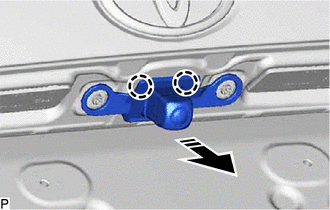

|
Remove in this Direction |
Disengage the 2 claws as shown in the illustration.
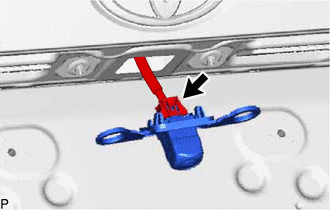
Disconnect the connector to remove the rear television camera assembly.
3.REMOVE LUGGAGE COMPARTMENT DOOR OUTSIDE GARNISH SUB-ASSEMBLY (for GTMC Made)
86790D
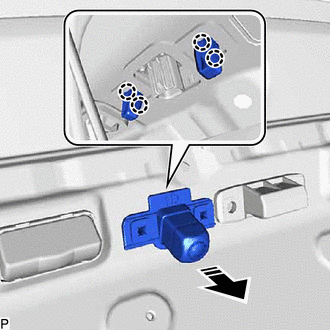
4.REMOVE REAR TELEVISION CAMERA ASSEMBLY (for GTMC Made)
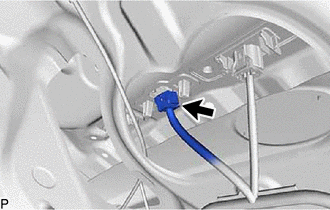
Disconnect the connector.
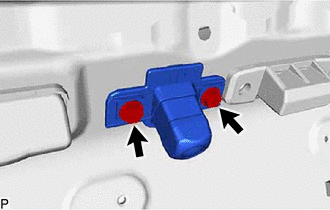
Remove the 2 screws.
|
|
Remove in this Direction |
Disengage the 4 claws and remove the rear television camera assembly as shown in the illustration.
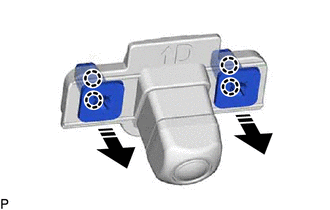
When reusing the rear television camera assembly:
|
|
Remove in this Direction |
Disengage the 4 claws to remove the 2 grommets as shown in the illustration.