TIRE PRESSURE MONITORING TIRE PRESSURE WARNING SYSTEM(for Gasoline Model (for Type A)) C2126 Transmitter ID not Received (Main)
DESCRIPTION
If ID registration via the automatic ID registration function is canceled or the tire pressure warning ECU and receiver does not receive data from the tire pressure warning valve and transmitters after the tire pressure warning valve and transmitter ID registration is completed using the GTS, the tire pressure warning ECU and receiver stores DTC C2126.
After ID registration is complete using the GTS, the tire pressure warning light blinks. When the tire pressure warning ECU and receiver receives the data from all tire pressure warning valve and transmitters with registered IDs, the tire pressure is judged to be normal and the tire pressure warning light turns off.
| DTC No. | Detection Item | DTC Detection Condition | Trouble Area | Note |
|---|---|---|---|---|
| C2126 | Transmitter ID not Received (Main) | ·
After transmitter ID registration is completed, ECU does not receive data in 1 trip from transmitters whose IDs are stored in ECU. ·
ID registration is canceled via the automatic ID registration function |
·
Transmitter ID registration failure ·
Tire pressure warning valve and transmitter ·
Tire pressure warning ECU and receiver |
- |
- NOTICE:
- ·
If DTC C2126 is stored, C2128 may also be stored. If DTC C2128 is stored, perform troubleshooting for DTC C2128 before performing troubleshooting for DTC C2126.
·ID Switching Function:
Even when the 2nd tire set is selected, "(Main)" is displayed on the GTS.
- HINT:
-
The purpose of this DTC is to help prevent delivering a vehicle that has incorrectly registered transmitter IDs. After all IDs are registered, DTC C2126 is detected and the tire pressure warning light blinks. If the tire pressure warning light does not go off after a little while, the transmitter IDs may be incorrectly registered.
CAUTION / NOTICE / HINT
- NOTICE:
- ·
When replacing the tire pressure warning ECU and receiver or tire pressure warning valve and transmitter, read the transmitter IDs and number of the transmitters (4 or 5) stored in the old ECU using the GTS and write them down before removal.
·It is necessary to perform initializationSuspension>TIRE PRESSURE MONITORING>TIRE PRESSURE WARNING SYSTEM (for Gasoline Model (for Type A))>INITIALIZATION202304,999999,_53,_080780,_0393955,RM100000002BB37, after registrationSuspension>TIRE PRESSURE MONITORING>TIRE PRESSURE WARNING SYSTEM (for Gasoline Model (for Type A))>REGISTRATION202304,999999,_53,_080780,_0393955,RM100000002B0BZ, of the transmitter IDs into the tire pressure warning ECU and receiver if the ECU and/or one of the valve and transmitters has been replaced.
PROCEDURE
Set the tire pressure to the specified value.
Turn the ignition switch off.
Connect the GTS to the DLC3.
Turn the ignition switch to ON.
Turn the GTS on.
Enter the following menus: Chassis / Tire Pressure Monitor / Data List.
Display the "ID Tire Inflation Pressure" value for each wheel using the GTS.
- Chassis > Tire Pressure Monitor > Data List
-
Tester Display Measurement Item Range Normal Condition Diagnostic Note ID 1 Tire Inflation Pressure ID1 tire inflation pressure min.: Absolute pressure (abs) / 0 kPa (0 kgf/cm2, 0 psi), Relative pressure (Gauge) / 0 kPa (0 kgf/cm2, 0 psi)
max.: Absolute pressure (abs) / 480 kPa (4.9 kgf/cm2, 70 psi), Relative pressure (Gauge) / 380 kPa (3.9 kgf/cm2, 55 psi)Actual tire inflation pressure If N/A is displayed, data has not been received.*1 ID 2 Tire Inflation Pressure ID2 tire inflation pressure min.: Absolute pressure (abs) / 0 kPa (0 kgf/cm2, 0 psi), Relative pressure (Gauge) / 0 kPa (0 kgf/cm2, 0 psi)
max.: Absolute pressure (abs) / 480 kPa (4.9 kgf/cm2, 70 psi), Relative pressure (Gauge) / 380 kPa (3.9 kgf/cm2, 55 psi)Actual tire inflation pressure If N/A is displayed, data has not been received.*1 ID 3 Tire Inflation Pressure ID3 tire inflation pressure min.: Absolute pressure (abs) / 0 kPa (0 kgf/cm2, 0 psi), Relative pressure (Gauge)/ 0 kPa (0 kgf/cm2, 0 psi)
max.: Absolute pressure (abs) / 480 kPa (4.9 kgf/cm2, 70 psi), Relative pressure (Gauge) / 380 kPa (3.9 kgf/cm2, 55 psi)Actual tire inflation pressure If N/A is displayed, data has not been received.*1 ID 4 Tire Inflation Pressure ID4 tire inflation pressure min.: Absolute pressure (abs) / 0 kPa (0 kgf/cm2, 0 psi), Relative pressure (Gauge) / 0 kPa (0 kgf/cm2, 0 psi)
max.: Absolute pressure (abs) / 480 kPa (4.9 kgf/cm2, 70 psi), Relative pressure (Gauge) / 380 kPa (3.9 kgf/cm2, 55 psi)Actual tire inflation pressure If N/A is displayed, data has not been received.*1
- HINT:
- ·
*1: It may take a few minutes until the values are displayed.
·The wheel position cannot be determined from ID1 through ID4 on the Data List.
- Chassis > Tire Pressure Monitor > Data List
-
Tester Display ID 1 Tire Inflation Pressure ID 2 Tire Inflation Pressure ID 3 Tire Inflation Pressure ID 4 Tire Inflation Pressure - 50003 203 36,37,38,39
Rapidly reduce the tire pressure for each wheel at least 40 kPa (0.4 kg/cm2, 5.8 psi) within 30 seconds. If the "ID Tire Inflation Pressure" value displayed on the GTS does not change, the tire pressure warning valve and transmitter corresponding to the unchanged "ID Tire Inflation Pressure" value was the cause of the output DTC.
- HINT:
- ·
Identify the malfunctioning tire pressure warning valve and transmitter by repeatedly decreasing the tire pressure for each tire.
·Record which "ID Tire Inflation Pressure" value corresponds to each tire.
Check the Data List.
- NOTICE:
- ·
It may take a few minutes until the values are displayed.
·When an "ID Tire Inflation Pressure" value has not changed, reset the tire pressure to the appropriate specified value and rotate the tire 90 to 270 degrees. Then rapidly release the tire pressure and recheck the value.
·Record the transmitter IDs and positions of transmitters that are normal.
After confirming that the "ID Tire Inflation Pressure" value for one tire has changed, repeat this procedure one by one. Identify the transmitter not received.
- Result:
Result Proceed to Change in all tire inflation pressure data A No change in all tire inflation pressure data B No change in any tire inflation pressure data C
A
B
C
Turn the ignition switch off.
Connect the GTS to the DLC3.
Turn the ignition switch to ON.
Turn the GTS on.
Enter the following menus: Chassis / Tire Pressure Monitor / Data List.
Read the Data List according to the display on the GTS.
- Chassis > Tire Pressure Monitor > Data List
-
Tester Display Measurement Item Range Normal Condition Diagnostic Note Registered ID 1 Code Registered ID1 code min.: 0
max.: FFFFFFF*1ID No. registered for transmitter ID1 displayed - Registered ID 2 Code Registered ID2 code min.: 0
max.: FFFFFFF*1ID No. registered for transmitter ID2 displayed - Registered ID 3 Code Registered ID3 code min.: 0
max.: FFFFFFF*1ID No. registered for transmitter ID3 displayed - Registered ID 4 Code Registered ID4 code min.: 0
max.: FFFFFFF*1ID No. registered for transmitter ID4 displayed -
- HINT:
- ·
*1: Displayed only when the ID No. is not registered.
·The wheel position cannot be determined from ID1 through ID4 on the Data List.
- Chassis > Tire Pressure Monitor > Data List
-
Tester Display Registered ID 1 Code Registered ID 2 Code Registered ID 3 Code Registered ID 4 Code - 50003 203 7,8,9,10
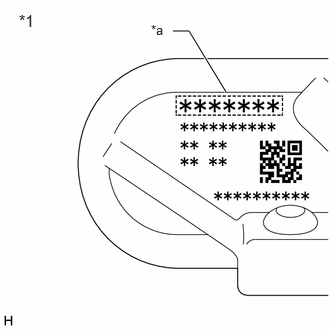
| *1 | Tire Pressure Warning Valve and Transmitter |
| *a | Transmitter ID (7-digit Number) |
Disassemble all of the tires and check the tire pressure warning valve and transmitter IDs.
Confirm that the ID number on the transmitter and recorded transmitter ID match.
- Result:
Result Proceed to Match A Do not match B
A
B
Turn the ignition switch off.
Connect the GTS to the DLC3.
Turn the ignition switch to ON.
Turn the GTS on.
Enter the following menus: Chassis / Tire Pressure Monitor / Data List.
Read the Data List according to the display on the GTS.
- Chassis > Tire Pressure Monitor > Data List
-
Tester Display Measurement Item Range Normal Condition Diagnostic Note Registered ID 1 Code Registered ID1 code min.: 0
max.: FFFFFFF*1ID No. registered for transmitter ID1 displayed - Registered ID 2 Code Registered ID2 code min.: 0
max.: FFFFFFF*1ID No. registered for transmitter ID2 displayed - Registered ID 3 Code Registered ID3 code min.: 0
max.: FFFFFFF*1ID No. registered for transmitter ID3 displayed - Registered ID 4 Code Registered ID4 code min.: 0
max.: FFFFFFF*1ID No. registered for transmitter ID4 displayed -
- HINT:
- ·
*1: Displayed only when the ID No. is not registered.
·The wheel position cannot be determined from ID1 through ID4 on the Data List.
- Chassis > Tire Pressure Monitor > Data List
-
Tester Display Registered ID 1 Code Registered ID 2 Code Registered ID 3 Code Registered ID 4 Code - 50003 203 7,8,9,10
| *1 | Tire Pressure Warning Valve and Transmitter |
| *a | Transmitter ID (7-digit Number) |
Disassemble all of the tires and check the tire pressure warning valve and transmitter IDs.
Confirm that the ID number on the transmitter and recorded transmitter ID match.
- Result:
Result Proceed to Match A Do not match B
A
B
- Result:
Proceed to NEXT
NEXT
- Result:
Proceed to NEXT
NEXT