RM3660EC _56 Audio / Visual / Telematics _080752 NAVIGATION / MULTI INFO DISPLAY _0391865 NAVIGATION SYSTEM(for Gasoline Model with RST Switch) J

NAVIGATION / MULTI INFO DISPLAY  NAVIGATION SYSTEM(for Gasoline Model with RST Switch)  USB Audio System Recognition/Play Error  


DESCRIPTION

When a USB device is connected to the USB jack of the No. 1 stereo jack adapter assembly, it must have playable files. The device must also communicate with and be recognized by the navigation receiver assembly. This diagnostic procedure is for when a device is not recognized, or files from the device cannot be played normally.

WIRING DIAGRAM
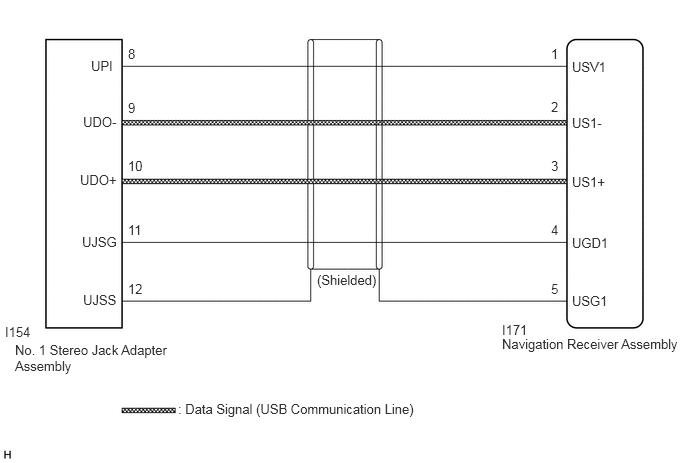
E360450E16
0.156,3.563 1.813,3.958 1.656,0.396 10 false No. 1 Stereo Jack Adapter Assembly 0.052,3.375 0.458,3.573 0.406,0.198 10 false I154 0.948,0.604 1.552,0.823 0.604,0.219 10 false UPI 0.865,1.188 1.469,1.406 0.604,0.219 10 false UDO- 0.833,1.792 1.438,2.01 0.604,0.219 10 false UDO+ 0.854,2.438 1.458,2.656 0.604,0.219 10 false UJSG 0.865,3.042 1.469,3.26 0.604,0.219 10 false UJSS 1.333,2.927 1.531,3.135 0.198,0.208 10 false 12 1.333,2.313 1.531,2.521 0.198,0.208 10 false 11 1.333,1.646 1.531,1.854 0.198,0.208 10 false 10 1.333,1.042 1.531,1.25 0.198,0.208 10 false 9 1.333,0.479 1.531,0.688 0.198,0.208 10 false 8 3.302,2.833 4.833,3.031 1.531,0.198 10 false (Shielded) 5.958,0.615 6.563,0.833 0.604,0.219 10 false USV1 5.958,1.198 6.563,1.417 0.604,0.219 10 false US1- 5.958,1.813 6.563,2.031 0.604,0.219 10 false US1+ 5.958,2.448 6.563,2.667 0.604,0.219 10 false UGD1 5.958,3.052 6.563,3.271 0.604,0.219 10 false USG1 5.74,2.927 5.938,3.135 0.198,0.208 10 false 5 5.74,2.313 5.938,2.521 0.198,0.208 10 false 4 5.74,1.646 5.938,1.854 0.198,0.208 10 false 3 5.74,1.031 5.938,1.24 0.198,0.208 10 false 2 5.74,0.479 5.938,0.688 0.198,0.208 10 false 1 5.229,3.5 7.156,3.76 1.927,0.26 10 false Navigation Receiver Assembly 5.229,3.354 5.74,3.583 0.51,0.229 10 false I171 1.854,4.177 4.573,4.438 2.719,0.26 10 false : Data Signal (USB Communication Line)

PROCEDURE

1.CHECK USB DEVICE
a.

Disconnect the USB device from the No. 1 stereo jack adapter assembly.


c.

Check if the USB device is a compatible format.

HINT:

Refer to System Description for compatible formats and versions.

Click hereAudio / Visual / Telematics>NAVIGATION / MULTI INFO DISPLAY>NAVIGATION SYSTEM (for Gasoline Model with RST Switch)>SYSTEM DESCRIPTION


Result:
Result Proceed to
No playable files exist, or incompatible device format or version. A
Playable files exist, and compatible device format or version. B


A

END (USB DEVICE FORMAT WAS INCOMPATIBLE OR NO PLAYABLE FILES PRESENTED)

B

2.CHECK HARNESS AND CONNECTOR (NAVIGATION RECEIVER ASSEMBLY - NO. 1 STEREO JACK ADAPTER ASSEMBLY)
a.

Disconnect the I171 navigation receiver assembly connector.


b.

Disconnect the I154 No. 1 stereo jack adapter assembly connector.
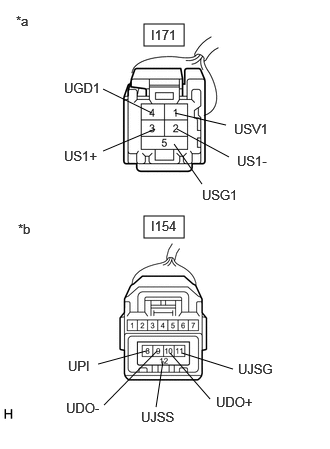

c.
E442860C13
1.5,2.25 1.917,2.479 0.417,0.229 1.5,0.25 1.917,0.479 0.417,0.229 1.073,0.927 1.583,1.177 false 1.844,1.344 2.385,1.635 false 1.823,1.177 2.354,1.302 false 1.073,1.573 1.615,1.344 false 1.813,1.5 2.104,1.917 false 1.896,3.677 2.427,3.844 false 1.771,3.677 2.188,4.156 false 1.083,4.219 1.635,3.656 false 1.021,3.792 1.521,3.656 false 1.625,4.24 1.698,3.76 false 0.167,0.135 0.479,0.333 0.313,0.198 10 false *a 0.188,2.302 0.5,2.5 0.313,0.198 10 false *b 1.573,0.281 1.948,0.479 0.375,0.198 10 false I171 1.573,2.271 2.083,2.573 0.51,0.302 10 false I154 0.667,0.833 1.167,1.031 0.5,0.198 10 false UGD1 2.469,1.594 2.969,1.792 0.5,0.198 10 false US1- 2.438,1.26 2.938,1.458 0.5,0.198 10 false USV1 0.667,1.542 1.167,1.74 0.5,0.198 10 false US1+ 2.104,1.948 2.604,2.146 0.5,0.198 10 false USG1 0.708,3.729 1.208,3.927 0.5,0.198 10 false UPI 0.688,4.167 1.188,4.365 0.5,0.198 10 false UDO- 2.25,4.104 2.75,4.302 0.5,0.198 10 false UDO+ 2.479,3.76 2.979,3.958 0.5,0.198 10 false UJSG 1.469,4.26 1.969,4.458 0.5,0.198 10 false UJSS
*a Front view of wire harness connector
(to Navigation Receiver Assembly)
*b Front view of wire harness connector
(to No. 1 Stereo Jack Adapter Assembly)


Measure the resistance according to the value(s) in the table below.

Standard Resistance:
Tester Connection Condition Specified Condition
I154-8 (UPI) - I171-1 (USV1) Always Below 1 Ω
I154-9 (UDO-) - I171-2 (US1-) Always Below 1 Ω
I154-10 (UDO+) - I171-3 (US1+) Always Below 1 Ω
I154-11 (UJSG) - I171-4 (UGD1) Always Below 1 Ω
I154-12 (UJSS) - I171-5 (USG1) Always Below 1 Ω
I154-8 (UPI) or I171-1 (USV1) - Body ground Always 10 kΩ or higher
I154-9 (UDO-) or I171-2 (US1-) - Body ground Always 10 kΩ or higher
I154-10 (UDO+) or I171-3 (US1+) - Body ground Always 10 kΩ or higher
I154-11 (UJSG) or I171-4 (UGD1) - Body ground Always 10 kΩ or higher
I154-12 (UJSS) or I171-5 (USG1) - Body ground Always 10 kΩ or higher


Result:
Proceed to
OK
NG


OK

3.INSPECT NAVIGATION RECEIVER ASSEMBLY (NO. 1 STEREO JACK ADAPTER ASSEMBLY POWER SOURCE)

NG

REPAIR OR REPLACE HARNESS OR CONNECTOR

3.INSPECT NAVIGATION RECEIVER ASSEMBLY (NO. 1 STEREO JACK ADAPTER ASSEMBLY POWER SOURCE)
a.

Disconnect the I154 No. 1 stereo jack adapter assembly connector.
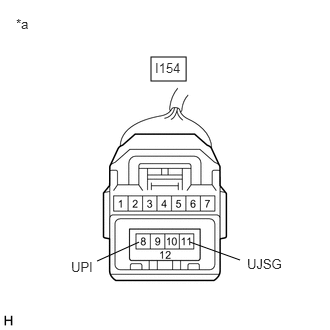

b.
E360496C50
1.573,0.594 1.938,0.844 0.365,0.25 1.979,2.521 2.5,2.708 false 1.448,2.521 1.01,2.719 false 0.167,0.167 0.479,0.365 0.313,0.198 10 false *a 1.615,0.625 1.979,0.865 0.365,0.24 10 false I154 0.74,2.698 1.146,2.948 0.406,0.25 10 false UPI 2.573,2.667 3.083,2.875 0.51,0.208 10 false UJSG
*a Front view of wire harness connector
(to No. 1 Stereo Jack Adapter Assembly)


Measure the voltage according to the value(s) in the table below.

Standard Voltage:
Tester Connection Condition Specified Condition
I154-8 (UPI) - I154-11 (UJSG) Engine switch on (ACC) 5 V


Result:
Proceed to
OK
NG


OK

4.FORMAT USB DEVICE AND RECHECK

NG

4.FORMAT USB DEVICE AND RECHECK
a.

Delete all files in the USB device and format/restore it.


b.

Save the data again and check if it can be played on the in-vehicle device.

NOTICE:

Formatting a USB device erases all music on the device. Ensure that a backup of the music data is available before performing this operation.


OK:

Malfunction disappears.


Result:
Proceed to
OK
NG


OK

END

NG

5.REPLACE USB DEVICE
a.

Turn the engine switch off.

HINT:

When this malfunction occurs, it is necessary to turn the engine switch off to make it possible for the vehicle to recognize a new device when it is connected.


b.

Turn the engine switch on (ACC).


c.

Connect a known good USB device to the No. 1 stereo jack adapter assembly.

HINT:
·

If the malfunction occurred when a USB device was in use, use another USB device for the inspection.


Result:
Proceed to
NEXT


NEXT

6.CHECK USB DEVICE
6.CHECK USB DEVICE
a.

Check if a USB device is recognized by the navigation receiver assembly, and if information such as track, artist and album names is displayed on the screen.

OK:

USB device is recognized properly and the information is displayed on the screen.


Result:
Proceed to
OK
NG


OK

USB DEVICE WAS INCOMPATIBLE OR DEFECTIVE

NG