DOOR / HATCH POWER BACK DOOR SYSTEM B22049E Kick Sensor Stuck ON
DESCRIPTION
B22049E is output when the multiplex network door ECU detects that the kick door control sensor assembly is stuck on.
| DTC No. | Detection Item | DTC Detection Condition | Trouble Area |
|---|---|---|---|
| B22049E | Kick Sensor Stuck ON | One of the following conditions is met for approximately 60 seconds or more:
·
The multiplex network door ECU detects a kick door control sensor assembly short circuit ·
Multiplex network door ECU malfunction ·
Kick door control sensor assembly malfunction |
·
Kick door control sensor assembly ·
Multiplex network door ECU ·
Wire harness or connector |
WIRING DIAGRAM
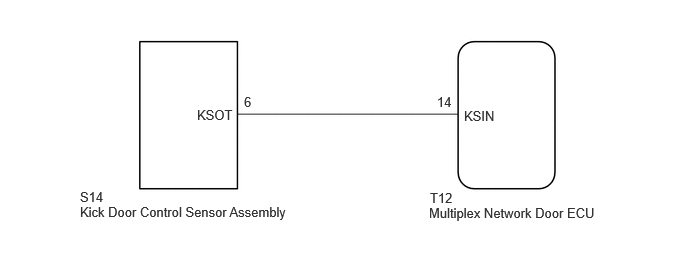
CAUTION / NOTICE / HINT
- NOTICE:
- ·
Before troubleshooting, make sure that the kick door control sensor assembly is not damaged.
·Before troubleshooting, be sure to read Precautions for Hands Free Power Back Door.
·If the multiplex network door ECU has been removed and installed or replaced, or if any of the connectors have been disconnected, initialize the power back door system.
·Check the smart entry and start system (for Entry Function) first before troubleshooting the power back door system.
PROCEDURE
Clear the DTCs.
- Body Electrical > Back Door > Clear DTCs
- 50002 489
Recheck for DTCs.
- Body Electrical > Back Door > Trouble Codes
- 50001 489
- OK:
DTC B22049E is not output.
- Result:
Proceed to OK NG
OK
NG
Disconnect the S14 kick door control sensor assembly connector.
Wait for approximately 60 seconds.
Clear the DTCs.
- Body Electrical > Back Door > Clear DTCs
- 50002 489
Check for DTCs.
- Body Electrical > Back Door > Trouble Codes
- 50001 489
- OK:
DTC B22049E is not output.
- Result:
Proceed to OK NG
OK
NG
Disconnect the T12 multiplex network door ECU connector.
Measure the resistance according to the value(s) in the table below.
- Standard Resistance:
Tester Connection Condition Specified Condition Click Location & Routing(T12,S14)Location & Routingewd_type=routing;type=c,c;code=T12,S14
Click Connector(T12)Body>No. 1 Back Door Wire>Multiplex Network Door ECUewd_type=component;type=c;code=T12;pinno=14
Click Connector(S14)Body>No. 2 Luggage Room Wire / No. 3 Luggage Room Wire>Kick Door Control Sensorewd_type=component;type=c;code=S14;pinno=6
T12-14 (KSIN) or S14-6 (KSOT) - Body ground Always 10 kΩ or higher
- Result:
Proceed to OK NG
OK
NG