LIGHTING (EXT) LIGHTING SYSTEM U023587 Lost Communication with Cruise Control Front Distance Range Sensor Missing Message
DESCRIPTION
| DTC No. | Detection Item | DTC Detection Condition | Trouble Area | DTC Output from |
|---|---|---|---|---|
| U023587 | Lost Communication with Cruise Control Front Distance Range Sensor Missing Message | Detection condition:
The ignition switch is ON Malfunction status:
A communication malfunction with the millimeter wave radar sensor assembly is detected Malfunction duration:
5 seconds or more |
·
Local bus (Open or short) ·
Forward recognition camera ·
Millimeter wave radar sensor assembly |
Front Recognition Camera (Front Lighting Control) |
| Pattern | DTC output part name
(Display on GTS) |
Suspected Area (Malfunction Status) |
|---|---|---|
| Forward Recognition Camera
(Front Recognition Camera(Front Light Control)) |
||
| U023587 | ||
|
○: DTC is output -: DTC is not output |
||
| Pattern 1 | ○ | Local bus (Open or short) |
| Millimeter wave radar sensor assembly (Internal malfunction) | ||
| Forward recognition camera (Internal malfunction) | ||
WIRING DIAGRAM
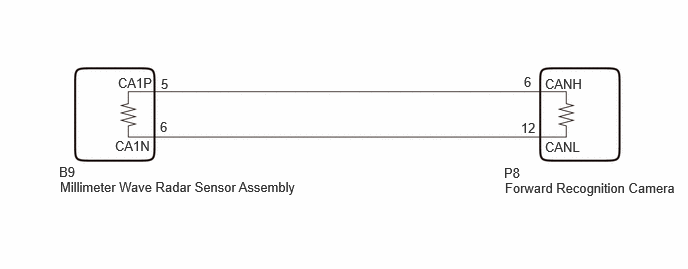
CAUTION / NOTICE / HINT
- NOTICE:
- ·
When replacing the millimeter wave radar sensor assembly, always replace it with a new one. If a millimeter wave radar sensor assembly which was installed to another vehicle is used, the information stored in the millimeter wave radar sensor assembly will not match the information from the vehicle and a DTC may be stored.
·When the millimeter wave radar sensor assembly has been replaced with a new one, it is necessary to perform millimeter wave radar sensor assembly beam axis alignment and to clear the vehicle control history (RoB). Before performing the Driving Adjustment, make sure to read Before Starting Driving Adjustment.
- HINT:
-
Beam axis alignment of the millimeter wave radar sensor assembly can be performed using either Triangle Target, Flat Surface Target or Driving Adjustment.
-
Triangle Target: Click hereEngine / Hybrid System>CRUISE CONTROL>MILLIMETER WAVE RADAR SENSOR>TARGET ADJUSTMENT(TRIANGLE TARGET)202409,999999,_51,_083055,_0401007,RM100000002NTD8,
-
Flat Surface Target: Click hereEngine / Hybrid System>CRUISE CONTROL>MILLIMETER WAVE RADAR SENSOR>TARGET ADJUSTMENT(FLAT SURFACE TARGET)202409,999999,_51,_083055,_0401007,RM100000002NTDA,
-
Driving Adjustment: Click hereEngine / Hybrid System>CRUISE CONTROL>MILLIMETER WAVE RADAR SENSOR>DRIVING ADJUSTMENT202409,999999,_51,_083055,_0401007,RM100000002NTD7,
·When replacing the forward recognition camera, always replace it with a new one. If a forward recognition camera which was installed to another vehicle is used, the information stored in the forward recognition camera will not match the information from the vehicle and a DTC may be stored.
·When the forward recognition camera is replaced with a new one or the windshield glass is replaced or removed/installed, make sure to perform beam axis adjustment for the forward recognition camera and clear the vehicle control history for each system.
- HINT:
-
Forward recognition camera axis alignment can be performed by using either One Time Recognition, Sequential Recognition or Driving Adjustment.
-
One Time Recognition: Click hereEngine / Hybrid System>CRUISE CONTROL>FRONT CAMERA>TARGET ADJUSTMENT(ONE TIME RECOGNITION)202409,999999,_51,_083055,_0401005,RM100000002NTD0,
-
Sequential Recognition: Click hereEngine / Hybrid System>CRUISE CONTROL>FRONT CAMERA>TARGET ADJUSTMENT(SEQUENTIAL RECOGNITION)202409,999999,_51,_083055,_0401005,RM100000002NTD3,
-
Driving Adjustment: Click hereEngine / Hybrid System>CRUISE CONTROL>FRONT CAMERA>DRIVING ADJUSTMENT202409,999999,_51,_083055,_0401005,RM100000002NTD4,
·After the ignition switch is turned off, there may be a waiting time before disconnecting the negative (-) auxiliary battery terminal.
·When disconnecting and reconnecting the auxiliary battery
- HINT:
-
When disconnecting and reconnecting the auxiliary battery, there is an automatic learning function that completes learning when the respective system is used.
PROCEDURE
Disconnect the cable from the negative (-) auxiliary battery terminal.
Disconnect the P8 forward recognition camera connector.
Measure the resistance according to the value(s) in the table below.
- Standard Resistance:
Tester Connection Condition Specified Condition P8-6 (CANH) - P8-12 (CANL) Cable disconnected from negative (-) auxiliary battery terminal 108 to 132 Ω P8-6 (CANH) - G114-4 (CG) Cable disconnected from negative (-) auxiliary battery terminal 200 Ω or higher P8-12 (CANL) - G114-4 (CG) Cable disconnected from negative (-) auxiliary battery terminal 200 Ω or higher P8-6 (CANH) - G114-16 (BAT) Cable disconnected from negative (-) auxiliary battery terminal 6 kΩ or higher P8-12 (CANL) - G114-16 (BAT) Cable disconnected from negative (-) auxiliary battery terminal 6 kΩ or higher
- Result:
Proceed to OK NG
OK
NG
Temporarily replace the millimeter wave radar sensor assembly with a new one.
- Result:
Proceed to NEXT
NEXT
Connect the GTS to the DLC3.
Turn the ignition switch to ON.
Turn the GTS on.
Enter the following menus: Body Electrical / Front Recognition Camera (Front Lighting Control) / Clear DTCs.
Clear the DTCs.
- Body Electrical > Front Recognition Camera (Front Lighting Control) > Clear DTCs
- 50002 433
- Result:
Proceed to NEXT
NEXT
Connect the GTS to the DLC3.
Turn the ignition switch to ON.
Wait 5 seconds or more.
Turn the GTS on.
Enter the following menus: Body Electrical / Front Recognition Camera (Front Lighting Control) / Trouble Codes.
Check for DTCs.
- Body Electrical > Front Recognition Camera (Front Lighting Control) > Trouble Codes
- 50001 433
- OK:
DTC U023587 is not output.
- Result:
Proceed to OK NG
OK
NG
Disconnect the B9 millimeter wave radar sensor assembly connector.
Measure the resistance according to the value(s) in the table below.
- Standard Resistance:
Tester Connection Condition Specified Condition B9-5 (CA1P) - B9-6 (CA1N) Cable disconnected from negative (-) auxiliary battery terminal 108 to 132 Ω B9-5 (CA1P) - G114-4 (CG) Cable disconnected from negative (-) auxiliary battery terminal 200 Ω or higher B9-6 (CA1N) - G114-4 (CG) Cable disconnected from negative (-) auxiliary battery terminal 200 Ω or higher B9-5 (CA1P) - G114-16 (BAT) Cable disconnected from negative (-) auxiliary battery terminal 6 kΩ or higher B9-6 (CA1N) - G114-16 (BAT) Cable disconnected from negative (-) auxiliary battery terminal 6 kΩ or higher
- Result:
Proceed to OK NG
OK
NG
Temporarily replace the millimeter wave radar sensor assembly with a new one.
- Result:
Proceed to NEXT
NEXT
Connect the GTS to the DLC3.
Turn the ignition switch to ON.
Turn the GTS on.
Enter the following menus: Body Electrical / Front Recognition Camera (Front Lighting Control) / Clear DTCs.
Clear the DTCs.
- Body Electrical > Front Recognition Camera (Front Lighting Control) > Clear DTCs
- 50002 433
- Result:
Proceed to NEXT
NEXT
Connect the GTS to the DLC3.
Turn the ignition switch to ON.
Wait 5 seconds or more.
Turn the GTS on.
Enter the following menus: Body Electrical / Front Recognition Camera (Front Lighting Control) / Trouble Codes.
Check for DTCs.
- Body Electrical > Front Recognition Camera (Front Lighting Control) > Trouble Codes
- 50001 433
- OK:
DTC U023587 is not output.
- Result:
Proceed to OK NG
OK
NG