CRUISE CONTROL MILLIMETER WAVE RADAR SENSOR DRIVING ADJUSTMENT
CAUTION / NOTICE / HINT
- NOTICE:
- ·
Make sure to read "Before Starting Driving Adjustment" before proceeding with work.
·Make sure to perform the transition to online axis alignment mode with the vehicle stopped.
·Transitioning to online axis alignment mode will erase the learning value, so make sure to complete the adjustment.
·Turning the ignition switch off while in online axis alignment mode will cause the system to exit online axis alignment mode, so to continue with the adjustment, it is necessary to transition to online axis alignment mode again.
·All of the driving support system functions will be inoperative while the adjustment is in progress.
·When driving the vehicle with the GTS connected, be careful with how the wires are routed.
·If the adjustment does not complete even after driving for 15 minutes or more cumulatively, change to a different driving route.
·If the adjustment does not complete even after driving for 30 minutes or more cumulatively, perform adjustment by target recognition.
·After adjustment is complete, to start the various systems it is necessary to turn the ignition switch off and then to ON again.
·In situations such as when the online axis alignment terminates abnormally, to perform online axis alignment again, turn the ignition switch off and then back to ON and enter online axis alignment mode again.
PROCEDURE

 1. PERFORM MILLIMETER WAVE RADAR SENSOR OPTICAL AXIS LEARNING (When driving with GTS connected to vehicle)
Adjust the tire pressures to the standard values.
Make sure the surfaces of the radiator grille emblem and millimeter wave radar sensor assembly are clean and have no dirt, snow, or other matter adhering to them.
Clean away any foreign matter adhering to the surface of the radiator grille emblem.
Check that there is no damage or deformation around the front exterior area of the vehicle.
Check that the radiator grille and front bumper assembly are securely installed, and that there is no damage or deformation around the installation areas. If any abnormalities are found, repair or replace parts as necessary.
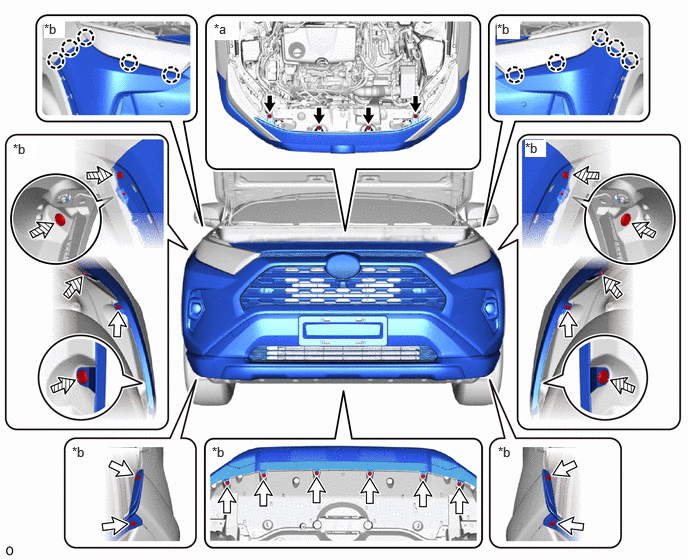
| *a | Radiator Grille Bracket Installation Areas to Inspect | *b | Front Bumper Assembly Installation Areas to Inspect |

|
Bolt | 
|
Screw |

|
Clip | - | - |
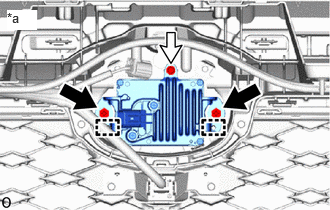
| *a | Millimeter Wave Radar Sensor Assembly Installation Areas to Inspect |
|
|
Bolt |
|
|
Screw |
Check that the millimeter wave radar sensor assembly is securely installed and if any abnormalities are found, securely install the millimeter wave radar sensor assembly and then perform optical axis learning.
Check the levelness of the ground.
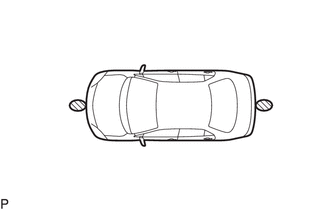

|
Levelness Check Point |
Check the levelness of the ground at the 2 points shown in the illustration.
Place the level on each levelness check point and check that the air bubble of the level is centered.
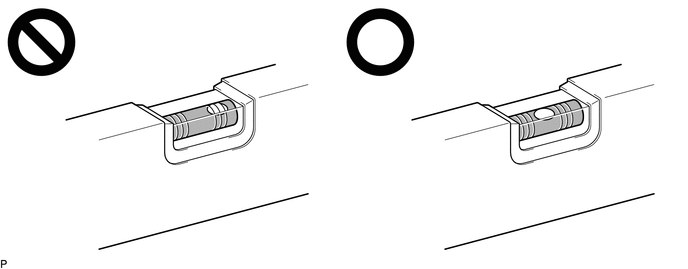
Front Radar Acceleration Sensor Calibration
With the ignition switch off, connect the GTS to the DLC3.
Turn the ignition switch to ON.
Enter the following menus: Body Electrical / Front Radar Sensor / Utility / Front Radar Acceleration Sensor Calibration.
- Body Electrical > Front Radar Sensor > Utility
-
Tester Display Front Radar Acceleration Sensor Calibration - 50005 429 4506
Perform the calibration according to the display on the GTS.
- NOTICE:
-
If an error code is displayed, perform troubleshooting according to the following table, then perform the calibration again.
Error No. Error Description Cause of Error Action to be Taken 12 Radar axis aiming failure upward ·The beam axis of the millimeter wave radar sensor assembly is deviated.
·Road inclement is outside the standard value.
Check the condition of the millimeter wave radar sensor assembly, radiator grille and front bumper assembly. Confirm road gradient. 13 Radar axis aiming failure downward ·The beam axis of the millimeter wave radar sensor assembly is deviated.
·Road inclement is outside the standard value.
Check the condition of the millimeter wave radar sensor assembly, radiator grille and front bumper assembly. Confirm road gradient. 14 Vehicle speed abnormality The vehicle is not stationary. Ensure that the vehicle remains stationary. 15 Other ·A mode change error occurred.
·Operation of the yaw rate sensor is abnormal.
·The vehicle is shaking.
Check for DTCs (Front Recognition Camera).
( 201910,999999,_51,_083055,_0401001,RM100000001JBM5,)
Check for DTCs (ABS / VSC / TRC).
·Electronically controlled brake system (for HV Model):
·Electronically controlled brake system (for Gasoline Model):
Ensure that the vehicle remains stationary. 16 Time out ·The vehicle cannot communicate with the GTS normally.
·Operation of the millimeter wave radar sensor assembly is abnormal.
·Ensure that the vehicle is connected with the GTS correctly.
·Perform acceleration sensor calibration again and replace the millimeter wave radar sensor assembly if the same error code is output.
18 Vehicle information undefined CAN communication between the forward recognition camera and the millimeter wave radar sensor assembly is abnormal. Check the condition of the connectors.
Transition to online axis alignment mode.
Enter the following menus: Body Electrical / Front Radar Sensor / Utility / Transition to Online Axis Alignment Mode.
- Body Electrical > Front Radar Sensor > Utility
-
Tester Display Transition to Online Axis Alignment Mode - 50005 429 4955
Confirm the conditions displayed on the screen and then press "Next".
Select "Front radar sensor" and then press "Next".
Check the GTS screen and confirm that it has transitioned to online axis alignment mode.
Press "Next".
Online axis adjustment (Optical Axis Learning)
Drive the vehicle to perform optical axis learning.
- HINT:
-
If the alignment is performed with the GTS connected to the vehicle, the alignment progress can be monitored through 5 stages on the GTS screen.
If the online axis alignment completes normally, the buzzer will sound intermittently for 2 seconds.
- NOTICE:
- ·
If the alignment terminates abnormally, the buzzer will sound for 3 seconds continuously.
·If an error code is displayed, perform troubleshooting according to the following table, then perform the beam axis alignment again.
Error No. Error Description Cause of Error Action to be Taken 6 Target angle abnormality The beam axis of the millimeter wave radar sensor assembly is outside the automatic correction range. Check the condition of the millimeter wave radar sensor assembly, radiator grille and front bumper assembly. 7 Radar abnormality Operation of the millimeter wave radar sensor assembly is abnormal. Replace the millimeter wave radar sensor assembly. 8 Radar dirtiness There is dirt on the front emblem or millimeter wave radar sensor assembly. Clean the front emblem or millimeter wave radar sensor assembly. 9 Temperature abnormality The temperature around the millimeter wave radar sensor assembly is too high. Wait until the temperature drops to the operable range (-30 to 50°C). 10 Voltage abnormality IG power source voltage is outside the operable range of the millimeter wave radar sensor assembly. Check the battery voltage (specified condition: 10 to 16 V).
·for M20C-FKS:
(
202409,999999,_57,_087045,_0418150,RM100000002NHRA_01_0014,)
·for M20D-FKS:
(
202409,999999,_57,_083089,_0402337,RM100000002NHRF_01_0014,)
·for A25B-FXS:
(
202409,999999,_57,_083088,_0402342,RM100000002NHRK_01_0003,)
·for A25D-FXS:
(
202409,999999,_57,_103487,_0477286,RM100000002NHRR_01_0003,)
·for A25F-FXS:
(
202409,999999,_57,_105207,_0483995,RM100000002NHRZ_01_0003,)
11 External communication abnormality CAN communication between the forward recognition camera and the millimeter wave radar sensor assembly is abnormal. Check the condition of the connectors and wire harness. 14 Vehicle speed abnormality The vehicle is not stationary. Ensure that the vehicle remains stationary. 16 Time out ·The vehicle cannot communicate with the GTS normally.
·Operation of the millimeter wave radar sensor assembly is abnormal.
·Ensure that the vehicle is connected with the GTS correctly.
·Perform online axis adjustment again and replace the millimeter wave radar sensor assembly if the same error code is output.
18 Vehicle information undefined CAN communication between the forward recognition camera and the millimeter wave radar sensor assembly is abnormal. Check the condition of the connectors.
Press "Exit" to exit the online axis adjustment mode.
Turn the ignition switch off.
Turn the ignition switch to ON and check that the warning light turns off.
Turn the ignition switch off.
Disconnect the GTS from the DLC3.
After beam axis adjustment completes, clear the following system vehicle control history entries.
Clear vehicle control history (Dynamic radar cruise control system).
for HV Model: Click hereEngine / Hybrid System>CRUISE CONTROL>DYNAMIC RADAR CRUISE CONTROL SYSTEM (for HV Model)>VEHICLE CONTROL HISTORY202409,999999,_51,_083055,_0400999,RM100000002NS7O,
for Gasoline Model: Click hereEngine / Hybrid System>CRUISE CONTROL>DYNAMIC RADAR CRUISE CONTROL SYSTEM (for Gasoline Model)>VEHICLE CONTROL HISTORY202409,999999,_51,_083055,_0401000,RM100000002NT2K,
Clear vehicle control history (Lane tracing assist system).
Clear vehicle control history (Front radar sensor system).
Clear vehicle control history (Pre-collision system).
Clear vehicle control history (Lighting system).
2. PERFORM MILLIMETER WAVE RADAR SENSOR OPTICAL AXIS LEARNING (When driving with GTS not connected to vehicle)
Adjust the tire pressures to the standard values.
Make sure the surfaces of the radiator grille emblem and millimeter wave radar sensor assembly are clean and have no dirt, snow, or other matter adhering to them.
Clean away any foreign matter adhering to the surface of the radiator grille emblem.
Check that there is no damage or deformation around the front exterior area of the vehicle.
Check that the radiator grille and front bumper assembly are securely installed, and that there is no damage or deformation around the installation areas. If any abnormalities are found, repair or replace parts as necessary.
| *a | Radiator Grille Bracket Installation Areas to Inspect | *b | Front Bumper Assembly Installation Areas to Inspect |
|
|
Bolt |
|
Screw |
|
|
Clip | - | - |
| *a | Millimeter Wave Radar Sensor Assembly Installation Areas to Inspect |
|
|
Bolt |
|
|
Screw |
Check that the millimeter wave radar sensor assembly is securely installed and if any abnormalities are found, securely install the millimeter wave radar sensor assembly and then perform optical axis learning.
Check the levelness of the ground.
|
|
Levelness Check Point |
Check the levelness of the ground at the 2 points shown in the illustration.
Place the level on each levelness check point and check that the air bubble of the level is centered.
Front Radar Acceleration Sensor Calibration
With the ignition switch off, connect the GTS to the DLC3.
Turn the ignition switch to ON.
Enter the following menus: Body Electrical / Front Radar Sensor / Utility / Front Radar Acceleration Sensor Calibration.
- Body Electrical > Front Radar Sensor > Utility
-
Tester Display Front Radar Acceleration Sensor Calibration - 50005 429 4506
Perform the calibration according to the display on the GTS.
- NOTICE:
-
If an error code is displayed, perform troubleshooting according to the following table, then perform the calibration again.
Error No. Error Description Cause of Error Action to be Taken 12 Radar axis aiming failure upward ·The beam axis of the millimeter wave radar sensor assembly is deviated.
·Road inclement is outside the standard value.
Check the condition of the millimeter wave radar sensor assembly, radiator grille and front bumper assembly. Confirm road gradient. 13 Radar axis aiming failure downward ·The beam axis of the millimeter wave radar sensor assembly is deviated.
·Road inclement is outside the standard value.
Check the condition of the millimeter wave radar sensor assembly, radiator grille and front bumper assembly. Confirm road gradient. 14 Vehicle speed abnormality The vehicle is not stationary. Ensure that the vehicle remains stationary. 15 Other ·A mode change error occurred.
·Operation of the yaw rate sensor is abnormal.
·The vehicle is shaking.
Check for DTCs (Front Recognition Camera).
(201910,999999,_51,_083055,_0401001,RM100000001JBM5,)
Check for DTCs (ABS / VSC / TRC).
·Electronically controlled brake system (for HV Model):
·Electronically controlled brake system (for Gasoline Model):
Ensure that the vehicle remains stationary. 16 Time out ·The vehicle cannot communicate with the GTS normally.
·Operation of the millimeter wave radar sensor assembly is abnormal.
·Ensure that the vehicle is connected with the GTS correctly.
·Perform acceleration sensor calibration again and replace the millimeter wave radar sensor assembly if the same error code is output.
18 Vehicle information undefined CAN communication between the forward recognition camera and the millimeter wave radar sensor assembly is abnormal. Check the condition of the connectors.
Transition to online axis alignment mode.
Enter the following menus: Body Electrical / Front Radar Sensor / Utility / Transition to Online Axis Alignment Mode.
- Body Electrical > Front Radar Sensor > Utility
-
Tester Display Transition to Online Axis Alignment Mode - 50005 429 4955
Confirm the conditions displayed on the screen and then press "Next".
Select "Front radar sensor" and then press "Next".
Check the GTS screen and confirm that it has transitioned to online axis alignment mode.
Press "Next".
In accordance with the instructions on the screen press "Exit" and then disconnect the GTS from the DLC3.
Online axis adjustment (Optical Axis Learning)
Drive the vehicle to perform optical axis learning.
If the online axis alignment completes normally, the buzzer will sound intermittently for 2 seconds.
- NOTICE:
-
If the alignment terminates abnormally, the buzzer will sound for 3 seconds continuously.
Turn the ignition switch off.
Turn the ignition switch to ON and check that the warning light turns off.
Turn the ignition switch off.
After beam axis adjustment completes, clear the following system vehicle control history entries.
Clear vehicle control history (Dynamic radar cruise control system).
for HV Model: Click hereEngine / Hybrid System>CRUISE CONTROL>DYNAMIC RADAR CRUISE CONTROL SYSTEM (for HV Model)>VEHICLE CONTROL HISTORY202409,999999,_51,_083055,_0400999,RM100000002NS7O,
for Gasoline Model: Click hereEngine / Hybrid System>CRUISE CONTROL>DYNAMIC RADAR CRUISE CONTROL SYSTEM (for Gasoline Model)>VEHICLE CONTROL HISTORY202409,999999,_51,_083055,_0401000,RM100000002NT2K,
Clear vehicle control history (Lane tracing assist system).
Clear vehicle control history (Front radar sensor system).
Clear vehicle control history (Pre-collision system).
Clear vehicle control history (Lighting system).