EXTERIOR PANELS / TRIM REAR BUMPER(for Type B) INSTALLATION
CAUTION / NOTICE / HINT
- HINT:
- ·
If the bumper is damaged, there is a possibility that the installation area of the blind spot monitor sensor may be deformed and the blind spot monitor system may not operate correctly, so visually inspect the blind spot monitor sensor installation area (frame, stud bolt) to make sure it is not dented or bent.
·If the visual inspection finds a problem, check the installation condition of the blind spot monitor sensor, and adjust the installation position of the blind spot monitor sensor as necessary.
PROCEDURE

 1.INSTALL REAR BUMPER ASSEMBLY
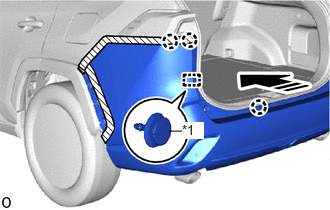
| *1 | Back Door Garnish Retainer |

|
Install in this Direction |
Attach the claw and back door garnish retainer to set the rear bumper assembly.
- HINT:
-
Use the same procedure on the other side.
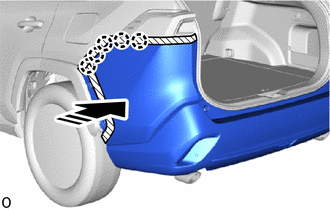
|
|
Install in this Direction |
Attach the claw.
- HINT:
-
Use the same procedure on the other side.
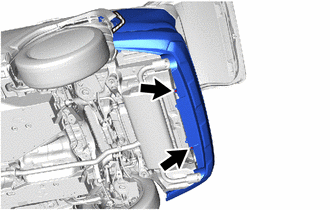
Install the 2 clips.
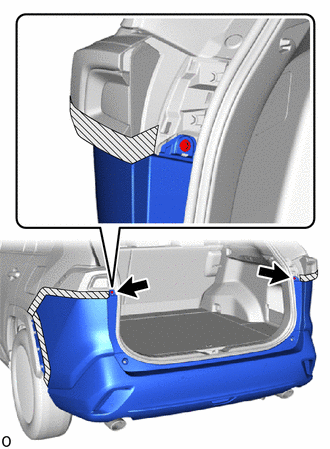
Install the 2 screws.
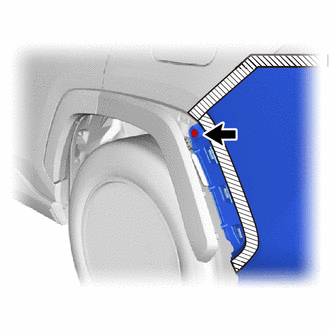
Install the clip.
- HINT:
-
Use the same procedure on the other side.
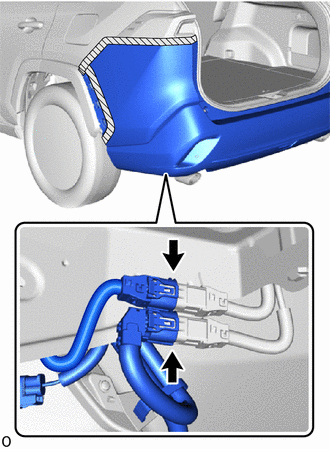
Connect the 2 connectors.
52599
2.INSTALL REAR BUMPER UPPER STOPPER
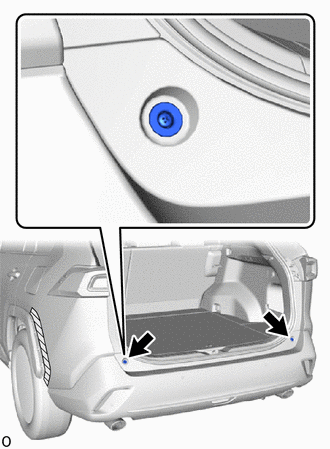
Install the 2 rear bumper upper stoppers.
81498
3.INSTALL REAR COMBINATION LIGHT COVER LH
81497
4.INSTALL REAR COMBINATION LIGHT COVER RH
- HINT:
-
Use the same procedure described for the LH side.
75606A
5.INSTALL QUARTER OUTSIDE MOULDING SUB-ASSEMBLY LH
75605A
6.INSTALL QUARTER OUTSIDE MOULDING SUB-ASSEMBLY RH
- HINT:
-
Use the same procedure described for the LH side.
52592
7.INSTALL REAR BUMPER SIDE SEAL LH
52591
8.INSTALL REAR BUMPER SIDE SEAL RH
9.CONNECT CABLE TO NEGATIVE AUXILIARY BATTERY TERMINAL (w/ Hands Free Power Back Door)
10. INITIALIZATION AFTER RECONNECTING BATTERY TERMINAL (w/ Hands Free Power Back Door)
- HINT:
-
When disconnecting and reconnecting the battery, there is an automatic learning function that completes learning when the respective system is used.
891B2
11.CHECK KICK DOOR CONTROL SENSOR (w/ Hands Free Power Back Door)