THEFT DETERRENT / KEYLESS ENTRY DIGITAL KEY SYSTEM Front Passenger Side Door Entry Lock/Unlock Operation Range has Decreased
DESCRIPTION
Remove all causes of non-operation other than the vehicle components and vehicle settings. Under these conditions, if the digital key entry operation range is small, there may be a malfunction in the front door outside handle assembly (for front passenger door) and the digital key.
Also, if the smart entry function does not operate only when the digital key is at the height of the passenger door glass, the vehicle may be determining that the digital key is inside the vehicle.
CAUTION / NOTICE / HINT
- NOTICE:
- ·
Before performing troubleshooting of the vehicle, refer to Precautions for Inspection or Registration to check for a cause of the malfunction which is not related to vehicle settings or vehicle components.
·Perform troubleshooting with the electrical key transmitter sub-assembly not inside the detection area of the smart entry and start system.
·When using the digital key to perform door lock/unlock with the entry function, refer to Precautions for Outside Vehicle Digital Key Detection Range/Diagnostic Range.
·Make sure that no DTCs are output. If any DTCs are output, proceed to Diagnostic Trouble Code Chart.
·Cancel power saving mode before performing troubleshooting.
·If the digital key system has been disabled, enable the system before performing troubleshooting.
·Before replacing the front door outside handle assembly (for front passenger door), refer to Service Bulletin.
PROCEDURE
While holding the digital key in the test range, perform a door lock/unlock using the entry function.*
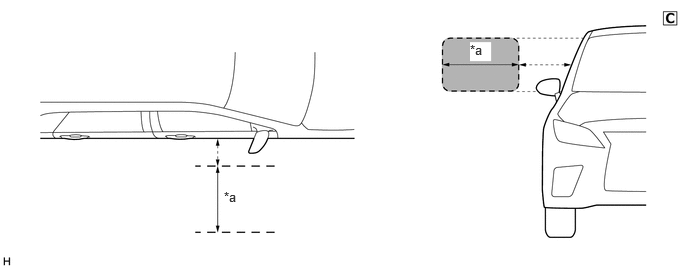
| *a | Test Range
(approximately 50 - 100 cm (reference value measured using a typical device)) |
- | - |
The illustrations shown are examples only.
- NOTICE:
- ·
If the entry function does not operate when near the passenger door glass, the vehicle may be determining that the digital key is inside the vehicle.
·Refer to Precautions for Inspection or Registration regarding the digital key and surrounding environment.
Hold the key in your hand and hold your hand close to the digital key detection range. Then perform door lock/unlock using the entry function.*
- NOTICE:
- ·
For details on the digital key detection range, refer to Precautions for Outside Vehicle Digital Key Detection Range/Diagnostic Range.
·Refer to Precautions for Inspection or Registration regarding the digital key and surrounding environment.
Repeat * while moving your hand closer to and farther from the vehicle, and check the range where the entry function operates.
- OK:
The entry function operates within the same range as usual
- Result:
Result Proceed to Operates within the digital key detection range A Digital key detection range is narrow B Operates within the digital key detection range, but does not operate within the test range C
A
B
C
Using the GTS, check for Vehicle Control History (RoB).
- Body Electrical > Entry&Start > Utility
-
Tester Display Vehicle Control History (RoB) - 50005 440 62
Take appropriate action in accordance with the result of the cause analysis.
- Result:
Proceed to NEXT
NEXT
- NOTICE:
-
With only one digital key connected to BLE, perform inspection in digital key diagnostic mode.
Check the front door outside handle assembly (for front passenger door) in digital key diagnostic mode.
Using the GTS, select Body Electrical / Entry&Start / Utility / Communication Check (Digital Key Diag Mode) / Digital key passenger door outside area
- Body Electrical > Entry&Start > Utility
-
Tester Display Communication Check (Digital Key Diag Mode) - 50005 440 5806
Hold the digital key in your hand, and hold your hand close to the digital key detection range. Check that the combination meter assembly buzzer sounds.*
- NOTICE:
- ·
For details on the digital key detection range, refer to Precautions for Outside Vehicle Digital Key Detection Range/Diagnostic Range.
·Refer to Precautions for Inspection or Registration regarding the digital key and surrounding environment.
Repeat * while moving your hand closer to and farther from the vehicle, and check the range where the combination meter assembly buzzer sounds.
- Result:
Result Proceed to The combination meter assembly buzzer sounds within a narrower range than the usual operating range A The combination meter assembly buzzer does not sound B
A
B
Check if there is digital key available that is already registered to the vehicle.
- Result:
Result Proceed to Another registered digital key is not available A Another registered digital key is available B
A
B
Check if another vehicle equipped with digital key system is available
- Result:
Result Proceed to Vehicle equipped with digital key system not available A Vehicle equipped with digital key system available B
A
B
Register a share key.
- HINT:
-
Refer to the digital key application.
- Result:
Proceed to NEXT
NEXT
Hold a different registered digital key in your hand hold your hand close to the digital key detection range. Then perform door lock/unlock using the entry function.*
- NOTICE:
- ·
For details on the digital key detection range, refer to Precautions for Outside Vehicle Digital Key Detection Range/Diagnostic Range.
·Refer to Precautions for Inspection or Registration regarding the digital key and surrounding environment.
Repeat * while moving your hand closer to and farther from the vehicle, and check the range where the entry function operates.
- OK:
The entry function operates within the same range as usual
- Result:
Proceed to OK NG
OK
NG
Install front door outside handle assembly (for front passenger door) properly.
- Result:
Proceed to OK NG
OK
NG
Register a share key that did not operate correctly within the default operating range to another vehicle equipped with a digital key system.
- HINT:
-
Refer to the digital key application.
- Result:
Proceed to NEXT
NEXT
Hold a registered digital key in your hand and hold your hand close to the digital key detection range. Then perform door lock/unlock using the entry function.*
- NOTICE:
- ·
For details on the digital key detection range, refer to Precautions for Outside Vehicle Digital Key Detection Range/Diagnostic Range.
·Refer to Precautions for Inspection or Registration regarding the digital key and surrounding environment.
Repeat * while moving your hand closer to and farther from the vehicle, and check the range where the entry function operates.
- OK:
The entry function operates within the same range as usual
- Result:
Proceed to OK NG
OK
NG
- NOTICE:
-
With only one digital key connected to BLE, perform inspection in digital key diagnostic mode.
Check the BLE indoor digital key receiver assembly in digital key diagnostic mode.
Using the GTS, select Body Electrical / Entry&Start / Utility / Communication Check (Digital Key Diag Mode) / Digital key engine/power start area
- Body Electrical > Entry&Start > Utility
-
Tester Display Communication Check (Digital Key Diag Mode) - 50005 440 5806
While holding the digital key in the test range, check that the combination meter assembly buzzer sounds.
| *a | Test Range
(approximately 50 - 100 cm (reference value measured using a typical device)) |
- | - |
The illustrations shown are examples only.
- Result:
Result Proceed to The combination meter assembly does not sound A The combination meter assembly buzzer sounds B
A
- HINT:
-
The range of the digital key detection area differs greatly depending on the type of digital key device, the way the device is held and the surrounding environment, etc. Explain to the customer that the entry function did not operate while they were outside the range of the digital key detection area.
B
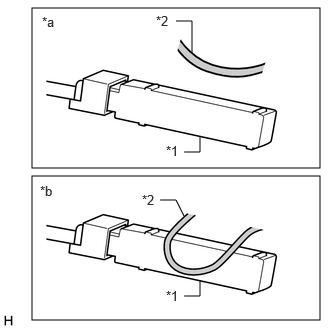
| *1 | BLE Indoor Digital Key Receiver Assembly |
| *2 | Wire Harness |
| *a | Normal |
| *b | Abnormal |
The illustrations shown are examples only.
Check that the wire harness is not contacting or hanging near the BLE indoor digital key receiver assembly.
- NOTICE:
-
If the wire harness is contacting or hanging near the BLE indoor digital key receiver assembly, the vehicle interior digital key detection range will change.
- Result:
Proceed to OK NG
OK
NG