8ZR-FXE ENGINE CONTROL SFI SYSTEM P011B62 Engine Coolant Temperature / Intake Air Temperature Signal Compare Failure
DESCRIPTION
This engine uses an engine coolant temperature sensor and an intake air temperature sensor to detect temperatures related to engine operation. A thermistor, whose resistance value varies according to the temperature, is built into each sensor. When the temperature becomes low, the resistance of the thermistor increases. When the temperature becomes high, the resistance decreases. These variations in resistance are transmitted to the ECM as voltage changes.
| DTC No. | Detection Item | DTC Detection Condition | Trouble Area | MIL | Memory | Note |
|---|---|---|---|---|---|---|
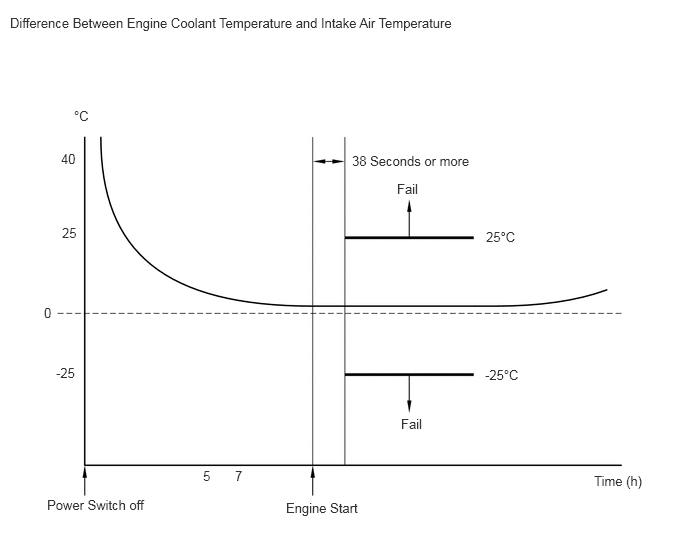
| P011B62 | Engine Coolant Temperature / Intake Air Temperature Signal Compare Failure | All of the following conditions are met (2 trip detection logic):
1.
The auxiliary battery voltage is 10.5 V or higher. 2.
7 hours or more have elapsed since the power switch was turned off in the previous trip. 3.
38 seconds or more have elapsed since a cold engine start was performed. 4.
Either of the following conditions is met: (a)
The minimum intake air temperature after the engine starts is -10°C (14°F) or higher. (b)
The engine coolant temperature before the engine starts is -10°C (14°F) or higher. 5.
The difference between the readings of the engine coolant temperature and intake air temperature is higher than 25°C (45°F). |
·
Intake air temperature sensor (mass air flow meter sub-assembly) ·
Engine coolant temperature sensor ·
ECM |
Comes on | DTC stored | SAE Code: P011B |
- HINT:
- ·
Waiting is required to prevent the temperature of the engine from affecting the readings. If the engine has been operated recently, it is not possible to accurately compare the readings.
- ·
For diagnosis, in order to duplicate the detection conditions of the DTC, it is necessary to park the vehicle for 7 hours. Parking the vehicle for 7 hours ensures that the actual engine coolant temperature and intake air temperature are very similar. When the vehicle has been parked for less than 7 hours, differences in the readings may exist, but this does not necessarily indicate a fault.
MONITOR DESCRIPTION
The ECM monitors the difference between the engine coolant temperature and the intake air temperature when the engine is started cold to accurately detect the engine temperature conditions. The monitor runs when the engine is started after 7 hours or more have elapsed since the power switch was turned off in the previous trip. If the difference between the engine coolant temperature and the intake air temperature on a cold start exceeds 25°C (45°F), the ECM interprets this as a malfunction in the engine coolant temperature sensor circuit or intake air temperature sensor circuit, illuminates the MIL and stores this DTC.
MONITOR STRATEGY
| Frequency of Operation | Once per driving cycle |
CONFIRMATION DRIVING PATTERN
- HINT:
- ·
After repair has been completed, clear the DTC and then check that the vehicle has returned to normal by performing the following All Readiness check procedure.
·When clearing the permanent DTCs, refer to the "CLEAR PERMANENT DTC" procedure.
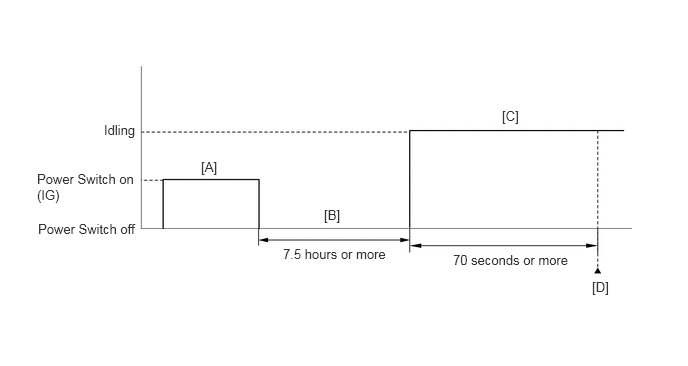
Connect the GTS to the DLC3.
Turn the power switch on (IG) [A].
Turn the GTS on.
Clear the DTCs (even if no DTCs are stored, perform the clear DTC procedure).
Turn the power switch off.
With the engine stopped, leave the vehicle as is for 7.5 hours or more [B].
Turn the power switch on (IG).
Turn the GTS on.
Put the engine in Inspection Mode (Maintenance Mode).
Start the engine and wait 70 seconds or more [C].
Enter the following menus: Powertrain / Engine / Trouble Codes [D].
Read the pending DTCs.
- HINT:
- ·
If a pending DTC is output, the system is malfunctioning.
·If a pending DTC is not output, perform the following procedure.
Enter the following menus: Powertrain / Engine / Utility / All Readiness.
Input the DTC: P011B62.
Check the DTC judgment result.
| GTS Display | Description |
|---|---|
| NORMAL | ·
DTC judgment completed ·
System normal |
| ABNORMAL | ·
DTC judgment completed ·
System abnormal |
| INCOMPLETE | ·
DTC judgment not completed ·
Perform driving pattern after confirming DTC enabling conditions |
- HINT:
- ·
If the judgment result is NORMAL, the system is normal.
·If the judgment result is ABNORMAL, the system is malfunctioning.
·If the judgment result is INCOMPLETE, perform steps [B] through [D] again.
·[A] to [D]: Normal judgment procedure.
The normal judgment procedure is used to complete DTC judgment and also used when clearing permanent DTCs.
·When clearing the permanent DTCs, do not disconnect the cable from the auxiliary battery terminal or attempt to clear the DTCs during this procedure, as doing so will clear the universal trip and normal judgment histories.
CAUTION / NOTICE / HINT
- NOTICE:
- ·
Vehicle Control History may be stored in the hybrid vehicle control ECU assembly if the engine is malfunctioning. Certain vehicle condition information is recorded when Vehicle Control History is stored. Reading the vehicle conditions recorded in both the Freeze Frame Data and Vehicle Control History can be useful for troubleshooting.
(Select Powertrain in Health Check and then check the time stamp data.)
·If any "Engine Malfunction" Vehicle Control History item has been stored in the hybrid vehicle control ECU assembly, make sure to clear it. However, as all Vehicle Control History items are cleared simultaneously, if any Vehicle Control History items other than "Engine Malfunction" are stored, make sure to perform any troubleshooting for them before clearing Vehicle Control History.
- HINT:
-
Read Freeze Frame Data using the GTS. The ECM records vehicle and driving condition information as Freeze Frame Data the moment a DTC is stored. When troubleshooting, Freeze Frame Data can help determine if the vehicle was moving or stationary, if the engine was warmed up or not, if the air fuel ratio was lean or rich, and other data from the time the malfunction occurred.
PROCEDURE
Connect the GTS to the DLC3.
Turn the power switch on (IG).
Turn the GTS on.
Enter the following menus: Powertrain / Engine / Trouble Codes.
Read the DTCs.
- Powertrain > Engine > Trouble Codes
- 50001 372
- Result:
Result Proceed to DTC P011B62 is output A DTC P011B62 and other DTCs are output B
- HINT:
-
If any DTCs other than P011B62 are output, troubleshoot those DTCs first.
A
B
Leave the vehicle for 7 hours or more.
- HINT:
-
It is necessary to leave the vehicle for 7 hours or more to create conditions similar to the DTC detection conditions.
Connect the GTS to the DLC3.
Turn the power switch on (IG).
Turn the GTS on.
Enter the following menus: Powertrain / Engine / Data List / Intake Air Temperature.
- Powertrain > Engine > Data List
-
Tester Display Intake Air Temperature - 50003 372 214
According to the display on the GTS, read the Data List.
- Standard:
Difference between the intake air temperature and the actual outside air temperature is 10°C (18°F) or less.
- HINT:
- ·
The temperature displayed on the outside temperature gauge of the vehicle (if equipped) is not suitable for comparing to the intake air temperature reading. The outside temperature gauge has a significant delay built in to prevent swings in the temperature display. Use an accurate thermometer to determine the outside air temperature.
·Perform "Inspection After Repair" after replacing the mass air flow meter sub-assembly.
- Result:
Proceed to OK NG
OK
NG
Connect the GTS to the DLC3.
Turn the power switch on (IG).
Turn the GTS on.
Enter the following menus: Powertrain / Engine / Data List / Coolant Temperature.
- Powertrain > Engine > Data List
-
Tester Display Coolant Temperature - 50003 372 205
According to the display on the GTS, read the Data List.
- Standard:
The difference between the engine coolant temperature and the actual outside air temperature is 10°C (18°F) or less.
- HINT:
- ·
If the result is not as specified, check that there are no heat sources such as a block heater in the engine compartment.
·Perform "Inspection After Repair" after replacing the engine coolant temperature sensor.
- Result:
Proceed to OK NG
OK
NG