CRUISE CONTROL FRONT CAMERA INSTALLATION
PROCEDURE

 8646C
1.INSTALL FORWARD RECOGNITION CAMERA
8646C
1.INSTALL FORWARD RECOGNITION CAMERA
- NOTICE:
- ·
When replacing the forward recognition camera, replace it with a new one.
·If the forward recognition camera has been struck or dropped, replace it with a new one.
·If the forward recognition camera is not properly installed, forward recognition camera optical axis learning cannot be performed properly. Make sure the forward recognition camera is installed securely.
·Do not touch the camera lens or the front windshield glass in front of the camera.
·Replace the forward recognition camera if there is any foreign matter on the camera lens.
·When replacing the forward recognition camera, do not dirty or damage the lens.
·If the forward recognition camera bracket is deformed or damaged, replace it together with the windshield glass.
·When replacing the windshield glass of a vehicle equipped with a forward recognition camera, make sure to use a Toyota genuine part. If a non-Toyota genuine part is used, the forward recognition camera may not be able to be installed due to a missing bracket. Also, the dynamic radar cruise control system, front camera system, lane control system, road sign assist system ,front radar sensor system, pre-collision system or automatic high beam system may not operate properly due to a difference in the transmissivity or black ceramic border.
·If there is any foreign matter on the area of the windshield glass in front of the forward recognition camera, clean the windshield glass before installing the forward recognition camera. Install the hood with heater sub-assembly and forward recognition camera.
Forward recognition with heater hood sub-assembly removal: Click hereEngine / Hybrid System>CRUISE CONTROL>CAMERA HEATER>REMOVAL201902,999999,_51,_078884,_0384729,RM100000001GI2J,
Forward recognition with heater hood sub-assembly installation: Click hereEngine / Hybrid System>CRUISE CONTROL>CAMERA HEATER>INSTALLATION201902,999999,_51,_078884,_0384729,RM100000001GI2K,
When using a new forward recognition camera:
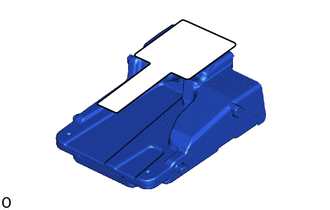
Remove the protective film.
- NOTICE:
-
Do not touch the camera lens after removing the protective film.
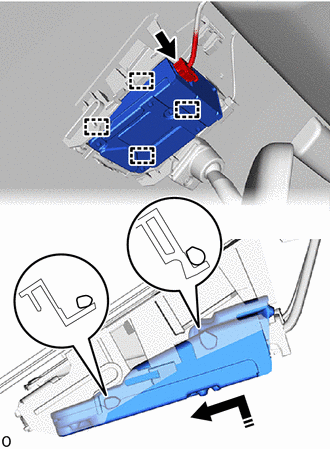

|
Install in this Direction |
Attach the guide to install the forward recognition camera as shown in the illustration.
- NOTICE:
-
Do not touch the camera lens.
Connect the connector.
86464A
2.INSTALL FORWARD RECOGNITION LATCH
- NOTICE:
-
Before installing the forward recognition latch, be sure to check that the forward recognition camera is securely installed.

| *a | Securely attach the claw |
|
|
Install in this Direction |
Attach the guide and claw as shown in the illustration to install the forward recognition latch.
- NOTICE:
-
Check that the forward recognition latch is securely installed.
86466D
3.INSTALL NO. 1 FORWARD RECOGNITION COVER
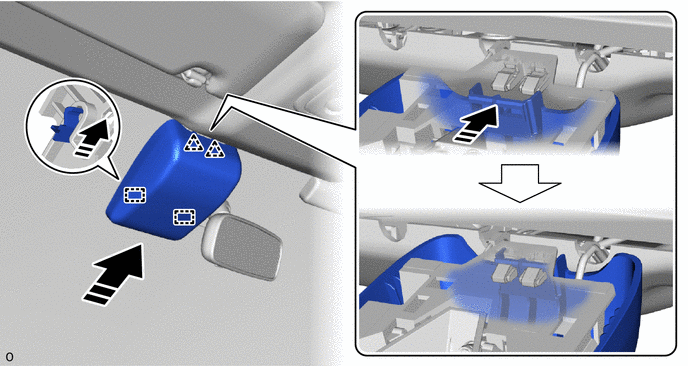
|
|
Install in this Direction | - | - |
Attach the guide and clip as shown in the illustration to install the No. 1 forward recognition cover.
- NOTICE:
-
When installing, press the cover parallel to the windshield glass surface and install.
- HINT:
-
Check the locking sound of the clip when attaching it.
8646C
4.ADJUST FORWARD RECOGNITION CAMERA
If the forward recognition camera has been replaced with a new one or the windshield glass has been removed and installed, it is necessary to perform Forward Recognition Camera Learning.
- HINT:
-
Forward Recognition Camera Learning can be performed by using either One Time Recognition or Sequential Recognition.
-
One Time Recognition: Click hereEngine / Hybrid System>CRUISE CONTROL>FRONT CAMERA>ADJUSTMENT (ONE TIME RECOGNITION)201906,202208,_51,_078884,_0384728,RM100000001IUI2,202208,999999,_51,_078884,_0384728,RM1000000024I1G,
-
Sequential Recognition: Click hereEngine / Hybrid System>CRUISE CONTROL>FRONT CAMERA>ADJUSTMENT (SEQUENTIAL RECOGNITION)201906,202208,_51,_078884,_0384728,RM100000001IULT,202208,999999,_51,_078884,_0384728,RM1000000024I1H,