CRUISE CONTROL CAMERA HEATER REMOVAL
PROCEDURE

 8646C
1.REMOVE FORWARD RECOGNITION CAMERA
8646C
1.REMOVE FORWARD RECOGNITION CAMERA
86401
2.REMOVE FORWARD RECOGNITION WITH HEATER HOOD SUB-ASSEMBLY
- NOTICE:
-
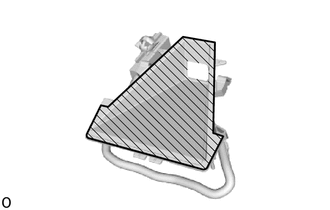 0,0 0,0 false
Inner Surface of Forward Recognition with Heater Hood Sub-assembly
- ·
Do not touch the inner surface of the forward recognition with heater hood sub-assembly.
·Do not apply force to the heating element of the forward recognition with heater hood sub-assembly or an open circuit may result.
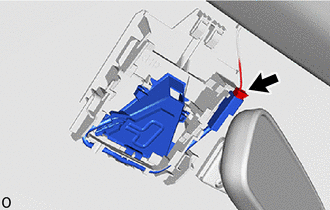
Disconnect the connector.
- NOTICE:
-
When disconnecting the connector, do not forcibly pull the wire harness.
Detach the connector clamp.
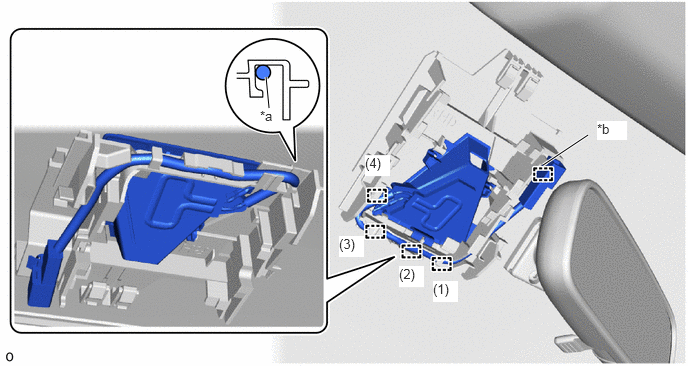
| *a | Wire Harness | *b | Connector Clamp |
Remove the wire harness from the guide in the order shown in the illustration.
- NOTICE:
-
Do not pull the harness forcibly when removing the wire harness.
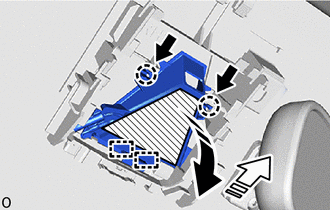

|
Push |

|
Remove in this Direction (1) |

|
Remove in this Direction (2) |
|
|
Heater Area |
Push the claw and pull the forward recognition with heater hood sub-assembly in the direction indicated by the arrow (1) in the illustration to detach the claw.
- NOTICE:
-
Do not press the heater area.
Pull the forward recognition with heater hood sub-assembly in the direction indicated by the arrow (2) as shown in the illustration to detach the guide and remove the forward recognition with heater hood sub-assembly.