THEFT DETERRENT / KEYLESS ENTRY ENTRY AND START SYSTEM(for Entry Function) Front Passenger Side Door Entry Unlock Function does not Operate
DESCRIPTION
If the entry unlock function does not operate for the front passenger door only, but the entry lock function operates, the request code is being transmitted properly from the front passenger door. In this case, there may be a problem related to the unlock sensor (connection between the certification ECU (smart key ECU assembly) and front door outside handle assembly (for Front Passenger Door)).
WIRING DIAGRAM
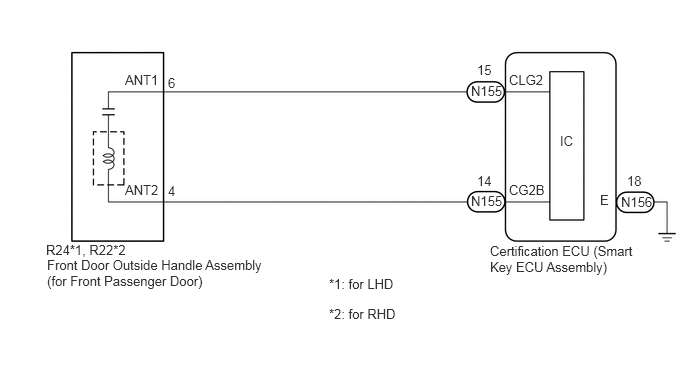
CAUTION / NOTICE / HINT
- NOTICE:
- ·
When using the GTS with the engine switch off, connect the GTS to the DLC3 and turn a courtesy light switch on and off at intervals of 1.5 seconds or less until communication between the GTS and the vehicle begins. Then select Model Code "KEY REGIST" under manual mode and enter the following menus: Body Electrical / Entry&Start. While using the GTS, periodically turn a courtesy light switch on and off at intervals of 1.5 seconds or less to maintain communication between the GTS and the vehicle.
·The entry and start system (for Entry Function) uses the LIN communication system and CAN communication system. Inspect the communication function by following How to Proceed with Troubleshooting. Troubleshoot the entry and start system (for Entry Function) after confirming that the communication systems are functioning properly.
·Before replacing the certification ECU (smart key ECU assembly), refer to Service Bulletin.
·After repair, confirm that no DTCs are output.
·Check that there are no electrical key transmitter sub-assemblies in the vehicle.
PROCEDURE
When the door control switch on the multiplex network master switch assembly is operated, check that the doors unlock and lock according to the switch operation.
- OK:
Door locks operate normally.
- Result:
Proceed to OK NG
OK
NG
Connect the GTS to the DLC3.
Turn the engine switch on (IG).
Turn the GTS on.
Enter the following menus: Body Electrical / Main Body / Data List.
Read the Data List according to the display on the GTS.
- Body Electrical > Main Body > Data List
-
Tester Display Measurement Item Range Normal Condition Diagnostic Note FR Door Lock Pos Front door RH unlock detection switch signal*1 UNLOCK or LOCK UNLOCK: Front door RH unlocked
LOCK: Front door RH locked- FL Door Lock Pos Front door LH unlock detection switch signal*2 UNLOCK or LOCK UNLOCK: Front door LH unlocked
LOCK: Front door LH locked-
*1: for LHD
*2: for RHD
- Body Electrical > Main Body > Data List
-
Tester Display FR Door Lock Pos FL Door Lock Pos - 50003 123 196,198
- OK:
The GTS display changes correctly in response to the lock/unlock operation of the front passenger door.
- Result:
Proceed to OK NG
OK
NG
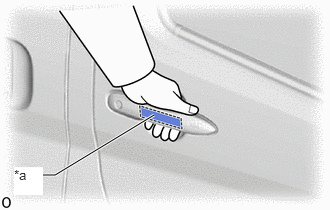
| *a | Unlock Sensor (Backside) |
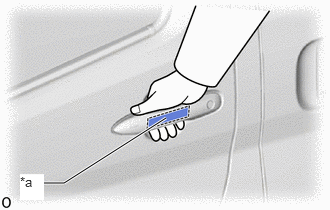
| *a | Unlock Sensor (Backside) |
Turn the engine switch off.
Turn the engine switch on (IG).
Open and close the front passenger door.
With the electrical key transmitter sub-assembly outside of the vehicle, press the lock switch of the electrical key transmitter sub-assembly to lock all of the doors.
Hold the electrical key transmitter sub-assembly at the same height as the door outside handle assembly and approximately 0.3 m (0.984 ft.) from the front passenger door.
Check that the LED of the electrical key transmitter sub-assembly blinks.
Enter the following menus: Body Electrical / Entry&Start / Data List.
Read the Data List according to the display on the GTS.
Touch the unlock sensor on the backside of the front door outside handle assembly (for Front Passenger Door).
- HINT:
-
When checking the operation of the unlock sensor again, make sure to perform the procedure from step (a).
- Body Electrical > Entry&Start > Data List
-
Tester Display Measurement Item Range Normal Condition Diagnostic Note P-Door Touch Sensor Front passenger door touch sensor (unlock sensor) OFF or ON OFF: Front passenger door touch sensor (unlock sensor) not touched
ON: Front passenger door touch sensor (unlock sensor) touched·Displays whether the unlock sensor is on or off (even if the sensor is touched and contact is maintained, "ON" is displayed only momentarily).
·Use this Data List item to help determine if there is an unlock sensor malfunction when the entry unlock function does not operate.
- Body Electrical > Entry&Start > Data List
-
Tester Display P-Door Touch Sensor - 50003 125 9
- OK:
The GTS display changes correctly in response to the operation of the front door outside handle assembly (for Front Passenger Door).
- Result:
Proceed to OK NG
OK
NG
Disconnect the N155 certification ECU (smart key ECU assembly) connector.
Disconnect the R24*1 or R22*2 front door outside handle assembly (for Front Passenger Door) connector.
*1: for LHD
*2: for RHD
Measure the resistance according to the value(s) in the table below.
- Standard Resistance:
for LHD: Tester Connection Condition Specified Condition N155-15 (CLG2) - R24-6 (ANT1) Always Below 1 Ω N155-14 (CG2B) - R24-4 (ANT2) Always Below 1 Ω N155-15 (CLG2) or R24-6 (ANT1) - Other terminals and body ground Always 10 kΩ or higher N155-14 (CG2B) or R24-4 (ANT2) - Other terminals and body ground Always 10 kΩ or higher
for RHD: Tester Connection Condition Specified Condition N155-15 (CLG2) - R22-6 (ANT1) Always Below 1 Ω N155-14 (CG2B) - R22-4 (ANT2) Always Below 1 Ω N155-15 (CLG2) or R22-6 (ANT1) - Other terminals and body ground Always 10 kΩ or higher N155-14 (CG2B) or R22-4 (ANT2) - Other terminals and body ground Always 10 kΩ or higher
Reconnect the R24*1 or R22*2 front door outside handle assembly (for Front Passenger Door) connector.
*1: for LHD
*2: for RHD
Reconnect the N155 certification ECU (smart key ECU assembly) connector.
- Result:
Proceed to OK NG
OK
NG

| *a | Component with harness connected
(Certification ECU (Smart Key ECU Assembly)) |
*b | Waveform 1 |
| *c | Unlock sensor not touched | *d | Unlock sensor touched |
Using an oscilloscope, check the waveform.
- OK:
Tester Connection Condition Tool Setting Specified Condition N155-15 (CLG2) - N156-18 (E) Procedure:
1.Engine switch off
2.Electrical key transmitter sub-assembly brought outside vehicle
3.All doors locked
4.Electrical key transmitter sub-assembly not near the vehicle
5.Front passenger door unlock sensor touched
5 V/DIV., 50 ms/DIV. Pulse generation
(See waveform 1)
- Result:
Proceed to OK NG
OK
NG