AUDIO / VIDEO AUDIO AND VISUAL SYSTEM(for Radio and Display Type) Disc cannot be Inserted or is Ejected Right After Insertion
CAUTION / NOTICE / HINT
- NOTICE:
- ·
Depending on the parts that are replaced during vehicle inspection or maintenance, performing initialization, registration or calibration may be needed. Refer to Precaution for Audio and Visual System.
·When replacing the radio and display receiver assembly, always replace it with a new one. If a radio and display receiver assembly which was installed to another vehicle is used, the following may occur:
-A communication malfunction DTC may be stored.
-The radio and display receiver assembly may not operate normally.
PROCEDURE
Make sure that the disc is an audio disc or a disc with an MP3, WMA or AAC file, and that it is not deformed, flawed, stained, deteriorated or otherwise defective.
- OK:
Normal disc.
- HINT:
- ·
Translucent or uniquely-shaped CDs cannot be played.
·CDs and DVDs with adhesive paper labels should not be played.
·Commercial audio CDs and DVDs can be played.
·CD-DA files on CD-ROMs, CD-Rs and CD-RWs can be played.
·MP3, WMA and AAC files on CD-ROMs, CD-Rs and CD-RWs can be played.
·For details on playable CDs and DVDs, refer to Owner's Manual.
- Result:
Proceed to OK NG
OK
NG
Check if the disc is inserted upside down.
- OK:
Disc is properly inserted.
- Result:
Proceed to OK NG
OK
NG
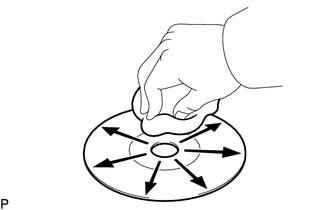
Clean the disc by wiping it clean with a soft cloth from the inside to the outside in a radial direction.
- OK:
Malfunction disappears.
- NOTICE:
-
Do not use a conventional record cleaner or anti-static preservative.
- Result:
Proceed to OK NG
OK
NG
Replace the disc with a new or known good one and check that the malfunction disappears.
- OK:
Malfunction disappears.
- Result:
Proceed to OK NG
OK
NG