AUDIO / VIDEO AUDIO AND VISUAL SYSTEM(for Radio and Display Type) Illumination for Panel Switch does not Come on with Tail Switch ON
CAUTION / NOTICE / HINT
- HINT:
-
Depending on the parts that are replaced during vehicle inspection or maintenance, performing initialization, registration or calibration may be needed. Refer to Precaution for Audio and Visual System.
- NOTICE:
-
When replacing the radio and display receiver assembly, always replace it with a new one. If a radio and display receiver assembly which was installed to another vehicle is used, the following may occur:
- ·
A communication malfunction DTC may be stored.
·The radio and display receiver assembly may not operate normally.
PROCEDURE
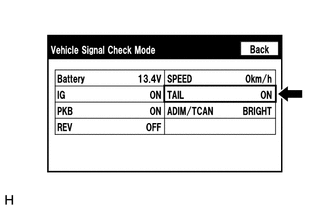
Enter the "Vehicle Signal Check Mode" screen. Refer to Check Vehicle Signal in Operation Check.
Check that the display changes between ON and OFF according to the light control switch operation.
- OK:
Light Control Switch Display Tail or head ON Off or AUTO OFF
- HINT:
- ·
This display is updated once per second. As a result, it is normal for the display to lag behind the actual switch operation.
·Make sure to move the vehicle to a bright area before performing an operation check with the light control switch in the AUTO position.
- Result:
Proceed to OK NG
OK
NG