THEFT DETERRENT / KEYLESS ENTRY SMART ENTRY AND START SYSTEM(for Entry Function, HEV Model) All Door Entry Lock/Unlock Functions do not Operate, but Wireless Functions Operate
DESCRIPTION
When the wireless operation can be used to lock and unlock the doors, communication between the door control receiver assembly and certification ECU (smart key ECU assembly) is normal. If the entry lock and unlock functions do not operate, the entry cancel function may be set through the customize function, there may be communication problems between the electrical key transmitter sub-assembly and vehicle, or there may be wave interference.
CAUTION / NOTICE / HINT
- NOTICE:
- ·
When using the GTS with the ignition switch off, connect the GTS to the DLC3 and turn a courtesy light switch on and off at intervals of 1.5 seconds or less until communication between the GTS and the vehicle begins. Then select Model Code "KEY REGIST" under manual mode and enter the following menus: Body Electrical / Entry&Start(CAN). While using the GTS, periodically turn a courtesy light switch on and off at intervals of 1.5 seconds or less to maintain communication between the GTS and the vehicle.
·The smart entry and start system (for Entry Function) uses the CAN communication system. Inspect the communication function by following How to Proceed with Troubleshooting. Troubleshoot the smart entry and start system (for Entry Function) after confirming that the communication systems are functioning properly.
·Before performing the inspection, check that DTC B124296 (wireless door lock control) is not output.
·Before replacing the certification ECU (smart key ECU assembly) or electrical key transmitter sub-assembly, refer to Service Bulletin.
·After repair, confirm that no DTCs are output.
·Check that there are no electrical key transmitter sub-assemblies in the vehicle.
PROCEDURE
Check that the wireless function operates normally.
- Result:
Result Proceed to Wireless door lock function operates normally A Wireless door lock function does not operate normally B
A
B
Read the Data List according to the display on the GTS.
- Body Electrical > Entry&Start > Data List
-
Tester Display Measurement Item Range Normal Condition Diagnostic Note Auto Entry Cancel Setting Smart entry and start system function OFF or ON OFF: Smart entry and start system not canceled
ON: Smart entry and start system canceledThe default setting for the entry cancel functions is OFF. If the customer requests that the smart entry and start system functions (locking and unlocking the doors while carrying the electrical key transmitter sub-assembly, etc.) be canceled, the setting can be changed through the customize function.
- Body Electrical > Entry&Start > Data List
-
Tester Display Auto Entry Cancel Setting - 50003 440 10
- Result:
Result Proceed to Entry function cancel is OFF A Entry function cancel is ON B
A
B
Check the operation of the entry lock and unlock functions.
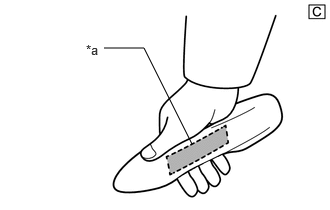
| *a | Unlock Sensor (Backside) |
Check that the entry unlock function.
Turn the ignition switch off.
Open and close the driver door.
With the electrical key transmitter sub-assembly outside of the vehicle, press the lock switch of the electrical key transmitter sub-assembly to lock all of the doors.
Hold the electrical key transmitter sub-assembly at the same height as the door outside handle assembly and approximately 0.3 m (0.984 ft.) from the driver door.
Check that the LED of the electrical key transmitter sub-assembly blinks.
Touch the unlock sensor on the backside of the front door outside handle assembly LH for 2 seconds or more.
*: Perform this step 3 seconds or more after performing step (3).
- HINT:
- ·
When checking the operation of the unlock sensor again, make sure to perform the procedure from step (1).
·Perform the same inspection for the front passenger door.
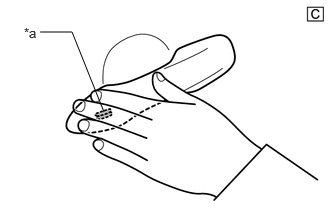
| *a | Lock Sensor |
Check that the entry lock function.
Turn the ignition switch off.
Open and close the driver door.
Hold the electrical key transmitter sub-assembly at the same height as the door outside handle assembly and approximately 0.3 m (0.984 ft.) from the driver door.
Touch the lock sensor of the front door outside handle assembly (groove on the front door outside handle) with 2 or more fingers for 2 seconds or more.
- HINT:
- ·
If the door does not lock even when touching the lock sensor for 2 seconds or more, touch it with your palm.
·When checking the operation of the lock sensor again, make sure to perform the procedure from step (1).
·When checking the operation of the entry lock function several times, it can be operated up to 2 times consecutively. To operate the function 3 times or more consecutively, the doors need to be unlocked once. However, this is only for the entry lock function, other door lock operations, such as a wireless door lock operation can be performed consecutively.
·Perform the same inspection for the front passenger door.
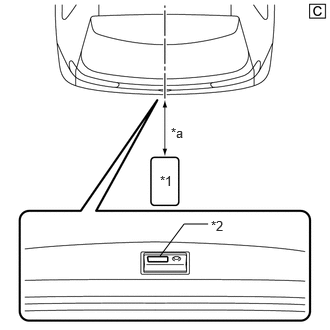
| *1 | Electrical Key Transmitter Sub-assembly |
| *2 | Back Door Opener Switch Assembly (Open Switch) |
| *a | 0.7 to 1 m (2.30 to 3.28 ft.) |
Check the entry back door open function.
With the back door closed and locked, press the lock switch of the back door opener switch assembly while carrying the electrical key transmitter sub-assembly and check that the back door opens.
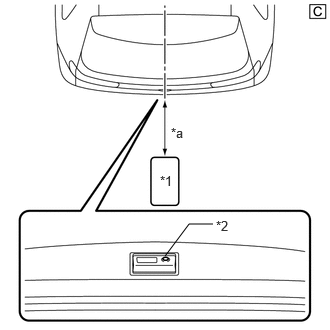
| *1 | Electrical Key Transmitter Sub-assembly |
| *2 | Back Door Opener Switch Assembly (Lock Switch) |
| *a | 0.3 m (0.984 ft.) |
Check the entry back door lock function.
With the back door closed and unlocked, press the lock switch of the back door opener switch assembly while carrying the electrical key transmitter sub-assembly outside of the vehicle and check that the back door locks.
- Result:
Result Proceed to Entry function does not operate normally A Entry function operates normally B
A
B
Read the Data List according to the display on the GTS.
- Body Electrical > Entry&Start > Data List
-
Tester Display Measurement Item Range Normal Condition Diagnostic Note Auto Entry Cancel Setting Smart entry and start system function OFF or ON OFF: Smart entry and start system not canceled
ON: Smart entry and start system canceledThe default setting for the entry cancel functions is OFF. If the customer requests that the smart entry and start system functions (locking and unlocking the doors while carrying the electrical key transmitter sub-assembly, etc.) be canceled, the setting can be changed through the customize function.
- Body Electrical > Entry&Start > Data List
-
Tester Display Auto Entry Cancel Setting - 50003 440 10
- HINT:
-
If the Data List cannot be read, check the value by performing manual operation of the customize function.
- Result:
Result Proceed to Entry door lock function cancel is OFF A Entry door lock function cancel is ON B
A
B
Move the electrical key transmitter sub-assembly as described below and perform the operation inspection.
- HINT:
- ·
When the electrical key transmitter sub-assembly is brought near the front door outside handle assembly LH or electrical key antenna (outside luggage compartment), the possibility of wave interference decreases, and it can be determined if wave interference is causing the problem symptom.
·If the inspection result is that the problem only occurs in certain locations or at certain times of day, the possibility of wave interference is high. Also, added vehicle components may cause wave interference. If installed, remove them and perform the operation check.
·There may be wave interference if the vehicle is near broadcasting antennas, large video displays, wireless garage door opener systems, wireless security cameras, home security systems, etc. In this case, move the vehicle to a different location and check if there is any improvement.
·If a tool for checking radio waves, such as a signal strength meter, is available, move around the area while observing both the LF band (used by the vehicle antenna to form the detection area) and RF band (used by the electrical key transmitter sub-assembly for transmission) to check for locations where there is wave interference.
·The transmitting wave of the wireless function and entry function are the same, but the wave logic is different. As a result, it is possible that only the wireless function or only the entry function is affected by wave interference.
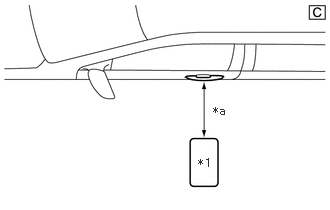
| *1 | Electrical Key Transmitter Sub-assembly |
| *a | Approximately 0.3 m (0.984 ft.) |
Bring the electrical key transmitter sub-assembly approximately 0.3 m (0.984 ft.) from the front door outside handle assembly LH and perform a driver door entry lock and unlock operation check.
- HINT:
-
Communication may not be possible if the electrical key transmitter sub-assembly is within 0.2 m (0.656 ft.) of the door handle.
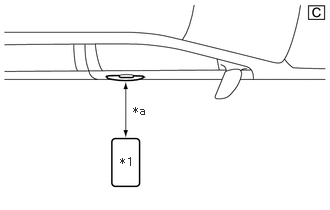
| *1 | Electrical Key Transmitter Sub-assembly |
| *a | Approximately 0.3 m (0.984 ft.) |
Bring the electrical key transmitter sub-assembly approximately 0.3 m (0.984 ft.) from the front door outside handle assembly RH and perform a front passenger door entry lock and unlock operation check.
- HINT:
-
Communication may not be possible if the electrical key transmitter sub-assembly is within 0.2 m (0.656 ft.) of the door handle.
| *1 | Electrical Key Transmitter Sub-assembly |
| *2 | Back Door Opener Switch Assembly (Open Switch) |
| *a | Approximately 0.3 m (0.984 ft.) |
Bring the electrical key transmitter sub-assembly approximately 0.3 m (0.984 ft.) from the electrical key antenna (outside luggage compartment) and perform a back door function check.
- HINT:
-
Communication may not be possible if the electrical key transmitter sub-assembly is within 0.2 m (0.656 ft.) of the rear bumper.
- Result:
Result Proceed to All operation checks fail A All operation checks are normal B Some operation checks are normal C
A
B
C
Check the following antennas in key diagnostic mode.
- Body Electrical > Entry&Start > Utility
-
Tester Display Communication Check(Key Diag Mode) - 50005 440 2541
Select either channel 1 or channel 2 and perform key diagnostic mode inspection for each channel.
| *1 | Electrical Key Transmitter Sub-assembly |
| *a | 0.7 to 1 m (2.30 to 3.28 ft.) |
Check the electrical key antenna (for driver door):
When the electrical key transmitter sub-assembly is brought within 0.7 to 1 m (2.30 to 3.28 ft.) of the front door outside handle assembly LH, check that the buzzer sounds.
- HINT:
- ·
Select either channel 1 or channel 2 and perform the key diagnostic mode inspection for each channel.
·If the buzzer sounds with [CH1] displayed but not with [CH2], the electrical key transmitter sub-assembly cannot be detected by channel 2 due to a malfunction, such as wave interference.
| *1 | Electrical Key Transmitter Sub-assembly |
| *a | 0.7 to 1 m (2.30 to 3.28 ft.) |
Check the electrical key antenna (for front passenger door):
When the electrical key transmitter sub-assembly is brought within 0.7 to 1 m (2.30 to 3.28 ft.) of the front door outside handle assembly RH, check that the buzzer sounds.
- HINT:
- ·
Select either channel 1 or channel 2 and perform the key diagnostic mode inspection for each channel.
·If the buzzer sounds with [CH1] displayed but not with [CH2], the electrical key transmitter sub-assembly cannot be detected by channel 2 due to a malfunction, such as wave interference.
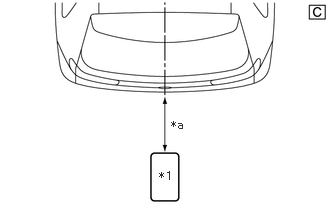
| *1 | Electrical Key Transmitter Sub-assembly |
| *a | 0.7 to 1 m (2.30 to 3.28 ft.) |
Check the electrical key antenna (outside luggage compartment):
When the electrical key transmitter sub-assembly is brought within 0.7 to 1 m (2.30 to 3.28 ft.) of the electrical key antenna (outside luggage compartment), check that the buzzer sounds.
- HINT:
- ·
Select either channel 1 or channel 2 and perform the key diagnostic mode inspection for each channel.
·If the buzzer sounds with [CH1] displayed but not with [CH2], the electrical key transmitter sub-assembly cannot be detected by channel 2 due to a malfunction, such as wave interference.
- OK:
Buzzer sounds.
- Result:
Result Proceed to All diagnostic mode inspections fail A Some diagnostic mode inspections fail (door) B Some diagnostic mode inspections fail (outside luggage compartment) C All diagnostic mode inspections are normal D
A
B
C
D
Check if there is another electrical key transmitter sub-assembly available that is already registered to the vehicle.
- Result:
Result Proceed to Another registered electrical key transmitter sub-assembly is not available A Another registered electrical key transmitter sub-assembly is available B
A
B
Register a new electrical key transmitter sub-assembly.
- HINT:
-
Refer to Service Bulletin.
- Result:
Proceed to NEXT
NEXT
Using another registered electrical key transmitter sub-assembly, check that the entry function operates normally.
- Result:
Result Proceed to Entry function operates normally A Entry function does not operate normally B
A
B