DOOR / HATCH POWER BACK DOOR SYSTEM OPERATION CHECK
OPERATION CONDITION
- NOTICE:
- ·
This check is possible only when the "System Settings" customization setting using the multi-information display in the combination meter assembly is set to "On" (The default setting is "On").
·Before performing an operation check, check that the power back door system customization is set to its default setting.
Conditions necessary for the power back door to open:
The back door is unlocked.*
The vehicle speed is 3 km/h (2 mph) or less (only when the ignition switch is turned to ON).
The shift lever is in P, the brake pedal is depressed or the parking brake lever is pulled up (this can be determined only when the ignition switch is turned to ON).
*: Depending on the customize settings, the back door may not unlock and only the driver door unlocks when the first unlock operation is performed. Check that the customize settings in the table below are set to "Disable", and check that the back door unlocks.
| Tester Display | Link |
|---|---|
| Unlock Key Twice Function | ( 202201,999999,_58,_115226,_0510939,RM1000000020BT8,) 202201,999999,_58,_115226,_0510939,RM1000000020BT8,)
|
| Wireless Unlock Twice Function | (202201,999999,_58,_115226,_0510941,RM1000000020BTG,)
|
| Entry Unlock Twice Function | for HEV Model:(202307,999999,_58,_115230,_0606511,RM100000002C246,)
for Gasoline Model:( 202307,999999,_58,_115230,_0606491,RM100000002C223,)
|
CHECK BASIC OPERATION
Check the opening operation.
With the back door fully closed, push the power back door control switch and check that the power back door warning buzzer sounds for 0.8 seconds, the hazard warning lights flash twice and the back door starts opening.
With the back door fully closed, push the electrical key transmitter sub-assembly (electrical key) and check that the power back door warning buzzer sounds for 0.8 seconds, the hazard warning lights flash twice and the back door starts opening.
With the back door fully closed, push the back door opener switch assembly and check that the power back door warning buzzer sounds for 0.8 seconds, the hazard warning lights flash twice and the back door starts opening.
With the back door fully closed, operate the unlock switch while carrying the digital key within the digital key detection area and check that the power back door warning buzzer sounds for 0.8 seconds, the hazard warning lights*1 flash twice and the back door starts opening.*1
*1: w/ Digital Key System
Check the close operation.
With the back door fully open, push the power back door control switch and check that the power back door warning buzzer sounds for 0.8 seconds, the hazard warning lights flash twice and the back door starts closing.
With the back door fully open, push the electrical key transmitter sub-assembly (electrical key) and check that the power back door warning buzzer sounds for 0.8 seconds, the hazard warning lights flash twice and the back door starts closing.
With the back door fully open, push the No. 1 power back door control switch and check that the power back door warning buzzer sounds for 0.8 seconds, the hazard warning lights flash twice and the back door starts closing.
During a power back door opening operation, push the lock switch or unlock switch on the digital key and check that the power back door warning buzzer sounds for 0.2 seconds and the back door opening operation stops. After the opening operation stops, push the lock switch or unlock switch on the digital key again and check that the power back door warning buzzer sounds for 0.8 seconds, the hazard warning lights*1 flash twice and the back door starts closing.*1
*1: w/ Digital Key System
Check the easy closer operation.
Using the multi-information display in the combination meter assembly, turn the customization setting "System Settings" to OFF".
CHECK OPERATION WHEN ANOTHER INPUT DETECTED DURING OPEN AND CLOSE OPERATIONS
Check operation when another input detected during open operations
During a power back door opening operation, push the power back door control switch and check that the power back door warning buzzer sound for 0.2 seconds, the hazard warning lights flash twice and the back door opening operation stops.
After the opening operation stops, press the power back door control switch again and check that the power back door operates until it reaches the fully closed position.
During a power back door opening operation, push the electrical key transmitter sub-assembly (electrical key) and check that the power back door warning buzzer sound for 0.2 seconds, the hazard warning lights flash twice and the back door opening operation stops.
After the opening operation stops, push the electrical key transmitter sub-assembly (electrical key) again and check that the power back door operates until it reaches the fully closed position.
During a power back door opening operation, push the No. 1 power back door control switch and check that the power back door warning buzzer sound for 0.2 seconds, the hazard warning lights flash twice and the power back door opening operation stops.
After the opening operation stops, push the No. 1 power back door control switch again and check that the power back door operates until it reaches the fully closed position.
During a power back door opening or closing operation, push the back door opener switch assembly and check that the power back door warning buzzer sounds for 0.2 seconds, the hazard warning lights flash twice and the power back door opening operation stops.
After the opening operation stops, push the back door opener switch assembly again and check that the power back door operates until it reaches the fully open position or the automatic opening operation stop position.
During a power back door opening operation, perform a kick operation and check that the power back door warning buzzer sounds for 0.2 seconds and the back door stops.
After the opening operation stops, perform a kick operation again and check that the power back door operates until it reaches the fully closed position.
During a power back door opening operation, push the lock switch or unlock switch on the digital key and check that the power back door warning buzzer sounds for 0.2 seconds and the back door opening operation stops. After the opening operation stops, push the lock switch or unlock switch on the digital key again and check that the power back door warning buzzer sounds for 0.8 seconds, the hazard warning lights*1 flash twice and the back door starts closing.*1
*1: w/ Digital Key System
Check operation when another input detected during close operations
During a power back door closing operation, push the power back door control switch and check that the power back door warning buzzer sound for 0.2 seconds and the back door stops.
After the closing operation stops, press the power back door control switch again and check that the power back door operates until it reaches the fully open position or the automatic opening operation stop position.
During a power back door closing operation, push the electrical key transmitter sub-assembly (electrical key) again and check that the power back door warning buzzer sound for 0.2 seconds and the back door stops.
After the closing operation stops, press the electrical key transmitter sub-assembly (electrical key) again and check that the power back door operates until it reaches the fully open position or the automatic opening operation stop position.
During a power back door closing operation, push the No. 1 power back door control switch again and check that the power back door warning buzzer sounds for 0.2 seconds and the power back door closing operation stops.
After the closing operation stops, push the No. 1 power back door control switch again and check that the power back door operates until it reaches the fully open position or the automatic opening operation stop position.
During a power back door closing operation, push the back door opener switch assembly and check that the power back door warning buzzer sounds for 0.2 seconds and the power back door closing operation stops.
After the closing operation stops, push the back door opener switch assembly again and check that the power back door operates until it reaches the fully open position or the automatic opening operation stop position.
During a power back door closing operation, perform a kick operation and check that the power back door warning buzzer sounds for 0.2 seconds and the back door stops.
After the closing operation stops, perform a kick operation again and check that the power back door operates until it reaches the fully open position or the automatic opening operation stop position.
During a power back door closing operation, push the lock switch or unlock switch on the digital key and check that the power back door warning buzzer sounds for 0.2 seconds and the back door closing operation stops. After the closing operation stops, push the lock switch or unlock switch on the digital key again and check that the power back door warning buzzer sounds for 0.8 seconds, the hazard warning lights*1 flash twice and the back door starts opening.*1
*1: w/ Digital Key System
CHECK WIRELESS ONE MOTION FUNCTION
- NOTICE:
- ·
Before performing an operation check, check that the power back door system customization is set to its default setting.
·This check is possible only when the "System Settings" customization setting using the multi-information display in the combination meter assembly is set to "On" (The default setting is "On").
·This check is possible only when the "PBD Wireless Function" customization setting using the GTS is set to "ON" (The default setting is "ON").
·This check is possible only when the "PBD Unlock with One Motion Setting" customization setting using the GTS is set to "ALL Doors" (The default setting is " ALL Doors").
Check the wireless one motion operation.
With all doors locked, push the electrical key transmitter sub-assembly (electrical key) and check that the power back door warning buzzer sounds for 0.8 seconds, the hazard warning lights flash twice and the back door starts opening.
CHECK JAM PROTECTION FUNCTION
- HINT:
- ·
The multiplex network door ECU detects changes in the operating speed of the back door while the power back door is operating. If a change in the operating speed is out of the normal range, it will be judged that foreign objects are in the path of the power back door and the operation will stop if the door is operating in the opening direction or move a certain amount in the reverse direction if the door is operating in the closing direction.
·When the power back door sensor assemblies built into both sides of the back door are compressed, it is judged that foreign objects are in the path of the power back door and the operation will reverse a little in the opposite direction and then stop.
·The power back door sensor assemblies operate only while the back door is closing. They do not operate while the back door is opening.
Check the jam protection function (the power back door sensor assembly) while the power back door is closing.
- NOTICE:
-
Do not check this function using a part of your body such as your hand. Also, pay thorough attention that nothing gets caught by accident in this process.
Fully open the back door.
Press a switch to close the power back door.
While the back door is closing, press a power back door sensor assembly using the handle of a hammer or equivalent.
Check that the buzzer sounds twice for 0.1 seconds, the jam protection function is immediately activated and the power back door reverses a certain amount and stops.
Check the jam protection function (the pulse sensor in the multiplex network door ECU) while the power back door is closing.
- NOTICE:
-
Do not check this function using a part of your body such as your hand. Also, pay thorough attention that nothing gets caught by accident in this process.
Fully open the back door.
Press a switch to close the power back door.
While the back door is closing, insert a tire or equivalent between the door panel and vehicle body, in order to interrupt the closing operation.
Check that the buzzer sounds twice for 0.1 seconds, the jam protection function is immediately activated and the power back door reverses a certain amount and stops.
Check the jam protection function while the power back door is opening.
- NOTICE:
-
Pay thorough attention that your body or your clothes, etc. do not get caught in the door by accident in this process.
Fully close the back door.
Press a switch to open the power back door.
While the back door is opening, use your hands to press on the outside surface of the back door panel so that the operating speed decreases.
Check that the buzzer sounds twice for 0.1 seconds, the jam protection function is immediately activated and the power back door stops.
CHECK ASSIST OPERATION
Check that the door automatically starts to fully close when the door is manually moved in the closing direction with the back door at rest.
CHECK AUTOMATIC OPENING OPERATION STOPPED POSITION MEMORIZATION FUNCTION (When not using Multi-information display)
Register open operation automatic stopped position in memory
Open the back door by operating each switch.
Operate each switch to stop the open operation when the back door reaches the desired automatic stopped position.
When the No. 1 power back door control switch is pressed and held for 2 seconds or more with the back door at the stopped position, the buzzer sounds 4 times and the system memorizes the automatic stopped position for the open operation.
Check that the back door stops at the memorized position when an open operation is performed with each switch.
Clear open operation automatic stopped position memory
Open the back door by operating each switch.
Stop the back door by operating each switch.
When the No. 1 power back door control switch is pressed and held for 7 seconds or more with the back door at the stopped position, the buzzer sounds 2 times and the system clears the automatic stopped position for the open operation.
CHECK AUTOMATIC OPENING OPERATION STOPPED POSITION MEMORIZATION FUNCTION (When using Multi-information display)
Register open operation automatic stopped position in memory
Using the multi-information display, select the "Opening Adjustment" customize setting.
According to the screen display, set the customize setting.
Check that the back door stops at the position set with the customize function when an open operation is performed with each switch.
Clear open operation automatic stopped position memory
Open the back door by operating each switch.
Stop the back door by operating each switch.
When the No. 1 power back door control switch is pressed and held for 7 seconds or more with the back door at the stopped position, the buzzer sounds 2 times and the system clears the automatic stopped position for the open operation.
CHECK POWER BACK DOOR CLOSE AND LOCK FUNCTION
When the following conditions are met, check that all doors lock when pressing the back door control switch after the power back door closes while carrying the transmitter switch (electrical key transmitter sub-assembly).
Back door is open
Door other than the back door is closed
Transmitter switch (electrical key transmitter sub-assembly) is not in the vehicle
- HINT:
-
If the back door control switch is operated with the hand holding the transmitter switch (electrical key transmitter sub-assembly), it may not operate due to being outside the key detection area.
CHECK POWER BACK DOOR RESERVATION LOCK FUNCTION
Conditions necessary for the power back door reservation lock function:
Ignition switch off
There are no electrical key transmitter sub-assemblies in the vehicle.
All of the other doors closed.
The electrical key transmitter sub-assembly is within the wireless door lock control system operating range (during wireless operation).
The electrical key transmitter sub-assembly is within the vehicle exterior detection area (during entry operation).
for HEV Model: Click hereVehicle Interior>THEFT DETERRENT / KEYLESS ENTRY>SMART ENTRY AND START SYSTEM (for Entry Function, HEV Model)>OPERATION CHECK202307,999999,_58,_115230,_0606511,RM100000002C245,
for Gasoline Model: Click hereVehicle Interior>THEFT DETERRENT / KEYLESS ENTRY>SMART ENTRY AND START SYSTEM (for Entry Function, Gasoline Model)>OPERATION CHECK202307,999999,_58,_115230,_0606491,RM100000002C222,
Power back door reservation lock function operation inspection:
During a power back door close operation, operate the lock switch of the electrical key transmitter sub-assembly and confirm that all of the doors lock when the close operation completes.
During a power back door close operation, touch the lock sensor of the door outside handle of the front door and confirm that all of the doors lock when the close operation completes.
CHECK HANDS FREE POWER BACK DOOR OPERATION
- NOTICE:
- ·
This check is possible only when the "System Settings" customization setting using the multi-information display in the combination meter assembly is set to "On" (The default setting is "On").
·This function operates when the "Kick Sensor" item is set to "On" using the customization function via the multi-information display in the combination meter assembly (The default setting is "On").
·This function operates when the "Kick Sensor Operation Function with ACC ON" item is set to "Enable" using the GTS customization function (The default setting is "Enable").
With the ignition switch off or ignition switch to ACC and the electrical key transmitter sub-assembly (electrical key) being carried, check that the power back door operates when a kick operation is performed within 100 mm (3.94 in.) of the rear bumper surface.
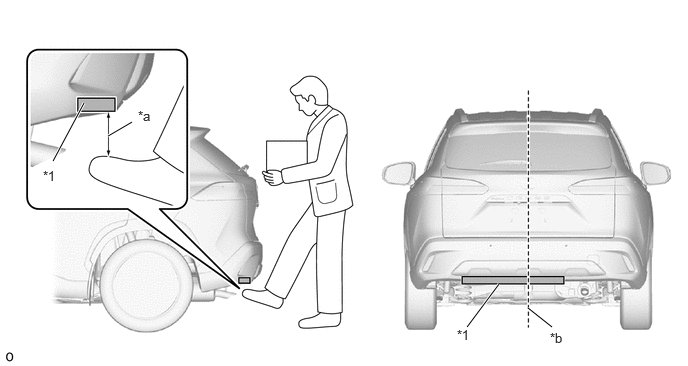
| *1 | Kick Door Control Sensor | - | - |
| *a | 100 mm (3.94 in.) | *b | Center of the rear bumper |
- HINT:
- ·
The hands free power back door detects a change in electrostatic capacitance in the detection area of the kick door control sensor (Operation trigger).
·Placing your leg or a metallic object within 100 mm (3.94 in.) of the rear bumper surface and then moving it out of the detection area results in the hands free power back door operating due to the kick door control sensor detecting a change in electrostatic capacitance.
·The kick door control sensor turns the sensing circuit on or off based on the vehicle speed and IG and ACC signals sent from the main body ECU (multiplex network body ECU) via LIN communication.