NAVIGATION / MULTI INFO DISPLAY NAVIGATION SYSTEM Sound cannot be Heard Sound Quality is Poor only when Replaying USB Storage Device
WIRING DIAGRAM
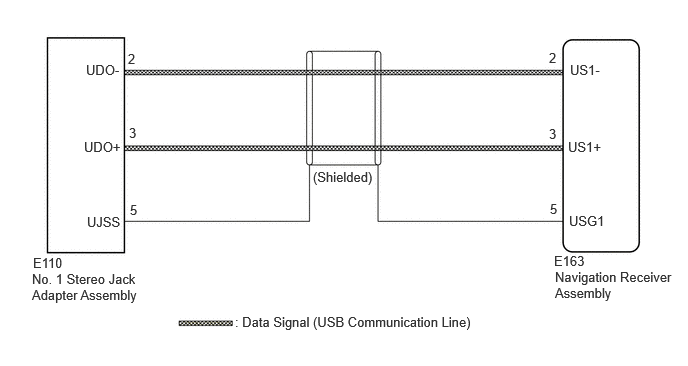
CAUTION / NOTICE / HINT
- NOTICE:
-
Depending on the parts that are replaced during vehicle inspection or maintenance, performing initialization, registration or calibration may be needed.
PROCEDURE
Disconnect the E163 navigation receiver assembly connector.
Disconnect the E110 No. 1 stereo jack adapter assembly connector.
Measure the resistance according to the value(s) in the table below.
- Standard Resistance:
Tester Connection Condition Specified Condition Click Location & Routing(E163,E110)Location & Routingewd_type=routing;type=c,c;code=E163,E110
Click Connector(E163)Instrument Panel>Instrument Panel Wire / Telephone Computer Wire>Navigation Receiver Assemblyewd_type=component;type=c;code=E163;pinno=2,3,5
Click Connector(E110)Instrument Panel>Instrument Panel Wire / Telephone Computer Wire>No. 1 Stereo Jack Adapter Assemblyewd_type=component;type=c;code=E110;pinno=2,3,5
E163-2 (US1-) - E110-2 (UDO-) Always Below 1 Ω E163-3 (US1+) - E110-3 (UDO+) Always Below 1 Ω E163-5 (USG1) - E110-5 (UJSS) Always Below 1 Ω E163-2 (US1-) or E110-2 (UDO-) - Body ground Always 10 kΩ or higher E163-3 (US1+) or E110-3 (UDO+) - Body ground Always 10 kΩ or higher E163-5 (USG1) or E110-5 (UJSS) - Body ground Always 10 kΩ or higher
- Result:
Proceed to OK NG
OK
NG
Replace the No. 1 stereo jack adapter assembly with a new or known good one.
Check if the problem symptom recurs.
- Result:
Result Proceed to Malfunction disappears A Malfunction occurs B
A
B