☰ Toyota Venza☰ فهرستAudio / Visual / Telematics › NAVIGATION / MULTI INFO DISPLAY › NAVIGATION RECEIVER
RM38N0EC
_56
Audio / Visual / Telematics
_111823
NAVIGATION / MULTI INFO DISPLAY
_0500514
NAVIGATION RECEIVER
A
NAVIGATION / MULTI INFO DISPLAY NAVIGATION RECEIVER REMOVAL
PROCEDURE

 1. PRECAUTION
55422C
2.REMOVE CENTER UPPER INSTRUMENT CLUSTER FINISH PANEL
3.REMOVE NAVIGATION RECEIVER ASSEMBLY WITH BRACKET
a.
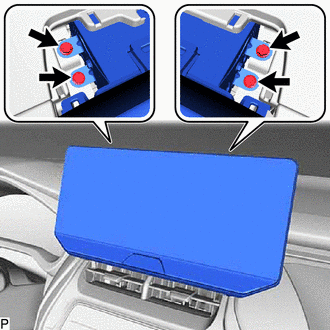
Remove the 4 bolts.
b.
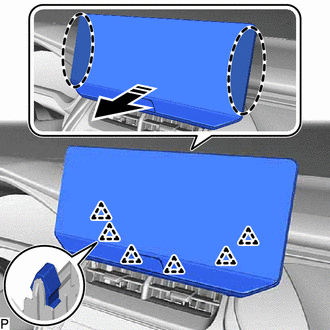
0,0 0,0
false

|
Place Hand Here |

|
Remove in this Direction |
Disengage the 6 clips as shown in the illustration.
c.
Disconnect each connector to remove the navigation receiver assembly with bracket.
86211J
4.REMOVE NO. 1 RADIO RECEIVER BRACKET
a.
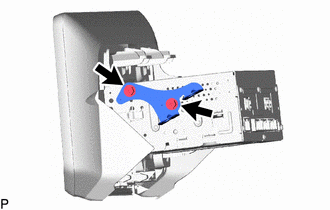
Remove the 2 screws and No. 1 radio receiver bracket.
86212C
5.REMOVE NO. 2 RADIO RECEIVER BRACKET
a.
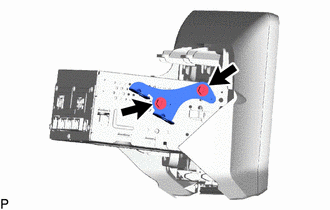
Remove the 2 screws and No. 2 radio receiver bracket.
84330
6.REMOVE HAZARD WARNING SIGNAL SWITCH ASSEMBLY
86140A
7.REMOVE NAVIGATION RECEIVER ASSEMBLY