THEFT DETERRENT / KEYLESS ENTRY DIGITAL KEY SYSTEM OPERATION CHECK
CHECK CUSTOMIZE PARAMETERS
The operation check below is based on the non-customized initial condition of the vehicle.
Digital Key System:Vehicle Interior>THEFT DETERRENT / KEYLESS ENTRY>DIGITAL KEY SYSTEM>CUSTOMIZE PARAMETERS202409,999999,_58,_083094,_0678553,RM100000002NS9E,
Wireless Door Lock Control System:Vehicle Interior>DOOR LOCK>WIRELESS DOOR LOCK CONTROL SYSTEM (w/ Smart Entry and Start System)>CUSTOMIZE PARAMETERS202409,999999,_58,_083092,_0712251,RM100000002NSAN,
Smart Entry and Start System (for Entry Function, HV Model):Vehicle Interior>THEFT DETERRENT / KEYLESS ENTRY>SMART ENTRY AND START SYSTEM (for Entry Function, HV Model)>CUSTOMIZE PARAMETERS202409,999999,_58,_083094,_0402997,RM100000002NSU9,
Smart Entry and Start System (for Entry Function, Gasoline Model):Vehicle Interior>THEFT DETERRENT / KEYLESS ENTRY>SMART ENTRY AND START SYSTEM (for Entry Function, Gasoline Model)>CUSTOMIZE PARAMETERS202409,999999,_58,_083094,_0402998,RM100000002NSV0,
Smart Entry and Start System (for Start Function, HV Model):Vehicle Interior>THEFT DETERRENT / KEYLESS ENTRY>SMART ENTRY AND START SYSTEM (for Start Function, HV Model)>CUSTOMIZE PARAMETERS202409,999999,_58,_083094,_0402999,RM100000002NSRN,
Smart Entry and Start System (for Start Function, Gasoline Model):Vehicle Interior>THEFT DETERRENT / KEYLESS ENTRY>SMART ENTRY AND START SYSTEM (for Start Function, Gasoline Model)>CUSTOMIZE PARAMETERS202409,999999,_58,_083094,_0403000,RM100000002NSSZ,
CHECK WIRELESS FUNCTION
- NOTICE:
- ·
The wireless operation range may differ depending on the type of digital key device.
·Refer to Precautions for Inspection or Registration regarding the digital key and surrounding environment.
- HINT:
-
The following functions can be customized using the wireless door lock control system settings, and operate in the same way as the wireless door lock control system.
-
Click here
- ·
Automatic locking function
·Answer-back function
·Wireless Unlock 2 Operation Function, etc.
Approach the vehicle and check that the establishment of a BLE connection is indicated on the digital key.
When a BLE connection is established, check that all doors unlock when the unlock switch is pressed.
When a BLE connection is established, check that all doors lock when the lock switch is pressed.
w/ back door open switch: When a BLE connection is established and the back door is unlocked, check that the back door opens when the back door open switch is pressed.
CHECK ENTRY FUNCTION
- NOTICE:
- ·
Regarding the digital key detection range for the entry function, refer to Precautions for Outside Vehicle Digital Key Detection Range/Diagnostic range.
·Refer to Precautions for Inspection or Registration regarding the digital key and surrounding environment.
- HINT:
-
The following functions can be customized using the smart entry and start system settings, and operate in the same way as the smart entry and start system.
- ·
Automatic locking function
·Answer-back function, etc.
Check the entry unlock function (driver door, front passenger door).
Lock all doors using the wireless function.
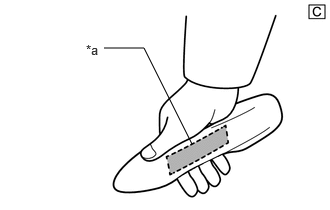
| *a | Unlock Sensor (Backside) |
The illustrations shown are examples only.
With the digital key in your hand, hold your hand inside the digital key detection range and touch the unlock sensor built into the reverse side of the front door outside handle. Check that all doors unlock.
- HINT:
-
Inspect the front passenger door using the same procedure.
Check the entry lock function (driver door, front passenger door).
Unlock all doors using the wireless function.
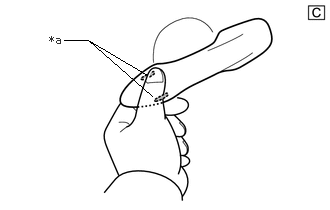
| *a | Lock Sensor |
The illustrations shown are examples only.
With the digital key in your hand, hold your hand inside the digital key detection range and touch the lock sensor on the surface of the front door outside handle. Check that all doors lock.
- HINT:
-
Inspect the front passenger door using the same procedure.
Check the entry back door open function.
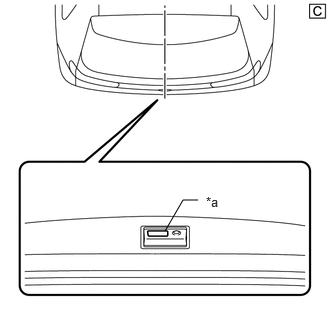
| *a | Back Door Opener Switch Assembly (Open Switch) |
The illustrations shown are examples only.
With the back door closed and locked, hold the digital key in your hand and hold your hand inside the digital key detection range. Then operate the open switch.
Check the entry back door lock function.
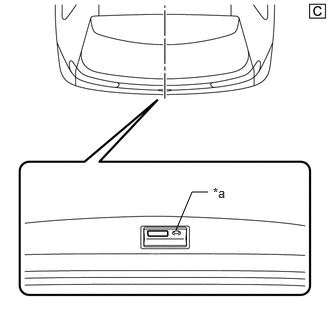
| *a | Back Door Opener Switch Assembly (Lock Switch) |
The illustrations shown are examples only.
With the back door closed and unlocked, hold the digital key in your hand and hold your hand inside the digital key detection range. Then operate the lock switch.
CHECK POWER SOURCE MODE CHANGING FUNCTION
- NOTICE:
- ·
Regarding the interior operating range, refer to Precautions for In-vehicle Operating Range.
·Refer to Precautions for Inspection or Registration regarding the digital key and surrounding environment.
Unlock the doors by using the digital key.
Place the digital key on the center console near the vehicle interior BLE digital key receiver.
When all of the following conditions are met, push the power switch*2 or engine switch*3 and check that the hybrid control system*2 or engine*3 starts.
Ignition switch off*1
The shift state is P*1
The brake pedal is depressed*1
- HINT:
-
*1: When the power switch*2 or engine switch*3 is pushed when the conditions are not met, the power source mode will change the same as for the power source mode changing function of the smart entry and start system.
-
except Gasoline Model: Click here
-
for Gasoline Model: Click here
*2: for HV Model
*3: for Gasoline Model
DIGITAL KEY DIAGNOSTIC MODE (Using GTS)
- NOTICE:
- ·
With only one digital key connected to BLE, perform inspection in digital key diagnostic mode.
·Regarding the digital key detection area outside the vehicle cabin, refer to Precautions for Outside Vehicle Digital Key Detection Range/Diagnostic Range.
·Regarding the interior operating range, refer to Precautions for In-vehicle Operating Range.
·Refer to Precautions for Inspection or Registration regarding the digital key and surrounding environment.
- HINT:
-
Whether the digital key operates correctly within the detection area can be confirmed when the buzzer sounds with the system in digital key diagnostic mode.
Enter the following menus: Body Electrical / Entry&Start / Utility / Communication Check(Digital Key Diag Mode).
- Body Electrical > Entry&Start > Utility
-
Tester Display Communication Check (Digital Key Diag Mode) - 50005 440 4806
Inspect the appropriate item according to the following table.
| Tester Display | Inspection Item |
|---|---|
| Digital key engine/power start area [*1] | BLE indoor digital key receiver assembly |
| Digital key driver door outside area [*2] | Front door outside handle assembly LH |
| Digital key passenger door outside area [*3] | Front door outside handle assembly RH |
| Digital key back door/trunk lid outside area [*4] | BLE luggage digital key receiver assembly |
Bring the digital key near the selected BLE digital key receiver and check that the buzzer sounds.
[*1]: BLE indoor digital key receiver assembly
- HINT:
-
Place the digital key on the center console near the vehicle interior BLE digital key receiver.
[*2]: Front door outside handle assembly LH
- HINT:
-
Hold the digital key in your hand and hold your hand inside the driver door digital key detection range.
[*3]: Front door outside handle assembly RH
- HINT:
-
Hold the digital key in your hand and hold your hand inside the front passenger door digital key detection range.
[*4]: BLE luggage digital key receiver assembly
- HINT:
-
Hold the digital key in your hand and hold your hand inside the back door digital key detection range.