THEFT DETERRENT / KEYLESS ENTRY SMART ENTRY AND START SYSTEM(for Entry Function, Gasoline Model) CUSTOMIZE PARAMETERS
CUSTOMIZE SMART ENTRY AND START SYSTEM (for Entry Function)
- HINT:
-
The following items can be customized.
- NOTICE:
- ·
When the customer requests a change in a function, first make sure that the function can be customized.
·Record the current settings before customizing.
Customizing with the GTS
Select the setting by referring to the table below.
- Entry & Start
-
Tester Display Description Default Setting ECU Auto Entry Cancel Setting Function that enables or disables the smart entry and start system. OFF $00:OFF,$01:ON Certification ECU (smart key ECU assembly) Auto Entry Cancel 2 Setting Function to set cancellation of Entry function. OFF $00:OFF,$04:ON Certification ECU (smart key ECU assembly) Ignition Available Area Setting (Back Door Type) Function that sets the area that the key must be in before the engine switch can be operated. Fr+Rr+BD $00:Fr+Rr,$01:Fr+Rr+BD Certification ECU (smart key ECU assembly) Park Wait Time Adjust Function that sets the period of time (lock confirmation time) that the door is prevented from being unlocked by operating the front door outside handle assembly after an entry lock operation is performed. 2.5s $00:0.5sec,$01:1.5sec,$02:2.5sec,$03:5sec Certification ECU (smart key ECU assembly) Door Unlock Sensor Touch Time Adjust Function that sets the length of time the unlock sensor on the door outside handle assembly LH must be touched to unlock all of the doors OFF $00:OFF,$01:Short,$02:Middle,$03:Long Certification ECU (smart key ECU assembly) Key Low Battery Warning Function Enables or disables the sounding of the buzzer when the transmitter battery is low and the ignition switch is turned off after being ON for 20 minutes or more. ON $00:OFF,$01:ON Certification ECU (smart key ECU assembly) Key Left in Vehicle Alarm Function Enables or disables the sounding of the buzzer when entry lock is performed with the key inside the vehicle. ON $00:OFF,$01:ON Certification ECU (smart key ECU assembly) Forget to Turn IG OFF Alarm Function Enables or disables lock sensor warning function when shift position is in P with ignition switch ON (If this value is "ON", a warning will activate when the lock sensor is touched). ON $00:OFF,$01:ON Certification ECU (smart key ECU assembly) Start Indicator Function Function that turns the entry warning light on the combination meter assembly on or off. ON $00:OFF,$01:ON Certification ECU (smart key ECU assembly) Touch Activation Over Threshold Function that limits the number of times the entry lock function can be operated consecutively. When set to Not Active entry lock function can be operated an unlimited number of times consecutively. Active $00:Active,$01:Not Active Certification ECU (smart key ECU assembly) Start Switch Light Function Function that sets whether the engine switch light blinks. ON $00:OFF,$01:ON Certification ECU (smart key ECU assembly) Power Saving Wait Time (Out of Entry Range) Function that sets the length of time before the detection area enters power saving mode when the electrical key transmitter sub-assembly is detected within 3.5 m (11.48 ft.) of the door handle. Normal $00:Normal,$01:Short Certification ECU (smart key ECU assembly) - 50006 17
CUSTOMIZE WIRELESS DOOR LOCK CONTROL SYSTEM
CUSTOMIZING WITH THE MULTI-DISPLAY
Customizing with the multi-display
Turn the ignition switch to ON.
Enter the following menus: Settings / Vehicle customize / Door control
Select the setting by referring to the table below.
| Display | Description | Default | Setting | Relevant ECU |
|---|---|---|---|---|
| Unlock | Function that sets which doors are unlocked by the entry unlock function. | All Doors | All Doors or Driver's Door | Certification ECU (Smart key ECU assembly) |
| Entry & Start | Function that enables or disables the entry and start system. | On | On or Off | Certification ECU (Smart key ECU assembly) |
ENTRY UNLOCK MODE CHANGE FUNCTION
Entry unlock mode change function (manual operation)
The following entry unlock modes can be selected when using the entry unlock mode change function.
All door unlock mode:
When the depression on a door outside handle sub-assembly is touched, all of the doors are unlocked simultaneously.
Driver door unlock mode:
When the depression on the door outside handle sub-assembly LH is pressed, only the driver door is unlocked. Then, when the depression on the door outside handle sub-assembly LH is pressed again, all of the doors are unlocked.
When the depression on the door outside handle sub-assembly RH is pressed, all of the doors are unlocked simultaneously.
When customizing through manual operation:
Turn the ignition switch off.
Check that the LED of the electrical key transmitter sub-assembly is not illuminated, and then press and hold the lock and unlock switches of the electrical key transmitter sub-assembly for 5 seconds or more while the electrical key transmitter sub-assembly is in the exterior detection area.
Check the current setting.
- HINT:
- ·
The mode switches between all door unlock mode and driver door unlock mode.
·The answer-back (combination meter assembly) operation for each mode is indicated in the table below.
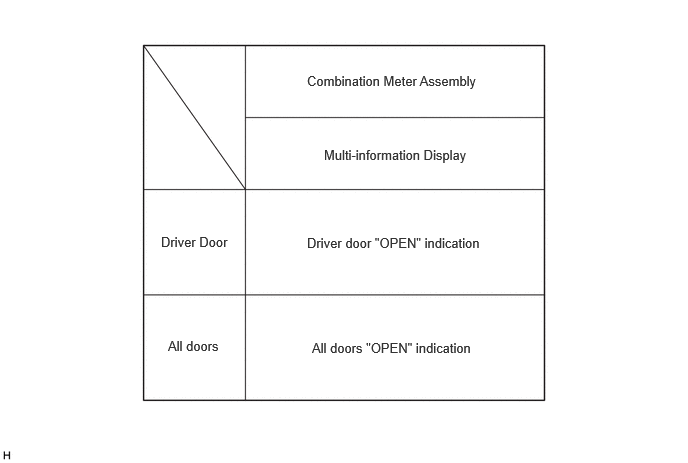
Release the lock and unlock switches of the electrical key transmitter sub-assembly.
Check that the LED of the electrical key transmitter sub-assembly is not illuminated, and then press and hold the lock and unlock switches of the electrical key transmitter sub-assembly for 5 seconds or more to change the mode.
- HINT:
- ·
Repeat the procedure as necessary to select the desired mode.
·When changing the mode consecutively, make sure to perform the operation 5 seconds after the previous operation.
Unlock the doors using the wireless function, and then open any door.
ENTRY CANCEL FUNCTION
Entry cancel function (manual operation)
- HINT:
-
While the smart entry and start system is canceled, it is possible to lock and unlock the doors with the wireless function, and the engine can be started by holding the electrical key transmitter sub-assembly near the engine switch.
The following functions are disabled when the smart entry and start system is canceled.
Entry unlock/lock functions
Push-button start function
Key lock-in prevention function
Entry warning functions
When canceling the smart entry and start system through manual operation:
Make sure the following conditions are met:
The ignition switch is off.
The driver door is closed.
The driver door is unlocked.
Press the unlock switch of the electrical key transmitter sub-assembly.
Open the driver door within 5 seconds of completing the step above (driver door: closed → opened).
With the driver door open, press the unlock switch of the electrical key transmitter sub-assembly 2 times within 5 seconds of completing the step above.
- NOTICE:
-
If the driver door is closed before or while pressing the unlock switch, the entry cancel setting mode will end.
Perform the following procedure within 30 seconds of completing the step above.
Close and open the driver door twice (driver door: open → closed → opened → closed → opened).
With the driver door open, press the unlock switch of the electrical key transmitter sub-assembly 2 times.
- NOTICE:
-
If the driver door is closed before or while pressing the unlock switch, the entry cancel setting mode will end.
Close and open the driver door (driver door: open → closed → opened).
Close the driver door within 5 seconds (driver door: open → closed).
Check that the buzzer sounds twice (short beeps) to confirm that the smart entry and start system has been canceled.
Perform the following procedure to restore the smart entry and start system to the active state from the canceled state.
Perform the procedure to cancel the smart entry and start system again.
Check that the buzzer sounds once (short beep) to confirm that the smart entry and start system has been restored to the active state.
- HINT:
- ·
The system changes between the canceled state and the active state each time the procedure to cancel the system through manual operation is performed.
·The buzzer sounds twice when the system changes from the active state to the canceled state, and sounds once when the system changes from the canceled state to the active state.