TELEMATICS TELEPHONE ANTENNA(for Instrument Panel) INSTALLATION
CAUTION / NOTICE / HINT
- HINT:
-
A bolt without a torque specification is shown in the standard bolt chart.
PROCEDURE

 86862
1.INSTALL NAVIGATION ANTENNA BRACKET
86862
1.INSTALL NAVIGATION ANTENNA BRACKET
86860
2.INSTALL NAVIGATION ANTENNA ASSEMBLY
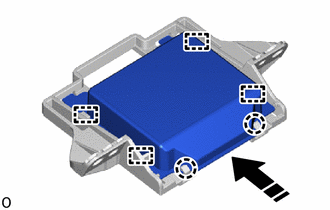

|
Install in this Direction |
Attach the guide and claw to install the navigation antenna assembly as shown in the illustration.
3.INSTALL NAVIGATION ANTENNA ASSEMBLY WITH BRACKET
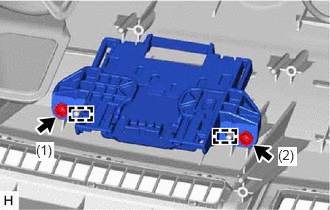
Attach the guide to set the navigation antenna assembly with bracket.
Install the 2 screws in the order shown in the illustration.
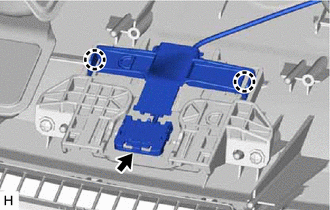
Attach the claw.
Connect the connector.
55950G
4.INSTALL DEFROSTER NOZZLE ASSEMBLY
5.INSTALL INSTRUMENT PANEL SAFETY PAD ASSEMBLY
6.CONNECT CABLE TO NEGATIVE AUXILIARY BATTERY TERMINAL
7. INITIALIZATION AFTER RECONNECTING AUXILIARY BATTERY TERMINAL
- HINT:
-
When disconnecting and reconnecting the auxiliary battery, there is an automatic learning function that completes learning when the respective system is used.
8.CHECK SRS WARNING LIGHT
9. PERFORM DIAGNOSTIC SYSTEM CHECK