DOOR / HATCH BACK DOOR CLOSER ECU REMOVAL
CAUTION / NOTICE / HINT
The necessary procedures (adjustment, calibration, initialization, or registration) that must be performed after parts are removed, installed, or replaced during the multiplex network door ECU removal/installation are shown below.
| Replaced Part or Performed Procedure | Necessary Procedures | Effect/Inoperative Function when Necessary Procedures are not Performed | Link |
|---|---|---|---|
| Multiplex network door ECU | Reset back door close position | Power back door system | ( 202304,999999,_59,_083093,_0584672,RM1000000029PGT,) 202304,999999,_59,_083093,_0584672,RM1000000029PGT,)
|
| Replaced Part or Performed Procedure | Necessary Procedures | Effect/Inoperative Function when Necessary Procedures are not Performed | Link |
|---|---|---|---|
| Multiplex network door ECU | Reset back door close position | Power back door system | (202304,999999,_59,_083093,_0584672,RM1000000029PGT,)
|
PROCEDURE

 67939B
1.REMOVE BACK DOOR CENTER GARNISH
67939B
1.REMOVE BACK DOOR CENTER GARNISH
67938A
2.REMOVE BACK DOOR SIDE GARNISH LH
67937B
3.REMOVE BACK DOOR SIDE GARNISH RH
- HINT:
-
Use the same procedure described for the LH side.
67199
4.REMOVE BACK DOOR HANDLE COVER
- HINT:
-
Use the same procedure for the RH and LH sides.
67750
5.REMOVE BACK DOOR TRIM BOARD ASSEMBLY
89222A
6.REMOVE MULTIPLEX NETWORK DOOR ECU
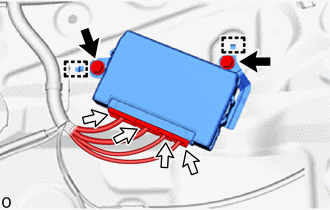

|
Bolt |

|
Connector |
Remove the 2 bolts.
Detach the guide and remove the multiplex network door ECU.
Disconnect the 4 connectors.
- NOTICE:
- ·
Do not subject the multiplex network door ECU to strong impacts or force, and do not drop it.
·Do not reuse the multiplex network door ECU that has been dropped.