M20D-FKS ENGINE CONTROL SFI SYSTEM P04602A Fuel Level Sensor "A" Signal Stuck In Range
DESCRIPTION
Refer to DTC P046012.
| DTC No. | Detection Item | DTC Detection Condition | Trouble Area | MIL | Memory | Note |
|---|---|---|---|---|---|---|
| P04602A | Fuel Level Sensor "A" Signal Stuck In Range | The change in the fuel sender gauge value is below the threshold when a certain amount of fuel is calculated to have been consumed. (1 trip detection logic). | ·
Fuel sender gauge assembly ·
NO. 2 fuel sender gauge assembly ·
ECM |
Comes on | DTC stored | SAE: P0461 |
MONITOR DESCRIPTION
When the fuel sender gauge assembly output value changes less than a specified amount, when compared to the fuel consumption calculated from the fuel injection volume, the ECM will detect a malfunction, illuminate the MIL and store a DTC.
MONITOR STRATEGY
| Required Sensors/Components | Fuel level sensor |
| Frequency of Operation | Continuous |
CONFIRMATION DRIVING PATTERN
- HINT:
- ·
After repair has been completed, clear the DTC and then check that the vehicle has returned to normal by performing the following All Readiness check procedure.
·When clearing the permanent DTCs, refer to the "CLEAR PERMANENT DTC" procedure.
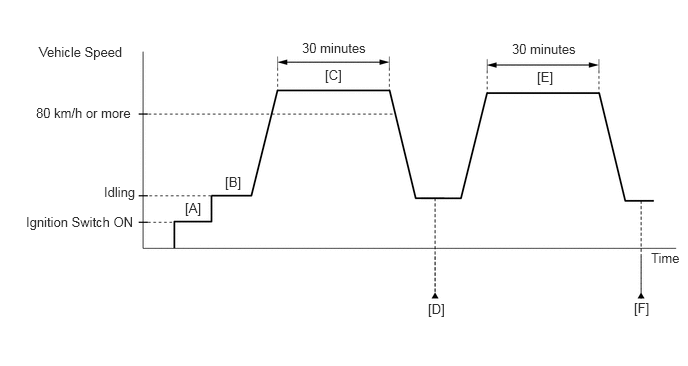
Connect the GTS to the DLC3.
Turn the ignition switch to ON.
Turn the GTS on.
Clear the DTCs (even if no DTCs are stored, perform the clear DTC procedure).
Turn the ignition switch off and wait for at least 30 seconds.
Turn the ignition switch to ON [A].
Turn the GTS on.
Start the engine [B].
Drive the vehicle at 80 km/h (50 mph) or more for 30 minutes [C].
Enter the following menus: Powertrain / Engine / Trouble Codes [D].
Read the pending DTCs.
- HINT:
- ·
If a pending DTC is output, the system is malfunctioning.
·If a pending DTC is not output, perform the following procedure.
Enter the following menus: Powertrain / Engine / Utility / All Readiness.
Input the DTC: P04602A.
Check the DTC judgment result.
| GTS Display | Description |
|---|---|
| NORMAL | ·
DTC judgment completed ·
System normal |
| ABNORMAL | ·
DTC judgment completed ·
System abnormal |
| INCOMPLETE | ·
DTC judgment not completed ·
Perform driving pattern after confirming DTC enabling conditions |
- HINT:
- ·
If the judgment result shows NORMAL, the system is normal.
·If the judgment result shows ABNORMAL, the system has a malfunction.
·If the judgment result is INCOMPLETE, perform steps [E] through [F].
·[A] to [D]: Normal judgment procedure.
The normal judgment procedure is used to complete DTC judgment and also used when clearing permanent DTCs.
·When clearing the permanent DTCs, do not disconnect the cable from the battery terminal or attempt to clear the DTCs during this procedure, as doing so will clear the universal trip and normal judgment histories.
Drive the vehicle at 80 km/h (50 mph) or more for 30 minutes [E].
Enter the following menus: Powertrain / Engine / Trouble Codes [F].
Read the pending DTCs.
- HINT:
- ·
If a pending DTC is output, the system is malfunctioning.
·If a pending DTC is not output, perform the following procedure.
Enter the following menus: Powertrain / Engine / Utility / All Readiness.
Input the DTC: P04602A.
Check the DTC judgment result.
| GTS Display | Description |
|---|---|
| NORMAL | ·
DTC judgment completed ·
System normal |
| ABNORMAL | ·
DTC judgment completed ·
System abnormal |
| INCOMPLETE | ·
DTC judgment not completed ·
Perform driving pattern after confirming DTC enabling conditions |
- HINT:
- ·
If the judgment result shows NORMAL, the system is normal.
·If the judgment result shows ABNORMAL, the system has a malfunction.
·[A] to [F]: Normal judgment procedure.
The normal judgment procedure is used to complete DTC judgment and also used when clearing permanent DTCs.
·When clearing the permanent DTCs, do not disconnect the cable from the battery terminal or attempt to clear the DTCs during this procedure, as doing so will clear the universal trip and normal judgment histories.
CAUTION / NOTICE / HINT
- HINT:
-
Read freeze frame data using the GTS. The ECM records vehicle and driving condition information as freeze frame data the moment a DTC is stored. When troubleshooting, freeze frame data can help determine if the vehicle was moving or stationary, if the engine was warmed up or not, if the air fuel ratio was lean or rich, and other data from the time the malfunction occurred.
PROCEDURE
Interview the customer for details about when they refuel the vehicle.
- HINT:
-
When the fuel tank is full, if the vehicle is repeatedly driven a short distance and then refueled, the fuel sender gauge output value will not change. In this case, the ECM may judge that the fuel sender gauge is stuck and store DTC P04602A. If the vehicle was driven in this manner, as the DTC was stored due to a user action, clear the DTCs without performing troubleshooting and return the vehicle to the customer.
- Result:
Proceed to NEXT
NEXT
Inspect the fuel sender gauge assembly.
- Result:
Proceed to OK NG
OK
NG
Inspect the NO. 2 fuel sender gauge assembly.
- Result:
Proceed to OK NG
OK
NG