NAVIGATION / MULTI INFO DISPLAY NAVIGATION RECEIVER INSTALLATION
PROCEDURE

 86140A
1.INSTALL NAVIGATION RECEIVER ASSEMBLY
86140A
1.INSTALL NAVIGATION RECEIVER ASSEMBLY
86212
2.INSTALL NO. 2 RADIO BRACKET
Install the No. 2 radio bracket with the 3 screws.
86211
3.INSTALL NO. 1 RADIO BRACKET
Install the No. 1 radio bracket with the 3 screws.
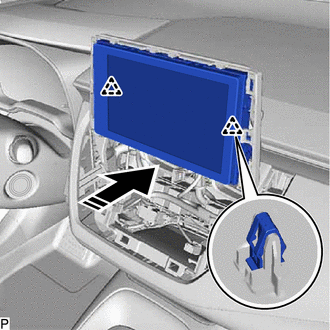
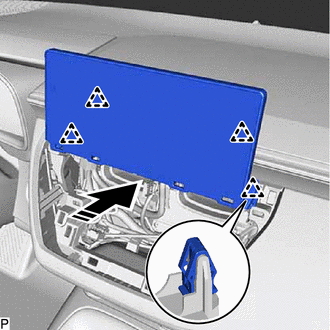
4.INSTALL NAVIGATION RECEIVER ASSEMBLY WITH BRACKET
except 10.25 Inch Display:
Connect each connector.

|
Install in this Direction |
Engage the 2 clips to temporarily install the navigation receiver assembly with bracket as shown in the illustration.
Install the navigation receiver assembly with bracket with the 4 bolts.
for 10.25 Inch Display:
Connect each connector.
|
|
Install in this Direction |
Engage the 4 clips to temporarily install the navigation receiver assembly with bracket as shown in the illustration.
Install the navigation receiver assembly with bracket with the 4 bolts.
55670A
5.INSTALL CENTER INSTRUMENT PANEL REGISTER ASSEMBLY
55900
6.INSTALL AIR CONDITIONING CONTROL ASSEMBLY
55405B
7.INSTALL CENTER INSTRUMENT CLUSTER FINISH PANEL SUB-ASSEMBLY (for 10.25 Inch Display)
8.PERFORM INITIALIZATION (for 9 Inch Display without RST Switch)