RM3660EC
_56
Audio / Visual / Telematics
_080751
AUDIO / VIDEO
_0392323
MICROPHONE
A
AUDIO / VIDEO MICROPHONE INSTALLATION
PROCEDURE

 86730A
1.INSTALL TELEPHONE MICROPHONE ASSEMBLY (for 10.25 Inch Display)
86730A
1.INSTALL TELEPHONE MICROPHONE ASSEMBLY (for 10.25 Inch Display)
a.
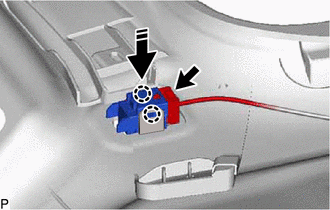
for RH Side with Navigation System:
i.
0,0 0,0
false

|
Install in this Direction |
Engage the 2 claws to install the telephone microphone assembly as shown in the illustration.
ii.
Connect the connector.
b.
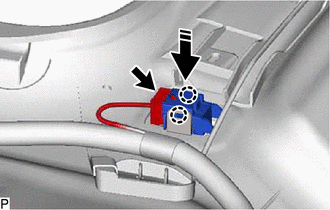
for LH Side:
i.
0,0 0,0
false
|
|
Install in this Direction |
Engage the 2 claws to install the telephone microphone assembly as shown in the illustration.
ii.
Connect the connector.
2.INSTALL ROOF HEADLINING ASSEMBLY (for 10.25 Inch Display)
86730A
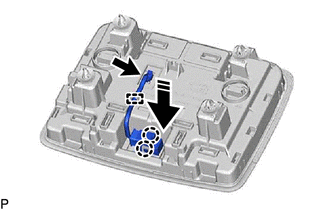
3.INSTALL TELEPHONE MICROPHONE ASSEMBLY (except 10.25 Inch Display)
a.
0,0 0,0
false
|
|
Install in this Direction |
Engage the 2 claws to install the telephone microphone assembly as shown in the illustration.
b.
Engage the clamp.
c.
Connect the connector.
4.INSTALL MAP LIGHT ASSEMBLY (except 10.25 Inch Display)