THEFT DETERRENT / KEYLESS ENTRY SMART ENTRY AND START SYSTEM(for Entry Function (NR Series)) Touching Unlock Sensor for Certain Period of Time does not Unlock All Doors
DESCRIPTION
If the entry unlock function of the driver door cannot be operated by touching and holding the unlock sensor of the driver door, but can be operated through other methods, it can be determined that the request code is being transmitted properly from the driver door. In this case, the certification ECU (smart key ECU assembly) may be malfunctioning.
CAUTION / NOTICE / HINT
- NOTICE:
- ·
When using the GTS with the engine switch off, connect the GTS to the DLC3 and turn a courtesy light switch on and off at intervals of 1.5 seconds or less until communication between the GTS and the vehicle begins. Then select Model Code "KEY REGIST" under manual mode and enter the following menus: Body Electrical / Entry&Start(CAN). While using the GTS, periodically turn a courtesy light switch on and off at intervals of 1.5 seconds or less to maintain communication between the GTS and the vehicle.
·The smart entry and start system (for Entry Function) uses the CAN communication system. Inspect the communication function by following How to Proceed with Troubleshooting. Troubleshoot the smart entry and start system (for Entry Function) after confirming that the communication systems are functioning properly.
·Before replacing the certification ECU (smart key ECU assembly), refer to Service Bulletin.
·After repair, confirm that no DTCs are output by performing "DTC Output Confirmation Operation".
·Check that there are no electrical key transmitter sub-assemblies in the vehicle.
- HINT:
-
Touching the unlock sensor for a certain period of time to unlock all of the doors can only be performed if the customize setting "Door Unlock Mode2" is set to "Driver".
PROCEDURE
Connect the GTS to the DLC3.
Turn the engine switch on (IG).
Turn the GTS on.
Enter the following menus: Customize Setting / Entry & Start.
- Entry & Start
-
Tester Display Description Default Setting ECU Door Unlock Mode2 Function that sets which doors are unlocked by the entry unlock function. All 0:All,1:Driver Certification ECU (Smart key ECU assembly) - 50006 17
- HINT:
-
Touching the unlock sensor for a certain period of time to unlock all of the doors can only be performed if the customize setting "Door Unlock Mode2" is set to "Driver".
- Result:
Result Proceed to The customize setting is set to Driver A The customize setting is set to All B
A
B
Connect the GTS to the DLC3.
Turn the engine switch on (IG).
Turn the GTS on.
Enter the following menus: Customize Setting / Entry & Start.
- Entry & Start
-
Tester Display Description Default Setting ECU Door Unlock Sensor Touch Time Adjust Function that sets the length of time the unlock sensor on the door outside handle assembly (for driver door) must be touched to unlock all of the doors Middle 00:OFF,01:Short,10:Middle,11:Long Certification ECU (Smart key ECU assembly) - 50006 17
- Result:
Result Proceed to The customize setting is set to Short, Middle or Long A The customize setting is set to OFF B
A
B
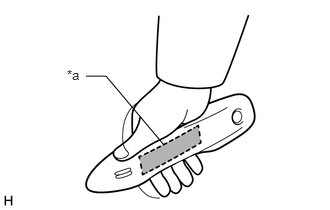
| *a | Unlock Sensor (Backside) |
Turn the engine switch off.
Connect the GTS to the DLC3.
Turn the engine switch on (IG).
Turn the GTS on.
Open and close the driver door.
With the electrical key transmitter sub-assembly outside of the vehicle, press the lock switch of the electrical key transmitter sub-assembly to lock all of the doors.
Hold the electrical key transmitter sub-assembly at the same height as the door outside handle assembly and approximately 0.3 m (0.984 ft.) from the driver door.
Check that the LED of the electrical key transmitter sub-assembly blinks.
Read the Data List according to the display on the GTS.
Touch the unlock sensor on the backside of the front door outside handle assembly (for driver door) for 2 seconds or more.*
*: Perform this step 3 seconds or more after performing step (f).
- HINT:
-
When checking the operation of the unlock sensor again, make sure to perform the procedure from step (a).
- Body Electrical > Entry&Start > Data List
-
Tester Display Measurement Item Range Normal Condition Diagnostic Note D-Door Touch Sensor Driver door touch sensor (unlock sensor) OFF or ON OFF: Driver door touch sensor (unlock sensor) not touched
ON: Driver door touch sensor (unlock sensor) touched·Displays whether the unlock sensor is on or off (even if the sensor is touched and contact is maintained, "ON" is displayed only momentarily).
·Use this Data List item to help determine if there is an unlock sensor malfunction when the entry unlock function does not operate.
- Body Electrical > Entry&Start > Data List
-
Tester Display D-Door Touch Sensor - 50003 125 8
- OK:
The GTS display changes correctly in response to the operation of the front door outside handle assembly (for driver door).
- Result:
Proceed to OK NG
OK
NG