NAVIGATION / MULTI INFO DISPLAY NAVIGATION SYSTEM(w/o RST Switch (except 10.25 Inch Display)) USB Audio System Recognition/Play Error
WIRING DIAGRAM
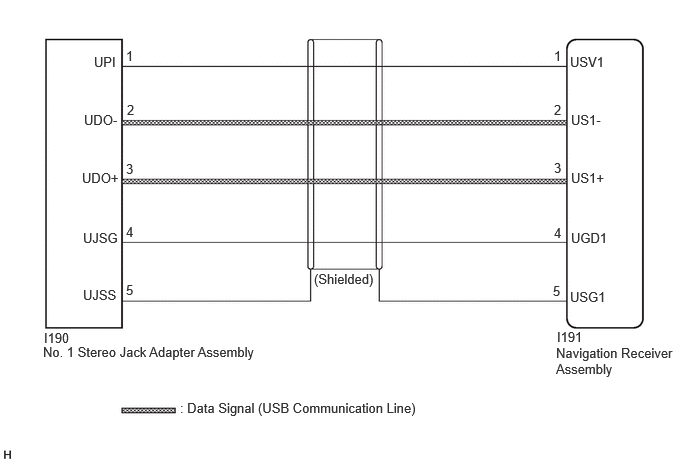
CAUTION / NOTICE / HINT
- NOTICE:
-
Depending on the parts that are replaced during vehicle inspection or maintenance, performing initialization, registration or calibration may be needed.
- HINT:
- ·
When many folders or files exist in the USB storage device, it may take a while to begin playback.
·When using a USB storage device, files that are protected by copyright or encrypted cannot be played
·If a USB hub is being used, remove it.
·When files on the USB storage device are not played in the sorted order, perform the following procedure.
(a)Assign a number to the start of each file name.
(b)Move the files to a folder and copy each folder to the USB storage device.
PROCEDURE
Disconnect the USB storage device or "iPod" from the No.1 stereo jack adapter assembly.
Check that playable files exist in the USB storage device or "iPod".
Check that the USB storage device or "iPod" being used by the customer is a compatible version and format.
- Result:
Result Proceed to The format of the USB storage device is compatible
The version of the "iPod" is compatibleA Playable files do not exist
The format of the USB storage device is not compatible
The version of the "iPod" is not compatibleB
A
B
Disconnect the I191 navigation receiver assembly connector.
Disconnect the I190 No. 1 stereo jack adapter assembly connector.
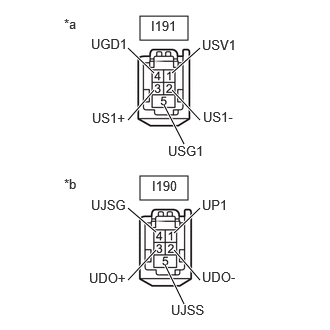
| *a | Front view of wire harness connector
(to Navigation Receiver Assembly) |
| *b | Front view of wire harness connector
(to No. 1 Stereo Jack Adapter Assembly) |
Measure the resistance according to the value(s) in the table below.
- Standard Resistance:
Tester Connection Condition Specified Condition I191-1 (USV1) - I190-1 (UPI) Always Below 1 Ω I191-2 (US1-) - I190-2 (UDO-) Always Below 1 Ω I191-3 (US1+) - I190-3 (UDO+) Always Below 1 Ω I191-4 (UGD1) - I190-4 (UJSG) Always Below 1 Ω I191-5 (USG1) - I190-5 (UJSS) Always Below 1 Ω I191-1 (USV1) or I190-1 (UPI) - Body ground Always 10 kΩ or higher I191-2 (US1-) or I190-2 (UDO-) - Body ground Always 10 kΩ or higher I191-3 (US1+) or I190-3 (UDO+) - Body ground Always 10 kΩ or higher I191-4 (UGD1) or I190-4 (UJSG) - Body ground Always 10 kΩ or higher I191-5 (USG1) or I190-5 (UJSS) - Body ground Always 10 kΩ or higher
- Result:
Proceed to OK NG
OK
NG
Disconnect the I190 No. 1 stereo jack adapter assembly connector.
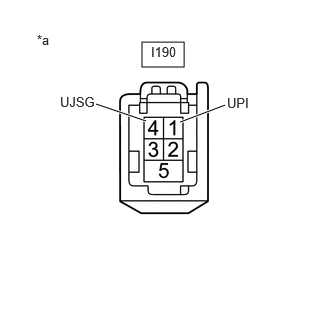
| *a | Front view of wire harness connector
(to No. 1 Stereo Jack Adapter Assembly) |
Measure the voltage according to the value(s) in the table below.
- Standard Voltage:
Tester Connection Condition Specified Condition I190-1 (UPI) - I190-4 (UJSG) Ignition switch ON 4.5 to 5.5 V
- HINT:
-
Measure the voltage with the navigation receiver assembly connectors connected.
- Result:
Proceed to OK NG
OK
NG
Format the USB storage device or initialize the "iPod" to delete the audio files.
- NOTICE:
-
When formatting the USB storage device or initializing the "iPod", all audio files stored in the device will be deleted. Make sure to back up the audio files before performing this procedure.
Restore the data and check if the problem can be reproduced.
- Result:
Result Proceed to Malfunction disappears A Malfunction occurs. B
A
B
Disconnect the USB storage device or "iPod" from the No. 1 stereo jack adapter assembly.
Turn the ignition switch from off to ON
- HINT:
-
If another USB storage device or "iPod" is to be connected, it is necessary to turn the ignition switch off in order for the device to be detected.
Connect a known good USB storage device or "iPod" to the No. 1 stereo jack adapter assembly.
- HINT:
- ·
When a USB storage device is used, replace it with another device and perform the inspection.
·When an "iPod" is used, replace it with another device and perform the inspection.
Perform the operation again and check if the problem symptom recurs.
- Result:
Result Proceed to Malfunction disappears A Malfunction occurs B
A
B
Replace the No. 1 stereo jack adapter assembly with a new or known good one.
Check if the problem symptom recurs.
- Result:
Result Proceed to Malfunction disappears A Malfunction occurs B
A
B