LIGHTING (EXT) LIGHTING SYSTEM(w/o Headlight ECU) OPERATION CHECK
AUTOMATIC LIGHT CONTROL SYSTEM OPERATION CHECK (w/ Automatic Light Control System)
- NOTICE:
-
Make sure that the customize settings are set to default when performing the automatic light control system operation check.
Turn the ignition switch to ON.
Turn the light control switch to the AUTO position.
Cover the automatic light control sensor.
Check that the taillights and low beam headlights come on.
Uncover the automatic light control sensor.
Check that the low beam headlights and taillights turn off.
LIGHT AUTO TURN-OFF SYSTEM OPERATION CHECK (except Driver Door-linked Auto Light Turn-off System)
When the light control switch is in the tail or head position
Turn the ignition switch to ON.
Turn the low beam headlights or high beam headlights on.
Turn the ignition switch off.
Check that the low beam headlights and high beam headlights turn off immediately.
- HINT:
-
The taillights and rear fog light* remain on.
-
*: w/ Rear Fog Light
When the light control switch is in the AUTO position
Turn the ignition switch to ON.
Turn the taillights, low beam headlights, high beam headlights, front fog light*1 or rear fog light*2 on.
*1: w/ Front Fog Light
*2: w/ Rear Fog Light
Turn the ignition switch off.
Check that all of the lights turn off immediately.
LIGHT AUTO TURN-OFF SYSTEM OPERATION CHECK (for Driver Door-linked Auto Light Turn-off System)
Close all of the doors.
Turn the ignition switch to ON.
Turn the taillights, low beam headlights, high beam headlights, front fog light*1 and rear fog lights*2 on.
*1: w/ Front Fog Light
*2: w/ Rear Fog Light
Turn the ignition switch off.
Open the driver door.
Check that all of the lights turn off immediately.
LIGHT AUTO TURN-OFF SYSTEM OPERATION CHECK (w/ Delay Function)
- NOTICE:
-
Make sure that the customize settings are set to default when performing the light auto turn-off system operation check.
When the taillights are on (low beam headlights are not on)
Close all of the doors.
Turn the ignition switch to ON.
Turn the taillights on.
Turn the ignition switch off.
Open the driver door.
Check that all of the lights turn off immediately.
When the low beam headlights are on
Close all of the doors.
Turn the ignition switch to ON.
Turn the low beam headlights on.
Turn the ignition switch off.
Open any of the doors.
Close the door.
Check that all of the lights turn off after 30 seconds (delay function).
- HINT:
-
Before the lights turn off, if the lock button on the key is pushed after all of the doors are locked, all of the lights will turn off immediately.
DAYTIME RUNNING LIGHT SYSTEM OPERATION CHECK
- NOTICE:
-
Make sure that the customize settings are set to default when performing the daytime running light system operation check.
*1: w/ Light Control Switch OFF Position
*2: w/ Automatic Light Control System
Start the engine.
Turn the light control switch to the OFF*1, TAIL or AUTO*2 position (with the low beam headlights not turned on via the automatic light control system).
Release the parking brake.
Check that the daytime running lights come on.
EXTENDED HEADLIGHT LIGHTING OPERATION CHECK (w/ Extended Headlight Lighting)
Turn the ignition switch off.
Turn the light control switch to the AUTO position.
Pull the light control switch to flash the headlights once.
Check that the low beam headlights come on for approximately 30 seconds.
AUTOMATIC HIGH BEAM SYSTEM OPERATION CHECK
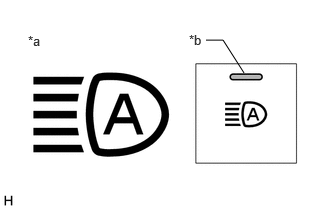
| *a | Automatic High Beam Indicator on Combination Meter Assembly |
| *b | Auto High Beam Switch Indicator |
Check the operation of the automatic high beam indicator.
*: w/ Automatic Light Control System
Turn the ignition switch to ON.
Turn the light control switch to the AUTO* or HEAD position.
Move the dimmer switch to the high position.
Press the auto high beam switch (indicator illuminates).
- HINT:
-
If the auto high beam switch is turned on when the light control switch is not in the AUTO* or HEAD position, or the dimmer switch is not in the high position, "To Activate Automatic High Beam, Switch Headlights to High Beam" will be displayed on the multi-information display.
Check that the automatic high beam indicator illuminates.
- NOTICE:
-
When the forward recognition camera cannot correctly detect objects due to inclement weather such as thick fog or other visual obstructions, the automatic high beam indicator may not turn on and consequently the automatic high beam system may not operate.
Check the operation of the automatic high beam function.
At night, when driving the vehicle with the automatic high beam system in standby mode, check that the high beams automatically turn on after a short delay when all of the following conditions are met:
The vehicle speed is more than approximately 40 km/h (25 mph). (for Europe)
The vehicle speed is more than approximately 30 km/h (19 mph). (except Europe)
The area in front of the vehicle is dark.
There are no oncoming vehicles with headlights on.
There are no preceding vehicles with taillights on.
There are few streetlights along the street ahead.
- NOTICE:
-
The low beams may not change to high beams due to illumination from city lighting, traffic lights or billboards, or due to reflective surfaces, such as signs or signboards.
At night, when driving the vehicle with the high beams turned on by the automatic high beam system, check that the automatic high beam system turns off the high beams and returns to standby mode when any of the following conditions are met:
The vehicle speed is less than approximately 30 km/h (19 mph). (for Europe)
The vehicle speed is less than approximately 25 km/h (16 mph). (except Europe)
The level of ambient light is higher than a specified threshold.
There are oncoming vehicles with headlights on.
There are preceding vehicles with taillights on.
Light from streetlights ahead is higher than a specified threshold.
- NOTICE:
- ·
Under the following conditions, the high beams may change to the low beams.
(a)There is interference from other illumination, such as city lighting, traffic lights or billboards, or reflective surfaces, such as signs or signboards
(b)There is interference from the fog lights of an oncoming vehicle
·Under the following conditions, the high beams may not change to the low beams.
(a)Passing an oncoming vehicle on a curve
(b)Preceding or oncoming vehicle appears and disappears on a continuous curve
(c)Preceding or oncoming vehicle appears and disappears due to the median, roadside trees or other obstacle
(d)Another vehicle cuts in front of the vehicle
When any of the following conditions are met, the automatic high beam system is canceled, and the automatic high beam indicator in the combination meter assembly turns off.
The ignition switch is turned off.
The light control switch is in a position other than AUTO* or HEAD.
The low beam headlights are turned off.
The dimmer switch is set to the low beam position.
The auto high beam switch is turned off.
*: w/ Automatic Light Control System
The automatic high beam system may not operate correctly under the following conditions.
| Cause | Details |
|---|---|
| Weather/Climate | ·
Inclement weather such as heavy rain, fog or snow. ·
The temperature inside the vehicle is high. ·
The taillights of a proceeding vehicle are obscured by snow, etc. |
| Front windshield | Refer to Front Camera System.
(  201902,999999,_51,_078884,_0383149,RM100000001G9I3,) 201902,999999,_51,_078884,_0383149,RM100000001G9I3,)
|
| Forward recognition camera | Refer to Front Camera System.
( 201902,999999,_51,_078884,_0383149,RM100000001G9I3,)
|
| Nearby vehicles or lights | ·
There are lights that resemble headlights or taillights in the surrounding area. ·
The headlights of an oncoming vehicle or taillights of a preceding vehicle are not illuminated. ·
The headlights of an oncoming vehicle or taillights of a preceding vehicle are dirty or discolored. ·
An oncoming or preceding vehicle has only one of its headlights or taillights on or is a motorcycle. ·
The headlights of an oncoming vehicle are misaligned. ·
The rear of a preceding vehicle is highly reflective or has a highly reflective object attached. ·
A bicycle or similar lightweight vehicle is detected. ·
There is a sudden change in brightness. |
| Road conditions | ·
Driving on an undulating road. ·
Driving on a road with many curves or a sharp curve. ·
Driving on a road with a poor surface such as an unpaved road. ·
There is a strong reflection from a sign or mirror in front of the vehicle. |
| Own vehicle | ·
The headlights are malfunctioning. ·
The attitude of the vehicle is abnormal such as when the vehicle is fully loaded with passengers and luggage, has a flat tire, or is towing a trailer. ·
The vehicle is affected by a cross wind. |