LIGHTING (EXT) LIGHTING SYSTEM(w/o Headlight ECU) CUSTOMIZE PARAMETERS
CUSTOMIZE LIGHTING SYSTEM (EXT)
- NOTICE:
- ·
When the customer requests a change in a function, first make sure that the function can be customized.
·Be sure to make a note of the current settings before customizing.
·When troubleshooting a function, first make sure that the function is set to the default setting.
- HINT:
-
The following items can be customized.
Customizing with the GTS
Connect the GTS to the DLC3.
Turn the ignition switch to ON.
Turn the GTS on.
Enter the following menus: Customize Setting / Light Control or Warning.
Select the setting by referring to the table below.
- Light Control
-
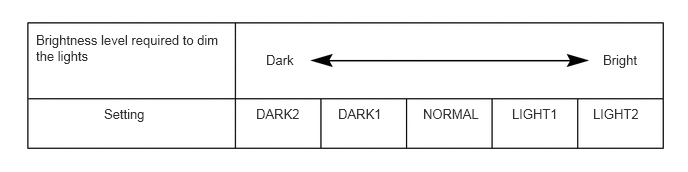
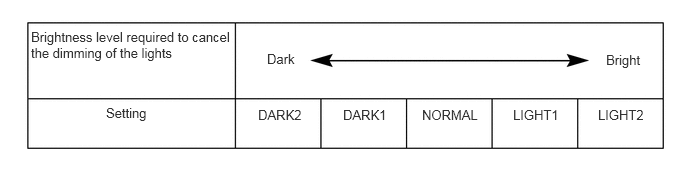
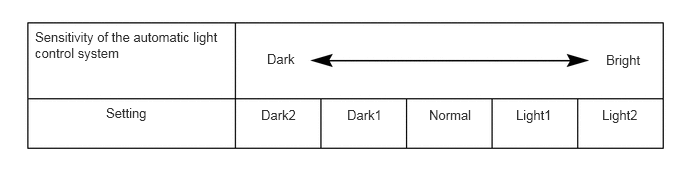
Tester Display Description Default Setting ECU Response Time Changes the delay timing of lighting the taillights when going into a tunnel when the light control switch is in the AUTO position.*1 Normal 0:Normal,1:Long Main Body ECU (Multiplex Network Body ECU) Disp Ex ON Sen Changes the ambient brightness level required to dim the lights such as the indicator lights of the combination meter, A/C indicator light and clock.*2,*A NORMAL 000:NORMAL,001:DARK2,010:DARK1,011:LIGHT1,100:LIGHT2 Main Body ECU (Multiplex Network Body ECU) Disp Ex OFF Sen Changes the ambient brightness level required to cancel the dimming of the lights such as the indicator lights of the combination meter, A/C indicator light and clock.*2,*B NORMAL 000:NORMAL,001:DARK2,010:DARK1,011:LIGHT1,100:LIGHT2 Main Body ECU (Multiplex Network Body ECU) Light Auto OFF Delay Keeps the headlights on for a certain period of time after turning the ignition switch off and closing all of doors with the low beam headlights on.*3 30 s 00:OFF,01:30 s,10:60 s,11:90 s Main Body ECU (Multiplex Network Body ECU) Sensitivity Adjusts the sensitivity of the automatic light control system.*2,*C Normal 000:Normal,001:Dark2,010:Dark1,011:Light1,100:Light2 Main Body ECU (Multiplex Network Body ECU) Extended Headlight Lighting Sets the headlight lighting time after the ignition switch is turned off.*4 30 s 00:30 s,01:60 s,10:90 s,11:120 s Main Body ECU (Multiplex Network Body ECU) Tail Remind Buzzer Function Sounds a buzzer when the driver door is opened with the light control switch in the TAIL or HEAD position. ON 0:OFF,1:ON Main Body ECU (Multiplex Network Body ECU) Auto Light Off Timing Setting Sets the timing to turn off the taillights when the light control switch is in the TAIL or HEAD position.*5 Door Open 0:IG OFF,1:Door Open Main Body ECU (Multiplex Network Body ECU) - 50006 8
*1: w/ Light Control Switch OFF Position
*2: w/ Automatic Light Control System
*3: w/ Delay Function
*4: w/ Extended Headlight Lighting
*5: for vehicles with customize setting "Auto Light Off Timing Setting"
- HINT:
-
The sensitivity adjustment may be difficult to confirm. Check by driving the vehicle.
*A
*B
*C
- Warning
-
Tester Display Description Default Setting ECU Lane Change Flashing Times Adjust Function to change the lane change flashing times. 3 $00:OFF,$01:3,$02:4,$03:5,$04:6,$05:7 Combination Meter Assembly - 50006 7
Customizing with the multi-display
Turn the ignition switch to ON.
Enter the following menus: MENU / Setup / Vehicle / Vehicle Customization / Lights Settings.
Select the setting by referring to the table below.
| Display | Default | Content | Setting | Relevant ECU |
|---|---|---|---|---|
| Headlights Auto-on Sensitivity*1 | 0 | Adjusts the sensitivity of the automatic light control system.*A | -2, -1, 0, +1 or +2 | Main Body ECU (Multiplex Network Body ECU) |
| Headlights Auto-off Timer*2 | 30 sec. | Keeps the headlights on for a certain period of time after turning the ignition switch off and closing all of doors with the low beam headlights on. | Off, 30 sec., 60 sec. or 90 sec. | Main Body ECU (Multiplex Network Body ECU) |
*1: w/ Automatic Light Control System
*2: w/ Delay Function
- HINT:
-
The sensitivity adjustment may be difficult to confirm. Check by driving the vehicle.
*A