BRAKE CONTROL / DYNAMIC CONTROL SYSTEMS ELECTRONICALLY CONTROLLED BRAKE SYSTEM(w/ VSC OFF Switch) UTILITY
DESCRIPTION
Refer to the table below and then perform the necessary operation according to the part to be replaced in order to perform calibration.
| Parts to be Replaced / Operation | Necessary Operation |
|---|---|
| Skid control ECU (brake actuator assembly) | Perform acceleration sensor zero point calibration and store system information. |
| Yaw rate and acceleration sensor (airbag ECU assembly) | 1.
Perform "Reset Memory". 2.
Perform acceleration sensor zero point calibration and store system information memorization. |
| Wheel alignment adjustment | 1.
Perform "Reset Memory". 2.
Perform acceleration sensor zero point calibration and store system information memorization. |
UTILITY ITEMS
| Utility Items | Main Purpose | Link |
|---|---|---|
| All Readiness | Confirm if DTC judgment has been completed. | Refer to utility |
| Calibration | Enter Dealer Mode (Calibration) and perform acceleration sensor zero point calibration and store system information memorization. | Refer to utility |
| Inspection Mode | Enter Inspection Mode which prohibits operation of VSC and TRC. | Refer to utility |
| Signal Check | Enter Dealer Mode (Signal Check) and perform a signal inspection of the electronically controlled brake system. | ( 201902,201906,_54,_078667,_0385049,RM100000001GK1O,201906,999999,_54,_078667,_0385049,RM100000001IQ9G,) 201902,201906,_54,_078667,_0385049,RM100000001GK1O,201906,999999,_54,_078667,_0385049,RM100000001IQ9G,)
|
| Vehicle Control History (RoB) | View vehicle control history. | (201902,999999,_54,_078667,_0385049,RM100000001GK1Y,)
|
| Reset Memory | Clear acceleration sensor zero point calibration data and system information. | Refer to utility |
ACCELERATION SENSOR ZERO POINT CALIBRATION AND STORE SYSTEM INFORMATION MEMORIZATION
- NOTICE:
- ·
After replacing the skid control ECU (brake actuator assembly), perform acceleration sensor zero point calibration and store system information memorization.
·After replacing or reinstalling the yaw rate and acceleration sensor (airbag ECU assembly), perform acceleration sensor zero point calibration and store system information memorization after performing "Reset Memory".
·As the acceleration sensor zero point cannot be stored again until the current zero point is cleared, perform "Reset Memory" and acceleration sensor zero point calibration and store system information memorization after replacing or removing and installing the yaw rate and acceleration sensor (airbag ECU assembly).
·While obtaining the zero point, keep the vehicle stationary and do not vibrate, tilt, move, or shake it.
·Be sure to perform this procedure on a level surface (with an inclination of less than 0.45 degrees).
·While obtaining the zero point, make sure the tire pressure is as specified and the vehicle is in full contact with the ground (not lifted up or loaded).
- HINT:
-
w/ Pre-collision System:
-
When entering Dealer Mode (Calibration), the skid control ECU (brake actuator assembly) communicates with the forward recognition camera to judge whether the vehicle is equipped with the pre-collision system. Therefore, do not exit Dealer Mode (Calibration) within 5 seconds of entering Dealer Mode (Calibration).
Clear the zero point calibration data and system information.
Turn the ignition switch off.
Apply the parking brake.
except Manual Transmission:
Check that the shift lever is in P.
for Manual Transmission:
Check that the shift lever is in neutral.
Connect the GTS to the DLC3.
Turn the ignition switch to ON.
Turn the GTS on.
Select the skid control ECU (brake actuator assembly) to clear the zero point calibration data using the GTS. Enter the following menus: Chassis / Brake / Utility / Reset Memory.
- Chassis > Brake > Utility
-
Tester Display Reset Memory - 50005 435 4560
Using the GTS, perform "Reset Memory".
- NOTICE:
-
After perform "Reset Memory", the ABS warning light, brake warning light and slip indicator light illuminate. If the vehicle is driven with the memory cleared, DTCs C124A00 and C051D54 will be stored.
Perform acceleration sensor zero point calibration and store system information memorization.
- HINT:
- ·
Acceleration sensor zero point calibration and store system information memorization are automatically performed immediately after Dealer Mode (Calibration) is entered.
·If store system information memorization has not yet been performed, the slip indicator light will remain on and DTC C124A00 will be stored.
·If acceleration sensor zero point calibration is not successful, the slip indicator light will remain on and DTC C051D54 will be stored.
Turn the ignition switch off.
Apply the parking brake.
except Manual Transmission:
Check that the shift lever is in P.
for Manual Transmission:
Check that the shift lever is in neutral.
Connect the GTS to the DLC3.
Turn the ignition switch to ON.
Check that the steering wheel is centered.
Turn the GTS on.
Switch the skid control ECU (brake actuator assembly) to calibration using the GTS. Enter the following menus: Chassis / Brake / Utility / Calibration.
- Chassis > Brake > Utility
-
Tester Display Calibration - 50005 435 5554
Using the GTS, perform "Calibration" and enter Dealer Mode (Calibration).
Confirm that the ABS warning light and slip indicator light indicate the Dealer Mode pattern (blinking at 0.25-second intervals).
- HINT:
- ·
After "Calibration" has successfully completed, the ABS warning light and slip indicator light indicate the Dealer Mode pattern (blinking at 0.25-second intervals).
·The slip indicator light may illuminate for approximately 7 seconds before learning successfully completes.
·w/ Pre-collision System:
Do not exit Dealer Mode (Calibration) within 5 seconds of entering Dealer Mode (Calibration). If Dealer Mode (Calibration) is exited within 5 seconds of entering Dealer Mode (Calibration), DTC U023A87 may be stored. If DTC U023A87 is output after exiting Dealer Mode (Calibration), enter Dealer Mode (Calibration) again, wait at least 5 seconds, then recheck for DTCs.
Turn the ignition switch off.
Disconnect the GTS.
ALL READINESS
- HINT:
- ·
With "All Readiness", you can check whether or not the DTC judgment has been completed by using the GTS.
·You should check "All Readiness" after simulating malfunction symptoms or for validation after finishing repairs.
Turn the ignition switch off.
Connect the GTS to the DLC3.
Turn the ignition switch to ON.
Turn the GTS on.
Clear the DTCs even if no DTCs are stored. Enter the following menus: Chassis / Brake / Trouble Codes.
- Chassis > Brake > Clear DTCs
- 50002 435
Press the DTC clear button.
Turn the ignition switch off.
Start the engine.
Perform the DTC judgment driving pattern to run the DTC judgment.
Enter the following menus: Chassis / Brake / Utility / All Readiness.
- Chassis > Brake > Utility
-
Tester Display All Readiness - 50005 435 1020
Input the DTC to be confirmed.
Check the DTC judgment result.
| GTS Display | Description |
|---|---|
| Normal | ·
DTC judgment completed ·
System normal |
| Abnormal | ·
DTC judgment completed ·
System abnormal |
| Incomplete | ·
DTC judgment not completed ·
Perform the driving pattern |
| N/A | ·
Unable to perform DTC judgment ·
Number of DTCs which do not fulfill DTC preconditions has reached ECU memory limit ·
Perform the driving pattern |
If the judgment result shows Incomplete or N/A, perform the DTC confirmation driving pattern again.
INSPECTION MODE (WHEN USING THE GTS)
When testing with a 2-wheel drum tester such as speedometer tester, combination tester for the speedometer and brakes, or chassis dynamometer, or when jacking up the front wheels and turning the wheels, perform the following procedure to enter Inspection Mode and disable the TRC, AUTO LSD and VSC systems.
- CAUTION:
- ·
Do not use the drum tester with any of the lock chains disconnected.
·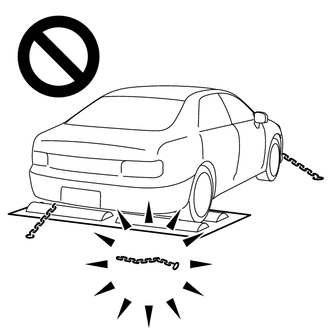
Using the drum tester with a lock chain disconnected could cause the vehicle to begin moving unexpectedly.
·Do not use the drum tester while the TRC, AUTO LSD or VSC is able to operate.
·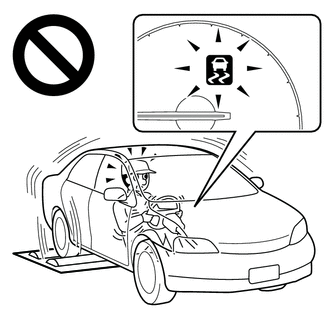
TRC, AUTO LSD or VSC operation could cause the vehicle to begin moving unexpectedly.
- HINT:
-
When the system is in Inspection Mode, TRC, AUTO LSD and VSC are disabled.
Activating Inspection Mode
- NOTICE:
- ·
Inspection Mode will be canceled when the ignition switch is turned off. Make sure to enter Inspection Mode again if the inspection is continued after the ignition switch is turned off.
·Never drive the vehicle while in Inspection Mode.
Turn the ignition switch off.
Connect the GTS to the DLC3.
Turn the ignition switch to ON.
Turn the GTS on.
Enter the following menus: Chassis / Brake / Utility / Inspection Mode.
- Chassis > Brake > Utility
-
Tester Display Inspection Mode - 50005 435 5555
for Multi-information Display Type:
Check that the VSC OFF indicator light comes on and "TRC OFF message" is displayed on the multi-information display (Confirm that the system has entered Inspection Mode).
except Multi-information Display Type:
Check that the TRC OFF indicator light and VSC OFF indicator light come on (Confirm that the system has entered Inspection Mode).
End of Inspection Mode.
Turning the ignition switch off ends Inspection Mode.
- NOTICE:
-
If the ignition switch is turned to ON within 60 seconds of being turned off, the system will reenter Inspection Mode.
for Multi-information Display Type:
Confirm that the VSC OFF indicator light turns off and the "TRC OFF message" on the multi-information display is cleared (Confirm that Inspection Mode is canceled).
except Multi-information Display Type:
Confirm that the TRC OFF indicator light and VSC OFF indicator light turn off (Confirm that Inspection Mode is canceled).
INSPECTION MODE (WHEN NOT USING THE GTS)
When testing with a 2-wheel drum tester such as speedometer tester, combination tester for the speedometer and brakes, or chassis dynamometer, or when jacking up the front wheels and turning the wheels, perform the following procedure to enter Inspection Mode and disable the TRC, AUTO LSD and VSC systems.
- CAUTION:
- ·
Do not use the drum tester with any of the lock chains disconnected.
·
Using the drum tester with a lock chain disconnected could cause the vehicle to begin moving unexpectedly.
·Do not use the drum tester while the TRC, AUTO LSD or VSC is able to operate.
·
TRC, AUTO LSD or VSC operation could cause the vehicle to begin moving unexpectedly.
- HINT:
-
When the system is in Inspection Mode, TRC, AUTO LSD and VSC are disabled.
Activating Inspection Mode
- NOTICE:
- ·
Inspection Mode will be canceled when the ignition switch is turned off. Make sure to enter Inspection Mode again if the inspection is continued after the ignition switch is turned off.
·Never drive the vehicle while in Inspection Mode.
Perform steps "D" to "H" within 30 seconds.
Ensure that the ignition switch is off and the engine is stopped (Step "A").
Apply the parking brake (Step "B").
except Manual Transmission:
Make sure that the shift lever is in P (Step "C").
for Manual Transmission:
Make sure that the shift lever is in neutral (Step "C").
Start the engine (Step "D").
Depress and release the brake pedal twice (Step "E").
While holding the brake pedal down, release and apply the parking brake twice (Step "F").
With the parking brake applied, depress and release the brake pedal twice (Step "G").
for Multi-information Display Type:
Check that the VSC OFF indicator light comes on and "TRC OFF message" is displayed on the multi-information display (Step "H").
- HINT:
-
If the VSC OFF indicator light does not come on and "TRC OFF message" is not displayed on the multi-information display in step "H", repeat steps "A" to "H".
except Multi-information Display Type:
Check that the TRC OFF indicator light and VSC OFF indicator light come on (Step "H").
- HINT:
-
If the TRC OFF indicator light and VSC OFF indicator light do not come on in step "H", repeat steps "A" to "H".
End of Inspection Mode.
Turning the ignition switch off ends Inspection Mode.
- NOTICE:
-
If the ignition switch is turned to ON within 60 seconds of being turned off, the system will reenter Inspection Mode.
for Multi-information Display Type:
Confirm that the VSC OFF indicator light turns off and the "TRC OFF message" on the multi-information display is cleared (Confirm that Inspection Mode is canceled).
except Multi-information Display Type:
Confirm that the TRC OFF indicator light and VSC OFF indicator light turn off (Confirm that Inspection Mode is canceled).