7GR-FKS ENGINE CONTROL SFI SYSTEM P008B00 Low Pressure Fuel System Pressure - Too High
DESCRIPTION
Refer to DTC P008A00.
| DTC No. | Detection Item | DTC Detection Condition | Trouble Area | MIL | Memory | Note |
|---|---|---|---|---|---|---|
| P008B00 | Low Pressure Fuel System Pressure - Too High | Actual fuel pressure (for low pressure side) value higher than target fuel pressure (for low pressure side) by threshold or more (1 trip detection logic). | ·
Fuel pump control ECU ·
Fuel pressure sensor (for low pressure side) ·
ECM |
Does not come on | DTC stored | SAE Code: P008B |
MONITOR DESCRIPTION
If the fuel pressure (for low pressure side) increases despite a decrease request signal being sent to the fuel pump control ECU by the ECM, the ECM will store this DTC.
MONITOR STRATEGY
| Frequency of Operation | Continuous |
CONFIRMATION DRIVING PATTERN
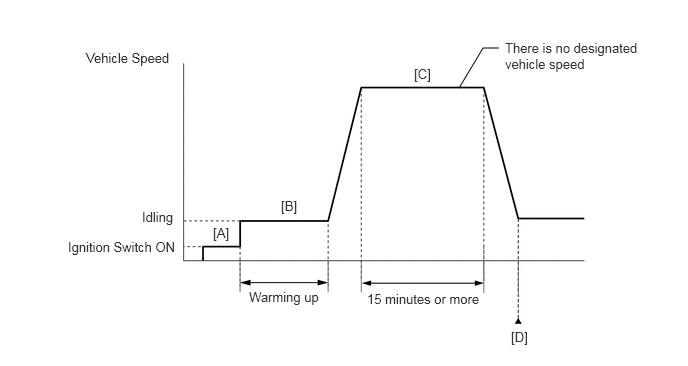
Connect the GTS to the DLC3.
Turn the ignition switch to ON.
Turn the GTS on.
Clear the DTCs (even if no DTCs are stored, perform the clear DTC procedure).
Turn the ignition switch off and wait for at least 30 seconds.
Turn the ignition switch to ON [A].
Turn the GTS on.
Start the engine and warm it up until the engine coolant temperature reaches 75°C (167°F) or higher [B].
Drive the vehicle for 15 minutes or more [C].
- CAUTION:
-
When performing the confirmation driving pattern, obey all speed limits and traffic laws.
Enter the following menus: Powertrain / Engine / Trouble Codes [D].
Read the pending DTCs.
- HINT:
- ·
If a pending DTC is output, the system is malfunctioning.
·If a pending DTC is not output, perform the following procedure.
Enter the following menus: Powertrain / Engine / Utility / All Readiness.
Input the DTC: P008B00.
Check the DTC judgment result.
| GTS Display | Description |
|---|---|
| NORMAL | ·
DTC judgment completed ·
System normal |
| ABNORMAL | ·
DTC judgment completed ·
System abnormal |
| INCOMPLETE | ·
DTC judgment not completed ·
Perform driving pattern after confirming DTC enabling conditions |
- HINT:
- ·
If the judgment result is NORMAL, the system is normal.
·If the judgment result is ABNORMAL, the system has a malfunction.
·If the judgment result is INCOMPLETE, perform steps [B] through [D] again.
CAUTION / NOTICE / HINT
- HINT:
-
Read Freeze Frame Data using the GTS. The ECM records vehicle and driving condition information as Freeze Frame Data the moment a DTC is stored. When troubleshooting, Freeze Frame Data can help determine if the vehicle was moving or stationary, if the engine was warmed up or not, if the air fuel ratio was lean or rich, and other data from the time the malfunction occurred.
PROCEDURE
Connect the GTS to the DLC3.
Turn the ignition switch to ON.
Turn the GTS on.
Enter the following menus: Powertrain / Engine / Trouble Codes.
Read the DTCs.
- Powertrain > Engine > Trouble Codes
- 50001 372
- Result:
Result Proceed to DTC P008B00 is output A DTC P008B00 and other DTCs are output B
- HINT:
-
If any DTCs other than P008B00 are output, troubleshoot those DTCs first.
A
B
Connect the GTS to the DLC3.
Turn the ignition switch to ON.
Turn the GTS on.
Start the engine.
Enter the following menus: Powertrain / Engine / Data List / Fuel Pressure (Low) / Fuel Pressure 2.
- Powertrain > Engine > Data List
-
Tester Display Fuel Pressure (Low) / Fuel Pressure 2 - 50003 372 267
Record the Fuel Pressure (Low) / Fuel Pressure 2 value.
Turn the ignition switch off.
Discharge the fuel pressure.
- HINT:
-
DTCs may be stored during this inspection. Check for DTCs and clear them using the GTS.
Remove the EFI-MAIN NO. 2 fuse from the No. 1 engine room relay block and junction block assembly.
Start the engine.
After the engine has stopped on its own, turn the ignition switch off.
- HINT:
-
If the engine does not stop naturally, perform direct injection by racing the engine to reduce the fuel pressure [Fuel Pressure (High)] and stop the engine.
Crank the engine again and make sure that the engine does not start.
Install the EFI-MAIN NO. 2 fuse.
Turn the ignition switch to ON.
Turn the GTS on.
Enter the following menus: Powertrain / Engine / Data List / Fuel Pressure (Low) / Fuel Pressure 2.
- Powertrain > Engine > Data List
-
Tester Display Fuel Pressure (Low) / Fuel Pressure 2 - 50003 372 267
Compare the Fuel Pressure (Low) / Fuel Pressure 2 value recorded with the engine running to the Fuel Pressure (Low) / Fuel Pressure 2 value currently shown on the GTS.
- Result:
Result Proceed to Fuel Pressure (Low) / Fuel Pressure 2 value drops A Fuel Pressure (Low) / Fuel Pressure 2 value is maintained B
- HINT:
-
Perform "Inspection After Repair" after replacing the fuel pressure sensor (for low pressure side).
A
B
Install the fuel pressure gauge (for low pressure line of low pressure side).
Connect the GTS to the DLC3.
Turn the ignition switch to ON.
Turn the GTS on.
Enter the following menus: Powertrain / Engine / Active Test / Control the Fuel Pump Duty Ratio / Data List / Fuel Pressure (Low) / Fuel Pressure 2.
- Powertrain > Engine > Active Test
-
Active Test Display Control the Fuel Pump Duty Ratio -
Data List Display Fuel Pressure (Low) / Fuel Pressure 2 - 50004 372 39 267
Compare the values in the Data List using the GTS and the fuel pressure gauge when the Active Test was performed.
- Standard:
GTS Operation Standard Low Data List value and fuel pressure gauge are within +/-50 kPa of each other High
- HINT:
-
Perform "Inspection After Repair" after replacing the fuel pressure sensor (for low pressure side).
- Result:
Proceed to OK NG
OK
NG
Install the fuel pressure gauge (for low pressure line of low pressure side).
Connect the GTS to the DLC3.
Turn the ignition switch to ON.
Turn the GTS on.
Enter the following menus: Powertrain / Engine / Active Test / Control the Fuel Pump Duty Ratio / Data List / Fuel Pressure (Low) / Fuel Pressure 2.
- Powertrain > Engine > Active Test
-
Active Test Display Control the Fuel Pump Duty Ratio -
Data List Display Fuel Pressure (Low) / Fuel Pressure 2 - 50004 372 39 267
Read the values on the Data List and the fuel pressure gauge when the Active Test was performed.
- Result:
GTS Operation Fuel Pressure (Low) / Fuel Pressure 2 Fuel pressure gauge Proceed to Low Below 600 kPag Below 600 kPa (6.1 kgf/cm2, 87 psi) A 600 kPag or higher 600 kPa (6.1 kgf/cm2, 87 psi) or higher B
A
B
Connect the GTS to the DLC3.
Turn the ignition switch to ON.
Turn the GTS on.
Clear the DTC.
- Powertrain > Engine > Clear DTCs
- 50002 372
Turn the ignition switch off and wait for at least 30 seconds.
- Result:
Proceed to NEXT
NEXT
Drive the vehicle in accordance with the driving pattern described in Confirmation Driving Pattern.
Enter the following menus: Powertrain / Engine / Utility / All Readiness.
- Powertrain > Engine > Utility
-
Tester Display All Readiness - 50005 372 20
Input the DTC: P008B00.
Check the DTC judgment result.
- Result:
Result Proceed to NORMAL
(DTCs are not output)A ABNORMAL
(DTC P008B00 is output)B
A
B