PARK ASSIST / MONITORING PARKING ASSIST MONITOR SYSTEM DIAGNOSIS SYSTEM
PARKING ASSIST MONITOR SYSTEM DIAGNOSTIC MODE
In diagnostic mode for the parking assist monitor system, signals received by the multi-display assembly can be checked and the parking assist monitor system can be calibrated, adjusted and checked using the multi-display assembly.
- NOTICE:
-
Depending on the parts that are replaced or operations that are performed during vehicle inspection or maintenance, calibration of other systems as well as the parking assist monitor system may be needed.
- HINT:
-
The displayed items may differ depending on vehicle specifications.
DIAGNOSIS SCREEN TRANSITION (DURING PARKING ASSIST MONITOR SYSTEM INITIALIZATION)
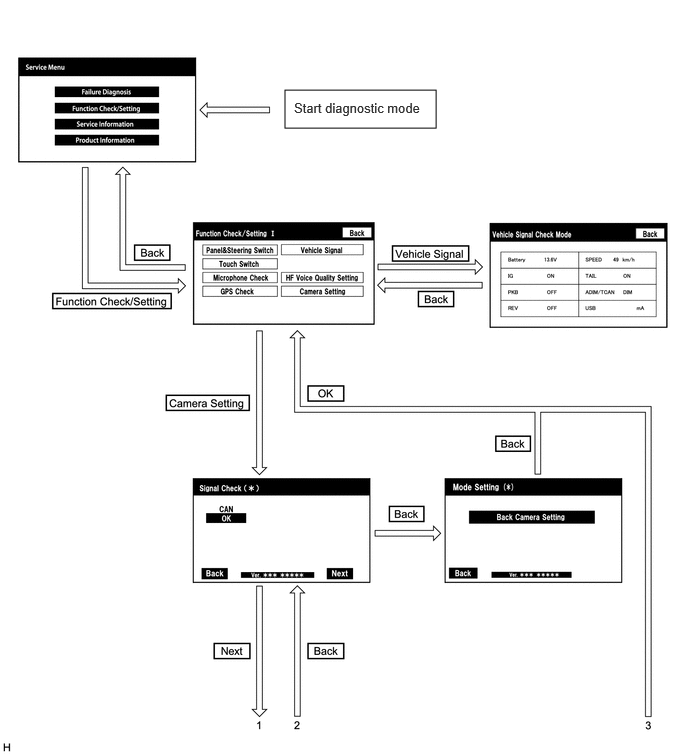
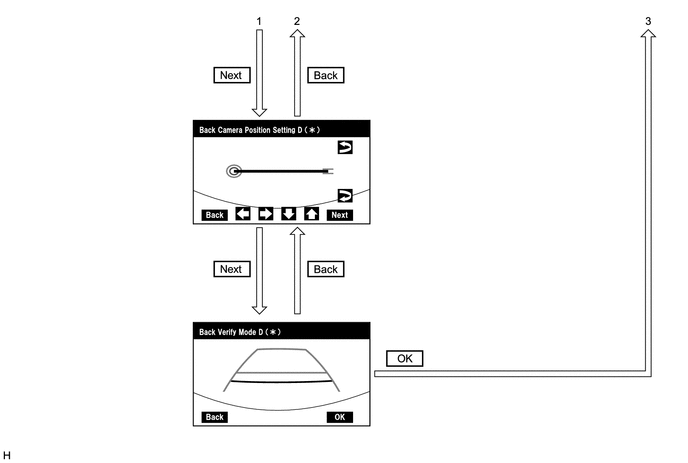
DIAGNOSIS SCREEN TRANSITION (AFTER PARKING ASSIST MONITOR SYSTEM INITIALIZATION)
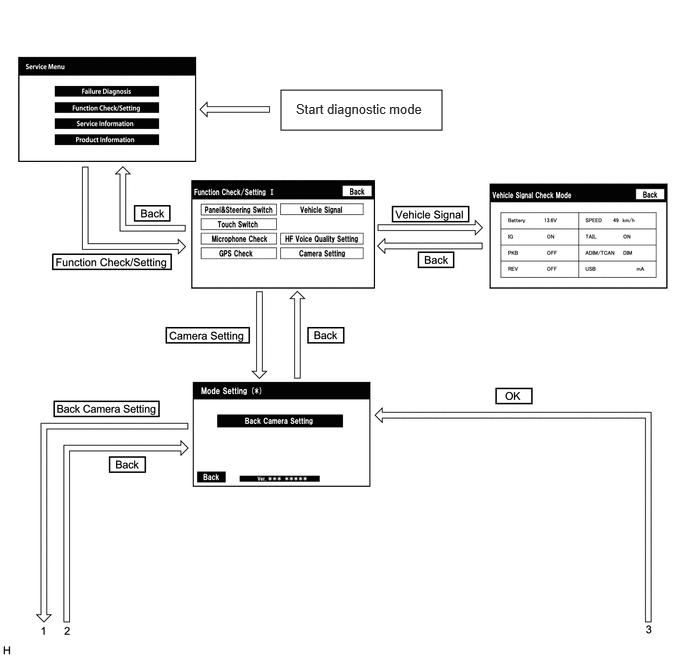
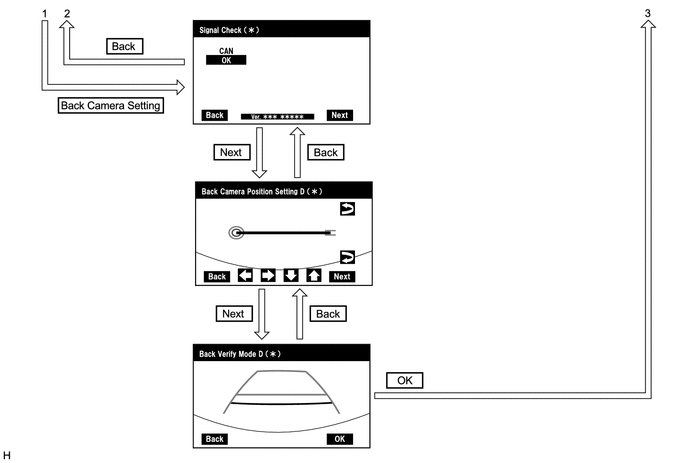
VEHICLE SIGNAL CHECK
- HINT:
-
Illustrations may differ from the actual vehicle screen depending on the device settings and options. Therefore, some detailed areas may not be shown exactly the same as on the actual vehicle screen.
Start diagnostic mode.
for TFTM Made: Click hereAudio / Visual / Telematics>NAVIGATION / MULTI INFO DISPLAY>NAVIGATION SYSTEM (Production Date from 2023/04)>DIAGNOSIS SYSTEM202201,999999,_56,_111967,_0588532,RM1000000029ZSR,
for GTMC Made: Click hereAudio / Visual / Telematics>AUDIO / VIDEO>AUDIO AND VISUAL SYSTEM (Production Date from 2023/04)>DIAGNOSIS SYSTEM202405,999999,_56,_111966,_0589552,RM100000002MH8J,
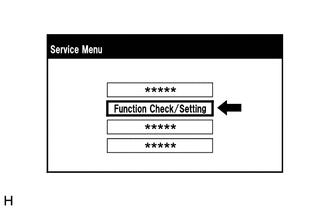
Select "Function Check/Setting" on the "Service Menu" screen to display the "Function Check/Setting I" screen.
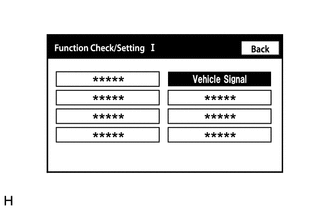
Select "Vehicle Signal" on the "Function Check/Setting I" screen.
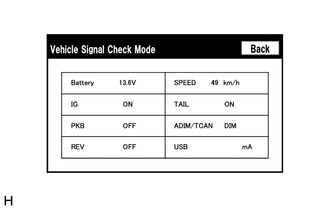
Vehicle Signal Check Mode
When the "Vehicle Signal Check Mode" screen is displayed, check the item displayed for "REV".
for TFTM Made: Click hereAudio / Visual / Telematics>NAVIGATION / MULTI INFO DISPLAY>NAVIGATION SYSTEM (Production Date from 2023/04)>DIAGNOSIS SYSTEM202201,999999,_56,_111967,_0588532,RM1000000029ZSR,
for GTMC Made: Click hereAudio / Visual / Telematics>AUDIO / VIDEO>AUDIO AND VISUAL SYSTEM (Production Date from 2023/04)>DIAGNOSIS SYSTEM202405,999999,_56,_111966,_0589552,RM100000002MH8J,
- HINT:
- ·
Only conditions having inputs are displayed.
·This screen displays vehicle signals input to the radio and display receiver assembly.
Finish diagnostic mode.
for TFTM Made: Click hereAudio / Visual / Telematics>NAVIGATION / MULTI INFO DISPLAY>NAVIGATION SYSTEM (Production Date from 2023/04)>DIAGNOSIS SYSTEM202201,999999,_56,_111967,_0588532,RM1000000029ZSR,
for GTMC Made: Click hereAudio / Visual / Telematics>AUDIO / VIDEO>AUDIO AND VISUAL SYSTEM (Production Date from 2023/04)>DIAGNOSIS SYSTEM202405,999999,_56,_111966,_0589552,RM100000002MH8J,
SIGNAL CHECK (PARKING ASSIST MONITOR SYSTEM INPUT SIGNALS)
- HINT:
-
Illustrations may differ from the actual vehicle screen depending on the device settings and options. Therefore, some detailed areas may not be shown exactly the same as on the actual vehicle screen.
Start diagnostic mode.
for TFTM Made: Click hereAudio / Visual / Telematics>NAVIGATION / MULTI INFO DISPLAY>NAVIGATION SYSTEM (Production Date from 2023/04)>DIAGNOSIS SYSTEM202201,999999,_56,_111967,_0588532,RM1000000029ZSR,
for GTMC Made: Click hereAudio / Visual / Telematics>AUDIO / VIDEO>AUDIO AND VISUAL SYSTEM (Production Date from 2023/04)>DIAGNOSIS SYSTEM202405,999999,_56,_111966,_0589552,RM100000002MH8J,
Select "Function Check/Setting" on the "Service Menu" screen to display the "Function Check/Setting I" screen.
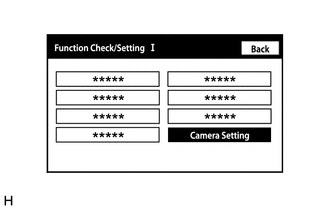
Select "Camera Setting" on the "Function Check/Setting I" screen.
- NOTICE:
-
If the "Camera Setting" selection screen is not displayed, turn the ignition switch off and enter the diagnosis screen after turning the ignition switch to ON once again.
- HINT:
-
After "Camera Setting" is selected, the screen transitions differ depending on whether initialization of the parking assist monitor system was performed after the rear television camera assembly was replaced.
Parking Assist Monitor System Initialization Screen Transition Not performed Signal Check (*) screen Performed Mode Setting (*) screen
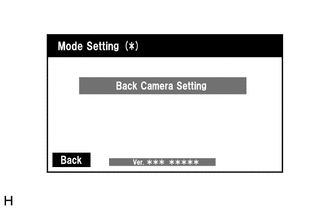
When the screen changes to the "Mode Setting (*)" screen, select "Back Camera Setting" to display the "Signal Check (*)" screen.
- HINT:
-
To select a grayed out item, select and hold the item for 2 seconds or more.
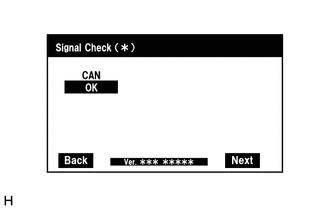
Signal Check
On the "Signal Check (*)" screen, it is possible to inspect the state of signals and check the settings.
| Item | Inspection Detail | Note |
|---|---|---|
| CAN | CAN communication signal input | When "CHK" (red) is displayed, selecting "Next" will not change the screen to the next screen. |
- HINT:
- ·
When "CHK" (red) is displayed, perform inspections based on the result of the following inspections.
·If performing the adjustment after proceeding to the next screen, confirm that all items display "OK" (blue) before selecting "Next".
CAN inspection
- HINT:
-
If "CHK" (red) is displayed for "CAN", check for DTCs and perform troubleshooting based on the output DTCs.
Finish diagnostic mode.
for TFTM Made: Click hereAudio / Visual / Telematics>NAVIGATION / MULTI INFO DISPLAY>NAVIGATION SYSTEM (Production Date from 2023/04)>DIAGNOSIS SYSTEM202201,999999,_56,_111967,_0588532,RM1000000029ZSR,
for GTMC Made: Click hereAudio / Visual / Telematics>AUDIO / VIDEO>AUDIO AND VISUAL SYSTEM (Production Date from 2023/04)>DIAGNOSIS SYSTEM202405,999999,_56,_111966,_0589552,RM100000002MH8J,
VIDEO DEVICE CONNECTION CHECK
CALIBRATION WHEN SERVICING VEHICLE
- NOTICE:
-
Depending on the parts that are replaced or operations that are performed during vehicle inspection or maintenance, calibration of other systems as well as the parking assist monitor system may be needed.