THEFT DETERRENT / KEYLESS ENTRY DIGITAL KEY SYSTEM Back Door Entry Lock and Unlock Functions do not Operate
DESCRIPTION
Remove all causes of non-operation other than the vehicle components and vehicle settings. Under these conditions, if only back door lock and unlock using the digital key are not possible, there may be a malfunction in the communication system between the digital key ECU assembly and BLE luggage digital key receiver assembly, or a malfunction in the digital key ECU assembly and BLE luggage digital key receiver assembly.
CAUTION / NOTICE / HINT
- NOTICE:
- ·
Before performing troubleshooting of the vehicle, refer to Precautions for Inspection or Registration to check for a cause of the malfunction which is not related to vehicle settings or vehicle components.
·Perform troubleshooting with the electrical key transmitter sub-assembly not inside the detection area of the smart entry and start system.
·When using the digital key to perform door lock/unlock with the entry function, refer to Precautions for Outside Vehicle Digital Key Detection Range/Diagnostic Range.
·Make sure that no DTCs are output. If any DTCs are output, proceed to Diagnostic Trouble Code Chart.
·Cancel power saving mode before performing troubleshooting.
·If the digital key system has been disabled, enable the system before performing troubleshooting.
·Before replacing the digital key ECU assembly or BLE luggage digital key receiver assembly, refer to Service Bulletin.
PROCEDURE
Check the smart entry and start system (for entry function).
- OK:
Smart entry and start system (for Entry Function) operates properly
- Result:
Proceed to OK NG
OK
NG
Check whether it is possible to use the digital key to perform door lock/unlock with the entry function.
Check the entry back door open function.
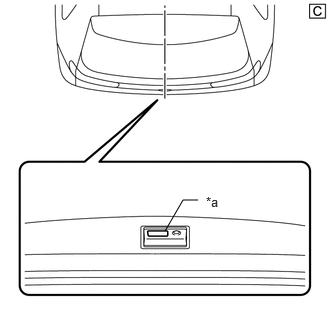
| *a | Back Door Opener Switch Assembly (Open Switch) |
The illustrations shown are examples only.
With the back door closed and locked, hold the digital key in your hand and hold your hand inside the digital key diagnostic range. Then operate the open switch.
- NOTICE:
- ·
With the back door closed and locked, hold the digital key in your hand and hold your hand inside the digital key diagnostic range. Then operate the open switch.
·Refer to Precautions for Inspection or Registration regarding the digital key and surrounding environment.
Check the entry back door lock function.
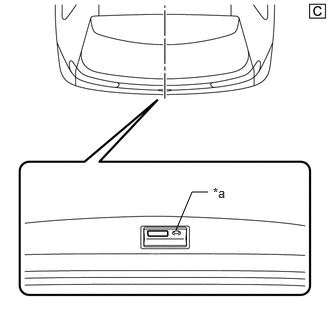
| *a | Back Door Opener Switch Assembly (Lock Switch) |
The illustrations shown are examples only.
With the back door closed and unlocked, hold the digital key in your hand and hold your hand inside the digital key diagnostic range. Then operate the lock switch.
- NOTICE:
- ·
For details on the digital key diagnostic range, refer to Precautions for Outside Vehicle Digital Key Detection Range/Diagnostic Range.
·Refer to Precautions for Inspection or Registration regarding the digital key and surrounding environment.
- Result:
Result Proceed to Entry function operates normally A Entry function does not operate normally B
A
B
Using the GTS, check for Vehicle Control History (RoB).
- Body Electrical > Entry&Start > Utility
-
Tester Display Vehicle Control History (RoB) - 50005 440 62
Take appropriate action in accordance with the result of the cause analysis.
- Result:
Proceed to NEXT
NEXT
Replace the BLE luggage digital key receiver assembly with a new one or used one.
Use the digital key and check whether back door lock/unlock is possible with the entry function.
- Result:
Proceed to OK NG
OK
NG