PARK ASSIST / MONITORING PANORAMIC VIEW MONITOR SYSTEM(Production Date from 2023/04) DIAGNOSIS SYSTEM
PANORAMIC VIEW MONITOR DIAGNOSIS SYSTEM
For panoramic view monitor system diagnosis, signals received by the parking assist ECU can be checked, and the panoramic view monitor system can be calibrated, adjusted and checked using the radio and display receiver assembly.
- NOTICE:
-
Depending on the parts that are replaced or operations that are performed during vehicle inspection or maintenance, calibration of other systems as well as the panoramic view monitor system may be needed.
- HINT:
-
The displayed screens and items may differ depending on vehicle specifications.
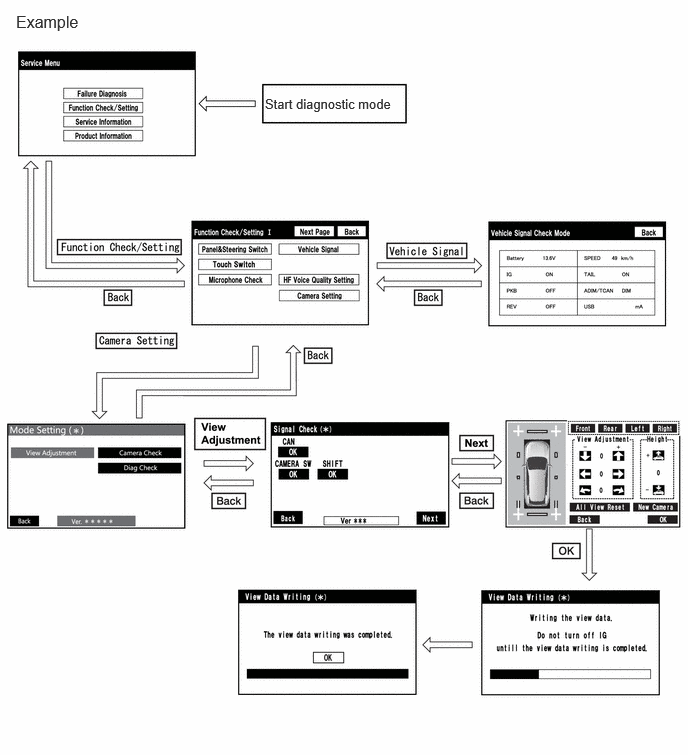
DIAGNOSIS SCREEN TRANSITION (VIEW ADJUSTMENT)
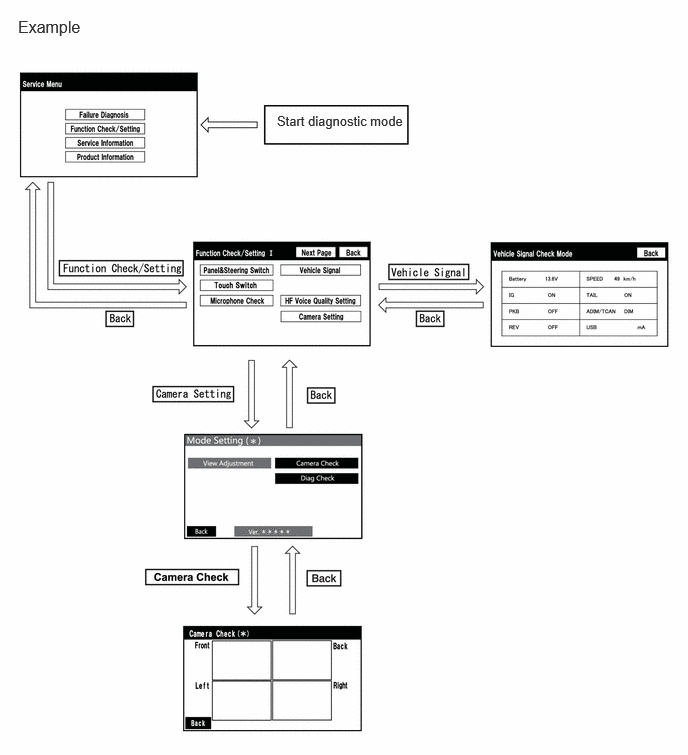
DIAGNOSIS SCREEN TRANSITION (CAMERA CHECK)
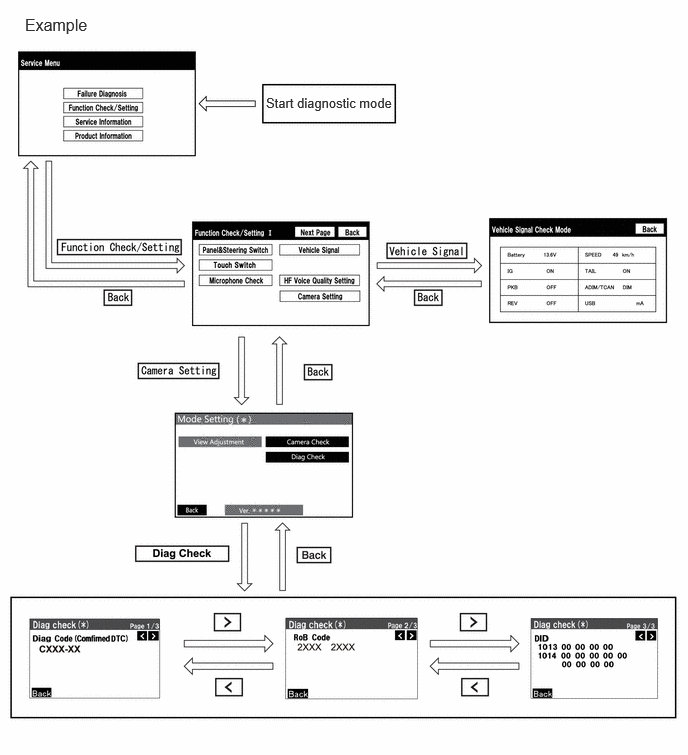
DIAGNOSIS SCREEN TRANSITION (DIAG CHECK)
DIAGNOSTIC MODE
System check (check using system check mode screen)
DIAG CHECK
Enter diagnostic mode.
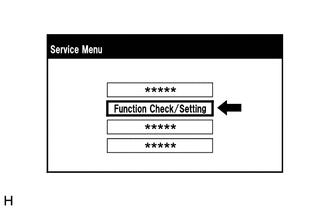
Select "Function Check/Setting" on the "Service Menu" screen.
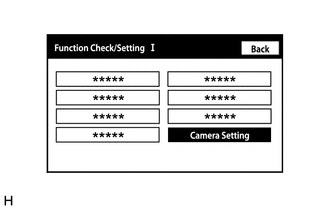
Select "Camera Setting" on the "Function Check/Setting I" screen.
- NOTICE:
-
If the "Camera Setting" selection screen is not displayed, turn the ignition switch off and enter the diagnosis screen after turning the ignition switch to ON once again.
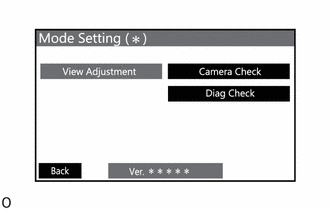
Select "Diag Check" on the "Mode Setting (*)" screen to display the "Diag Check (*)" screen.
- HINT:
-
To select a grayed out item, select and hold the item for 2 seconds or more.
Check Diagnosis
On the "Diag Check (*)" screen, DTCs output when the parking assist ECU detects a malfunction can be checked.
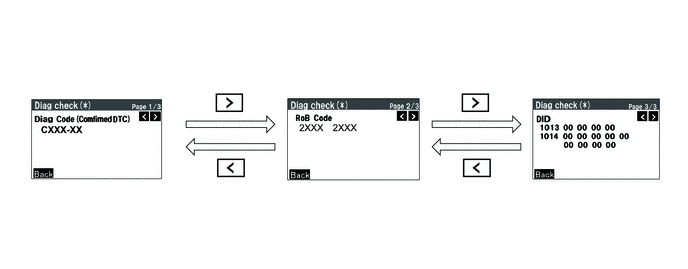
| Indication Name | Measurement Item | Note |
|---|---|---|
| Diag Code | DTC | DTCs output when the parking assist ECU detects a malfunction |
| RoB Code | RoB Code | RoB output when the parking assist ECU detects a malfunction |
| DID | DID table | Values based on information displayed on Data List |
SIGNAL CHECK (PARKING ASSIST ECU INPUT SIGNAL)
Enter diagnostic mode.
Select "Function Check/Setting" on the "Service Menu" screen to display the "Function Check/Setting I" screen.
Select "Camera Setting" on the "Function Check/Setting I" screen.
- NOTICE:
-
If the "Camera Setting" selection screen is not displayed, turn the ignition switch off and enter the diagnosis screen after turning the ignition switch to ON once again.
- HINT:
-
After "Camera Setting" is selected, the screen transitions differ depending on whether initialization of the parking assist ECU was performed after parking assist ECU replacement.
Parking Assist ECU Initialization Screen Transition Not performed "Signal Check (*)" screen Performed "Mode Setting (*)" screen
When the screen changes to the "Mode Setting (*)" screen, select "View Adjustment" to display the "Signal Check (*)" screen.
- HINT:
-
To select a grayed out item, select and hold the item for 2 seconds or more.
Signal check
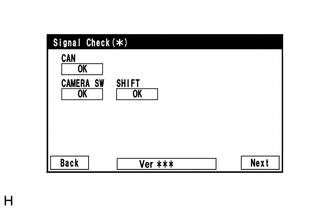
On the "Signal Check (*)" screen, it is possible to inspect the state of signals sent to the parking assist ECU and check the settings.
| Item | Inspection Detail | Note |
|---|---|---|
| CAN | Speed signal input | When "CHK" (red) is displayed, selecting "Next" will not change to the next screen. |
| CAMERA SW | Panoramic view monitor switch (trip switch) | |
| SHIFT | Shift R signal input |
- HINT:
- ·
When "CHK" (red) is displayed, perform inspections based on the result of the following inspections.
·If performing the adjustment after proceeding to the next screen, confirm that all items display "OK" (blue) before selecting "Next".
CAN inspection
- HINT:
-
If "CHK" (red) is displayed for "CAN", check for DTCs and perform troubleshooting based on the output DTCs.
CAMERA SW inspection
Check that "OK" (blue) is displayed for "CAMERA SW" and select "OK".
- HINT:
-
If "CHK" (red) remains displayed or the "CAMERA SW" inspection result is not normal, perform troubleshooting according to the Problem Symptoms Table ("CHK" message(s) are displayed on the "Signal Check" screen).
SHIFT inspection
Check that "OK" (blue) is displayed for "SHIFT" and select "OK".
- HINT:
-
If "CHK" (red) remains displayed or the "SHIFT" inspection result is not normal, perform troubleshooting according to the Problem Symptoms Table ("CHK" message(s) are displayed on the "Signal Check" screen).
CAMERA CHECK
- HINT:
- ·
Use this function when symptoms such as the camera images not being displayed occur.
·On the DTC screen, the 4 camera images are displayed as one image and the images input to the parking assist ECU from the cameras can be checked.
Enter diagnostic mode.
Select "Function Check/Setting" on the "Service Menu" screen to display the "Function Check/Setting I" screen.
Select "Camera Setting" on the "Function Check/Setting I" screen.
- NOTICE:
-
If the "Camera Setting" selection screen is not displayed, turn the ignition switch off and enter the diagnosis screen after turning the ignition switch to ON once again.
- HINT:
-
After "Camera Setting" is selected, the screen transitions differ depending on whether initialization of the parking assist ECU was performed after parking assist ECU replacement.
Parking Assist ECU Initialization Screen Transition Not performed "Signal Check (*)" screen Performed "Mode Setting (*)" screen
When the screen changes to the "Mode Setting (*)" screen, select "Camera Check" to display the "Camera Check (*)" screen.
- HINT:
-
To select a grayed out item, select and hold the item for 2 seconds or more.
Check camera images.
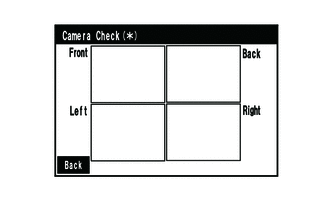
On the "Camera Check (*)" screen, the images that are input to the parking assist ECU from the 4 cameras are displayed on the screen and the camera images can be checked.
| Indication Name | Measurement Item | Indication Name | Measurement Item |
|---|---|---|---|
| Front | Front television camera assembly | Back | Rear television camera assembly |
| Left | Side television camera assembly LH | Right | Side television camera assembly RH |
CALIBRATION WHEN SERVICING VEHICLE
- NOTICE:
-
Depending on the parts that are replaced or operations that are performed during vehicle inspection or maintenance, calibration of other systems as well as the panoramic view monitor system may be needed.