ADVANCED DRIVER ASSISTANCE SYSTEM MILLIMETER WAVE RADAR SENSOR(Production Date from 2023/04) INSTALLATION
CAUTION / NOTICE / HINT
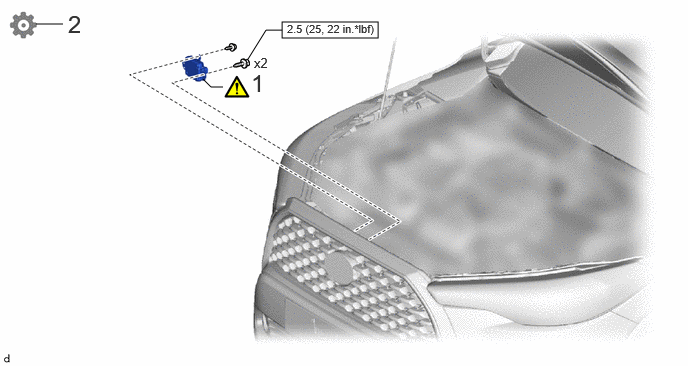
| Procedure | Part Name Code | 
|

|

|
|
|---|---|---|---|---|---|
| 1 | INSTALL MILLIMETER WAVE RADAR SENSOR ASSEMBLY | 88211B | ( 202201,999999,_95,_112293,_0580212,RM1000000028VJ6_01_0039,) 202201,999999,_95,_112293,_0580212,RM1000000028VJ6_01_0039,)
|
- | - |
| 2 | ADJUST MILLIMETER WAVE RADAR SENSOR ASSEMBLY | 88211B | - | - | (202201,999999,_95,_112293,_0580212,RM1000000028VJ6_01_0038,)
|

|
N*m (kgf*cm, ft.*lbf): Specified torque | - | - |
PROCEDURE

 88211B
1.INSTALL MILLIMETER WAVE RADAR SENSOR ASSEMBLY
88211B
1.INSTALL MILLIMETER WAVE RADAR SENSOR ASSEMBLY
|
|
|


|
Bolt | 
|
Screw |
Engage the guides to temporarily install the millimeter wave radar sensor assembly.
Install the millimeter wave radar sensor assembly with the 2 bolts and screw.
- Torque:
- Bolt : 2.5 N*m (25 kgf*cm, 22 in.*lbf)
- HINT:
-
Tighten the bolts and screw in the order shown in the illustration.
Connect the connector.
88211B
2.ADJUST MILLIMETER WAVE RADAR SENSOR ASSEMBLY
When the millimeter wave radar sensor assembly is replaced with a new one, adjustment of the radar sensor beam axis must be performed.
- HINT:
-
Millimeter wave radar sensor assembly learning can be performed by using either Triangle Target, Flat Surface Target or Driving Adjustment.
- ··