THEFT DETERRENT / KEYLESS ENTRY DIGITAL KEY SYSTEM PRECAUTION
PRECAUTIONS FOR DISCONNECTING CABLE FROM NEGATIVE (-) AUXILIARY BATTERY TERMINAL
- NOTICE:
-
After the ignition switch is turned off, there may be a waiting time before disconnecting the negative (-) auxiliary battery terminal.
- HINT:
-
When disconnecting and reconnecting the auxiliary battery, there is an automatic learning function that completes learning when the respective system is used.
PRECAUTIONS FOR DIGITAL KEY SYSTEM
Before using the digital key system, refer to the owner's manual for the method of use and make sure to observe all precautions. The digital key system may not be able to be used in situations such as the following. In this case, it is recommended to carry the electrical key transmitter sub-assembly.
When the smartphone is malfunctioning
When the smartphone and server cannot communicate
When the smartphone battery is depleted
When the service is temporarily stopped due to maintenance, etc.
PRECAUTIONS FOR INSPECTION OR REGISTRATION
If any of the following conditions are met, the digital key system cannot be used.
Furthermore, if an asterisk (*) is appended, the owner key cannot be registered.
The digital key cannot communicate*
The digital key battery is depleted*
The telematics service cannot be used*
There is no contract for the digital key service*
The device is not a digital key compatible device.*
Bluetooth function of the digital key is not set to ON.*
The owner key is not registered
If any of the following conditions are met, the digital key system may not be able to be used.
Furthermore, if an asterisk (*) is appended, the owner key may not be able to be registered.
The digital key radio wave conditions are bad*
The digital key application software is not the latest version*
The digital key is displaying a message
A share key function has been restricted from the owner key
The service center is malfunctioning*
In any of the following situations, the digital key system may not operate or the BLE connection range or operating range may be reduced depending on the radio wave environment.
There is a device that outputs strong radio waves or noise nearby.
(TV tower, electric power plant, broadcasting station, fuel station, airport, medical treatment facility, around a high voltage cable in an underpass or along a railway line or road, in the area of dense Wi-Fi router or Bluetooth device operation, in an area where a factory/vehicle/equipment is using a wireless device, etc.)
Parked in a pay parking facility
The digital key is covered by a metal case, bag, etc.
The digital key is contacting an object that is metal, magnetic, etc.
(coins, wallet, IC card, point card, disposable heat packs, CDs, DVDs, etc.)
A metallic film is applied to the rear window or pillars etc..
There is a device that outputs high-voltage or noise near the digital key
(wireless communication device, microwave oven, drone, medical devices, electrical key transmitter sub-assembly or RF wireless remote control of another vehicle, IH rice cooker, IH pot, machine tools, vacuum cleaner, washing machine, dryer, plasma TV, etc.)
When the digital key is near a device that is using Wi-Fi, Bluetooth, etc. communication
(Wi-Fi router, Wi-Fi or Bluetooth, etc. equipped household appliance, another mobile device, personal computer, tablet, digital audio player, portable game device, etc.)
There is an electronic device that outputs high-voltage or noise inside or around the vehicle.
When the digital key is contacting an object that contains moisture (ice pack, PET bottle, water bottle, etc.)
Registration of an owner key is possible when the following conditions are met:
The hybrid control system*1 or engine*2 is starting
The vehicle speed is 0 km/h
The mobile device is within the in-vehicle operating range.
It is possible for the mobile device to establish a Bluetooth connection
It is possible for the mobile device to use the network
*1: for HV Model
*2: for Gasoline Model
When diagnosing a vehicle at a dealer, all of the following items must be brought to the dealer by the customer.
Electrical key transmitter sub-assembly
Owner key
PRECAUTIONS FOR OUTSIDE VEHICLE DIGITAL KEY DETECTION RANGE/DIAGNOSTIC RANGE
Driver door/front passenger door digital key detection range
When locking/unlocking the door using the entry function, hold the digital key in your hand and hold your hand inside the detection range. Then operate the outside handle.
- HINT:
- ·
The range of the digital key detection area differs greatly depending on the type of digital key device, the way the device is held and the surrounding environment, etc.
·If operating near the edge of the vehicle such as near the driver door glass or front passenger door glass, the entry function may not operate as the vehicle may be determining that the digital key is inside the vehicle.
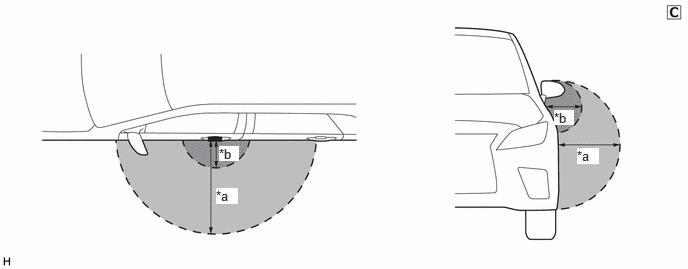
| *a | Digital Key Detection Range
(approximately 70 to 100 cm (2.30 to 3.28 ft.) (reference value measured using a typical device)) |
*b | Digital Key Diagnostic Range
(approximately 10 cm (3.28 ft.) (reference value measured using a typical device)) |
The illustrations shown are examples only.
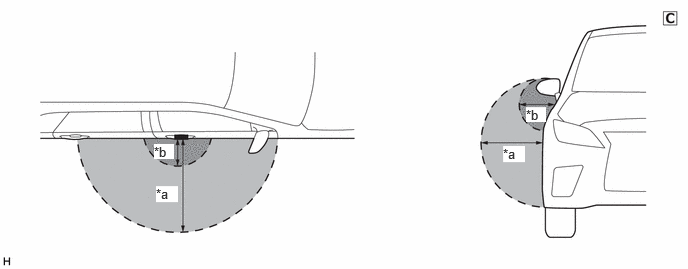
| *a | Digital Key Detection Range
(approximately 70 to 100 cm (2.30 to 3.28 ft.) (reference value measured using a typical device)) |
*b | Digital Key Diagnostic Range
(approximately 10 cm (3.28 ft.) (reference value measured using a typical device)) |
The illustrations shown are examples only.
Back door digital key detection range
When opening the back door using the entry function, hold the digital key in your hand and hold your hand inside the digital key detection range. Then operate the back door open switch. When locking the back door using the entry function, hold the digital key in your hand and hold your hand inside the digital key detection range. Then operate the back door lock switch.
- HINT:
-
The range of the digital key detection area differs greatly depending on the type of digital key device, the way the device is held and the surrounding environment etc.
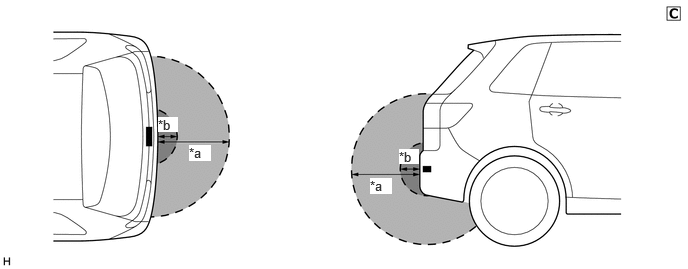
| *a | Digital Key Detection Range
(approximately 70 - 100 cm (reference value measured using a typical device)) |
*b | Digital Key Diagnostic Range
(approximately 10 cm (reference value measured using a typical device)) |
The illustrations shown are examples only.
PRECAUTIONS FOR IN-VEHICLE OPERATING RANGE
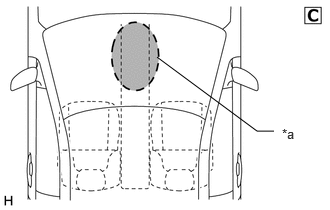
| *a | In-vehicle Operating Range |
The illustrations shown are examples only.
The in-vehicle operating range is above the center console near the vehicle interior BLE digital key receiver. When changing the power source mode to start the hybrid control system*1 or engine*2, etc., hold the digital key in the in-vehicle operating range.
*1: for HV Model
*2: for Gasoline Model
PRECAUTIONS FOR POWER SAVING MODE
If there are no vehicle operations for a certain amount of time, the vehicle enters power saving mode.
| Mode | Description |
|---|---|
| Power saving mode 1 | Start conditions
After a power source mode change operation (on to off), the power source mode is not changed to on for 5 days (120 hours) or more. Power saving control
Transmission of BLE digital key receiver signal stops. Door lock/unlock by touching the lock/unlock sensor of the door outside handle assembly may be possible. (However, after touching the lock/unlock sensor, it may take approximately 4 seconds to lock/unlock.) Power saving control
Transmission of BLE digital key receiver signal stops. Power saving control stop conditions
Power source mode ON |
| Power saving mode 2 | Start conditions
After a power source mode change operation (on to off), the power source mode is not changed to on for 14 days (336 hours) or more. Power saving control
Transmission of BLE digital key receiver signal stops. Door lock/unlock by touching the lock/unlock sensor of the door outside handle assembly may be possible. (However, after touching the lock/unlock sensor, it may take approximately 4 seconds to lock/unlock.) Power saving control
·
Transmission of BLE digital key receiver signal stops. ·
BLE connection between the digital key and vehicle stops. Power saving control stop conditions
Power source mode ON |
| Power saving mode 3 | Start conditions
The digital key is in the exterior digital key detection area for 10 minutes or more. Power saving control
Transmission of BLE digital key receiver signal stops. Power saving control stop conditions
·
The doors lock/unlock by using the wireless function. ·
The doors lock/unlock by touching the lock/unlock sensor of the door outside handle assembly. |
PRECAUTION WHEN USING GTS
When using the GTS with the ignition switch off, connect the GTS to the DLC3 and turn a courtesy light switch on and off at intervals of 1.5 seconds or less until communication between the GTS and the vehicle begins. Then select the vehicle type under manual mode and enter the following menus: Body Electrical / Entry&Start. While using the GTS, periodically turn a courtesy light switch on and off at intervals of 1.5 seconds or less to maintain communication between the GTS and the vehicle.
When connecting the GTS, the vehicle speed must be less than 5 km/h (3.1 mph). If the vehicle speed is 5 km/h or more, the GTS and certification ECU cannot communicate.
PRECAUTION WHEN REPLACING PARTS
If replacing any of the following parts, refer to Service Bulletin.
Certification ECU (smart key ECU assembly)
Digital key ECU assembly
Front door outside handle assembly LH
Front door outside handle assembly RH
BLE luggage digital key receiver assembly
BLE digital key receiver assembly