K121 CVT CONTINUOUSLY VARIABLE TRANSAXLE SYSTEM DTC CHECK / CLEAR
- NOTICE:
-
When the diagnosis system is changed from normal mode to check mode or vice versa, all DTCs and freeze frame data recorded in normal mode are cleared. Before changing modes, always check and make a note of DTCs and freeze frame data.
- HINT:
- ·
DTCs which are stored in the ECM can be displayed on the GTS. The GTS can display confirmed, pending and permanent DTCs.
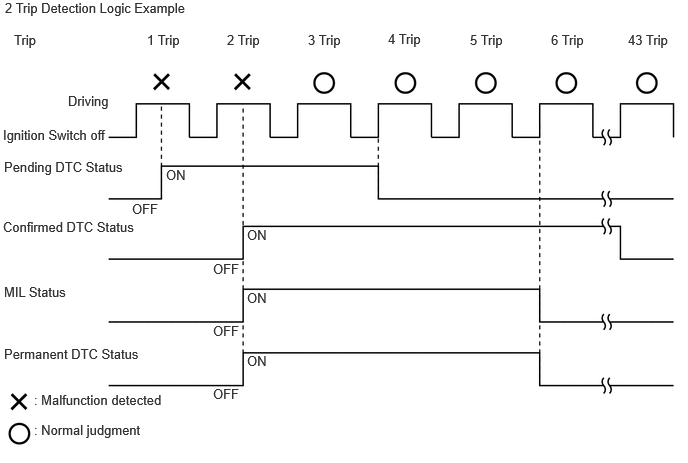
·If a malfunction is detected during the current driving cycle, confirmed and permanent DTCs are stored.
·Some DTCs are not stored if the ECM does not detect the same malfunction again during a second consecutive driving cycle. However, such malfunctions, detected during only one driving cycle, are stored as pending DTCs.
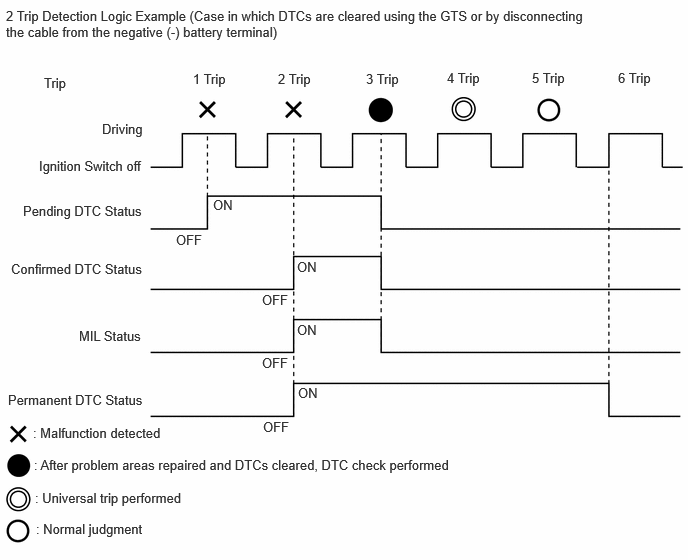
·Confirmed and pending DTCs can be cleared by using the GTS. However, permanent DTCs cannot be cleared using the GTS.
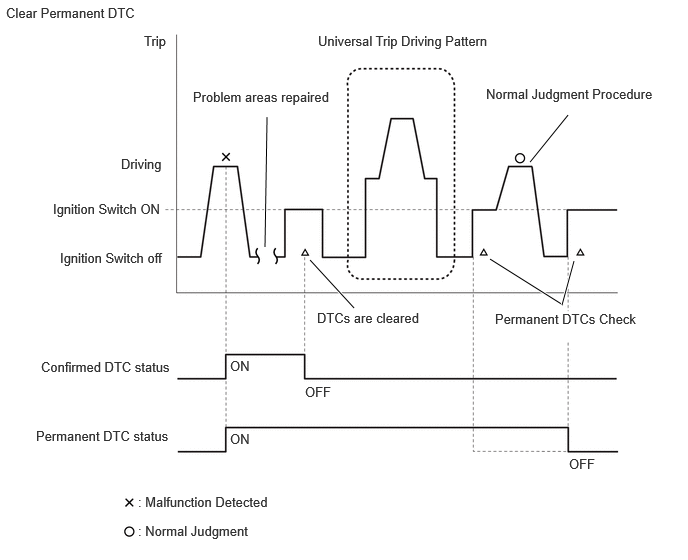
·After clearing confirmed DTCs using the GTS, permanent DTCs can be cleared when the universal trip is performed and then the system is determined to be normal for the relevant DTCs. The driving pattern to obtain a normal judgment is described under the "Confirmation Driving Pattern" for the respective DTC.
To clear permanent DTCs, all of the following conditions must be met:
-A universal trip has been performed.
-The vehicle has been judged as normal for 1 trip.
-No malfunctions are detected.
| Pending DTC | Store condition | Malfunction detected |
| Clear condition | System determined to be normal
or DTCs cleared using GTS |
|
| Confirmed DTC | Store condition | Malfunction detected (2nd trip) |
| Clear condition | No malfunctions in 40 driving cycles
or DTCs cleared using GTS |
|
| Permanent DTC | Store condition | Malfunction detected (2nd trip) |
| Clear condition | Ignition switch turned to ON after no malfunction is detected in 3 consecutive driving cycles
or After DTCs cleared using GTS, universal trip performed and normal judgment obtained for 1 trip |
|
| MIL | ON | Malfunction detected (2nd trip) |
| OFF | Ignition switch turned to ON after no malfunction is detected in 3 consecutive driving cycles
or DTCs cleared using GTS |
CHECK DTC
Check for DTCs and freeze frame data, and write them down.
- Powertrain > Engine > Trouble Codes
- 50001 372
- HINT:
GTS Display Description Test Failed Shows the malfunction judgment results during the current trip. Pending Shows the malfunction judgment results up to now. (Indicates the possibility of a malfunction when no DTC is confirmed.) Confirmed Shows the DTCs confirmed up to now. (The number of current trips differs for each DTC.)
Check the details of the DTCs.
- NOTICE:
-
When simulating a symptom and using the GTS to check for DTCs, use normal mode. For DTCs in the Diagnostic Trouble Code Chart subject to "2-trip detection logic", perform the following:
-
Turn the ignition switch off after the symptom is simulated once. Then repeat the simulation process. When the symptom has been simulated twice, the MIL will illuminate and DTCs will be stored in the ECM.
CLEAR DTC
Clear the DTCs.
- Powertrain > Engine > Clear DTCs
- 50002 372
CLEAR PERMANENT DTC
After clearing confirmed DTCs using the GTS (or by disconnecting the cable from the negative (-) battery terminal), permanent DTCs can be cleared when the universal trip is performed and then the system is determined to be normal for the relevant DTCs. The driving pattern to obtain a normal judgment is described under Confirmation Driving Pattern for the respective DTC.
To clear permanent DTCs, all of the following conditions must be met:
A universal trip has been performed.
The vehicle has been judged as normal for 1 trip. (Normal judgment does not have to be performed in 2 consecutive trips, but normal judgment should have occurred in the latest trip.)
No malfunctions are detected.
Connect the GTS to the DLC3.
Turn the ignition switch to ON.
Turn the GTS on.
Enter the following menus: Powertrain / Engine / Trouble Codes.
- Powertrain > Engine > Trouble Codes
- 50001 372
- HINT:
-
If "YES" is displayed for the value of "PERMANENT" at the top right of the GTS screen, permanent DTCs are stored.
Select the "Generic" tab.
Check if permanent DTCs are stored.
- HINT:
-
If permanent DTCs are not output, it is not necessary to continue this procedure.
Clear the DTCs (even if no DTCs are stored, perform the clear DTC procedure).
- Powertrain > Engine > Clear DTCs
- 50002 372
- NOTICE:
-
Do not clear the DTCs after performing this step.
Perform the universal trip.
- HINT:
-
The universal trip driving pattern and normal judgment procedure can be performed consecutively in the same driving cycle.
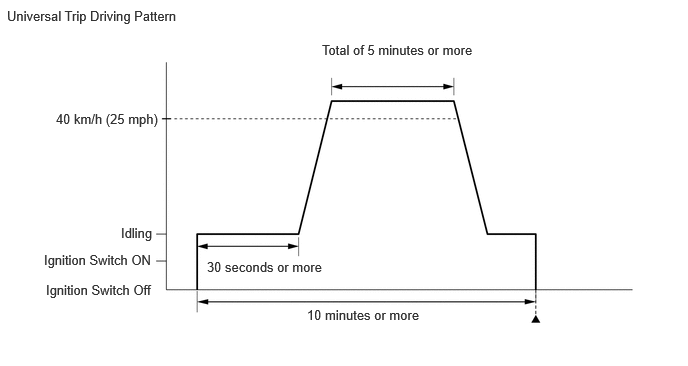
Start the engine and wait for 30 seconds or more.
Drive the vehicle at 40 km/h (25 mph) or more for a total of 5 minutes or more.
- CAUTION:
-
When performing a driving pattern, obey all speed limits and traffic laws.
- HINT:
-
It is possible to complete the drive pattern even if the vehicle decelerates to less than 40 km/h (25 mph) during the driving cycle provided that the vehicle is driven at 40 km/h (25 mph) or more for a total of 5 minutes.
Allow 10 minutes or more to elapse from the time the engine started.
Turn the ignition switch off and wait for 2 minutes or more.
Turn the ignition switch to ON.
Enter the following menus: Powertrain / Engine / Trouble Codes.
- Powertrain > Engine > Trouble Codes
- 50001 372
Check that the permanent DTCs have been cleared.
- HINT:
-
If permanent DTCs are not output, it is not necessary to continue this procedure.
Perform the normal judgment procedure in the respective confirmation driving pattern of each output DTC.
- HINT:
-
Do not turn the ignition switch off by mistake during this step.
With the ignition switch ON, wait for 5 seconds or more.
Turn the ignition switch off and wait for 2 minutes or more.
Turn the ignition switch to ON.
Enter the following menus: Powertrain / Engine / Trouble Codes.
- Powertrain > Engine > Trouble Codes
- 50001 372
Check that the permanent DTCs have been cleared.