M20C-FKS ENGINE CONTROL SFI SYSTEM MIL Circuit
DESCRIPTION
The Malfunction Indicator Lamp (MIL) is used to indicate vehicle malfunctions detected by the ECM.
The MIL operation can be checked visually. When the ignition switch is first turned to ON, the MIL should be illuminated and should then turn off after the engine is started. If the MIL remains illuminated or is not illuminated, conduct the following troubleshooting procedure using the GTS.
WIRING DIAGRAM
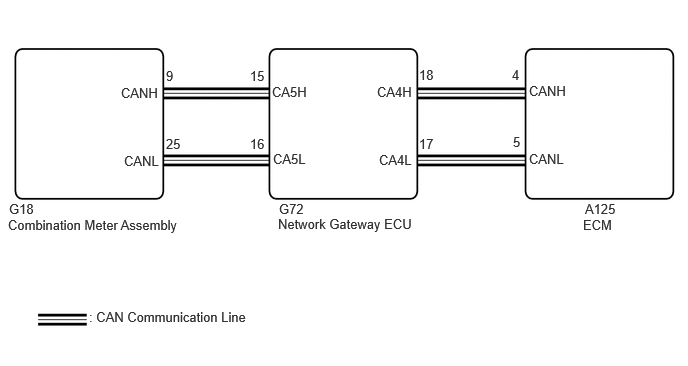
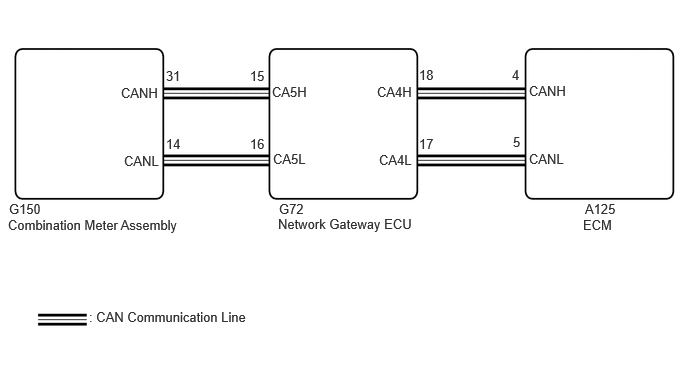
PROCEDURE
Perform troubleshooting in accordance with the table below.
- Result:
MIL Condition Proceed to Illuminates → Turns off Ignition switch ON → engine is started A Other than above - B
A
B
Connect the GTS to the DLC3.
Turn the ignition switch to ON.
Turn the GTS on.
Check the communication between the GTS and ECM.
- HINT:
-
It can be checked using the "Engine" item of the Data List.
- Result:
Result Proceed to Communication is possible A Communication is not possible B
A
B
Connect the GTS to the DLC3.
Turn the ignition switch to ON.
Turn the GTS on.
Enter the following menus: System Select / Health Check.
Check if any DTCs have been detected. Note down any DTCs.
- Result:
Result Proceed to DTCs are not output A Any DTCs is output B
- HINT:
-
Check for detected DTCs output from other ECUs which relate to the MIL.
A
B
Connect the GTS to the DLC3.
Turn the ignition switch to ON.
Turn the GTS on.
Enter the following menus: Body Electrical / Combination Meter / Active Test / Check Engine Warning.
- Body Electrical > Combination Meter > Active Test
-
Tester Display Check Engine Warning - 50004 409 64
Check the status of the MIL while performing the Active Test.
- Result:
Result Proceed to Changes A Does not change B
A
B