NAVIGATION / MULTI INFO DISPLAY TELEPHONE MICROPHONE ASSEMBLY INSTALLATION
PROCEDURE

 86730D
1.INSTALL NO. 2 TELEPHONE MICROPHONE ASSEMBLY (w/ Navigation System)
86730D
1.INSTALL NO. 2 TELEPHONE MICROPHONE ASSEMBLY (w/ Navigation System)
- HINT:
-
Use the same procedure for the LH side and RH side.
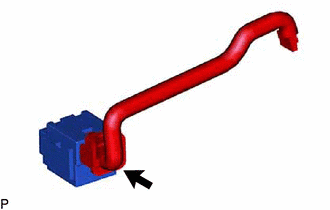
Connect the connector to install the No. 2 telephone microphone assembly.
86730E
2.INSTALL MICROPHONE ASSEMBLY (w/ Navigation System)
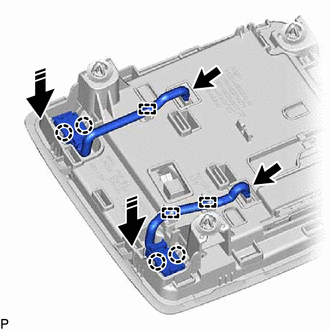

|
Install in this Direction |
Engage the 4 claws as shown in the illustration.
Engage the 3 clamps.
Connect the 2 connectors to install the 2 microphone assemblies.
86730D
3.INSTALL NO. 2 TELEPHONE MICROPHONE ASSEMBLY (for GTMC Made without Navigation System)
Connect the connector to install the No. 2 telephone microphone assembly.
86730E
4.INSTALL MICROPHONE ASSEMBLY (for GTMC Made without Navigation System)
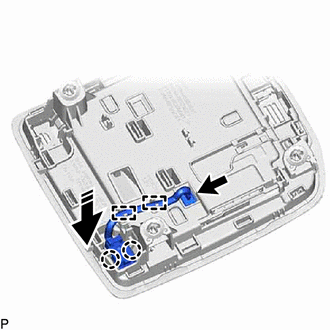
|
|
Install in this Direction |
Engage the 2 claws as shown in the illustration.
Engage the 2 clamps.
Connect the connector to install the microphone assembly.
86730A
5.INSTALL TELEPHONE MICROPHONE ASSEMBLY (for SFTM Made without Navigation System)
|
|
Install in this Direction |
Engage the 2 claws as shown in the illustration.
Engage the 2 clamps.
Connect the connector to install the telephone microphone assembly.
6.INSTALL MAP LIGHT ASSEMBLY