AUDIO / VIDEO NOISE FILTER INSTALLATION
PROCEDURE

 86011V
1.INSTALL RADIO SETTING CONDENSER
86011V
1.INSTALL RADIO SETTING CONDENSER
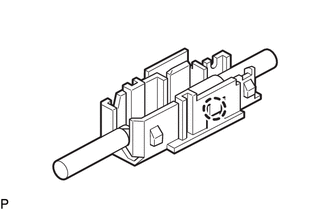
Engage the claw to install a new terminal cover to the wire harness.
- NOTICE:
- ·
Make sure to hold the crimped side of the terminal when installing the wire harness to the terminal cover.
·Make sure not to bend the exposed wire when installing the wire harness to the terminal cover.
·Do not use excessive force when inserting the wire harness into the terminal cover.
·If the terminal cover has been deformed during installation, replace the terminal and terminal cover with new ones.
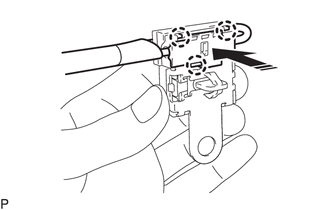

|
Install in this Direction |
Engage the 3 claws to install the new terminal cover with wire harness to a new condenser as shown in the illustration.
- NOTICE:
- ·
Do not use excessive force when inserting the terminal covers into the condenser.
·If a terminal cover has been deformed during installation, replace the terminal, terminal covers and condenser with new ones.
Engage the clamp to temporarily install the new radio setting condenser with wire harness.
Install the new radio setting condenser with the bolt.
- Torque:
- 10 N*m (102 kgf*cm, 7 ft.*lbf)
64740C
2.INSTALL DECK TRIM SIDE PANEL ASSEMBLY LH
62552F
3.INSTALL REAR SEAT SIDE GARNISH LH
71304C
4.INSTALL REAR SEATBACK HINGE SUB-ASSEMBLY LH
73706
5.INSTALL CHILD RESTRAINT SEAT ANCHOR BRACKET SUB-ASSEMBLY LH
62332C
6.INSTALL REAR DOOR OPENING TRIM WEATHERSTRIP LH
58467H
7.INSTALL NO. 3 BATTERY SERVICE COVER BOARD (for HV Model)
67918A
8.INSTALL REAR DOOR SCUFF PLATE LH
58577E
9.INSTALL REAR NO. 1 FLOOR MAT SUPPORT SIDE PLATE
10.INSTALL REAR SEATBACK BOARD CARPET ASSEMBLY RH (for SFTM Made)
11.INSTALL REAR SEATBACK BOARD CARPET ASSEMBLY RH (for GTMC Made)
58387B
12.INSTALL REAR FLOOR FINISH PLATE
64779
13.INSTALL SPARE WHEEL COVER TRAY
58417
14.INSTALL REAR NO. 3 FLOOR BOARD
15.INSTALL REAR SEATBACK ASSEMBLY LH (for SFTM Made)
16.INSTALL REAR SEATBACK ASSEMBLY LH (for GTMC Made)
72693
17.INSTALL REAR SEAT CUSHION LOCK HOOK (for SFTM Made)
72693
18.INSTALL REAR SEAT CUSHION LOCK HOOK (for GTMC Made)
19.INSTALL REAR SEAT CUSHION ASSEMBLY (for SFTM Made)
20.INSTALL REAR SEAT CUSHION ASSEMBLY (for GTMC Made)
71940A
21.INSTALL REAR SEAT HEADREST ASSEMBLY (for SFTM Made)
71940A
22.INSTALL REAR SEAT HEADREST ASSEMBLY (for GTMC Made)
58410B
23.INSTALL DECK BOARD ASSEMBLY