RM38N0EC
_58
Vehicle Interior
_111842
POWER OUTLETS (INT)
_0525782
WIRELESS CHARGING SYSTEM
D
POWER OUTLETS (INT) WIRELESS CHARGING SYSTEM OPERATION CHECK
WIRELESS CHARGING SYSTEM OPERATION CHECK
a.
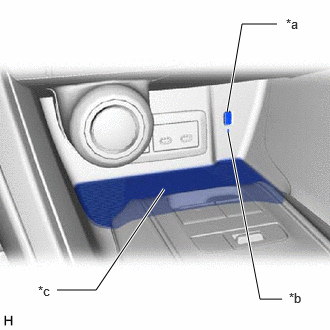
2.375,1.375 2.708,3.115
2.708,3.115 2.938,3.115
true
0.594,3.021 1,3.021
1,3.021 1.708,1.969
true
2.365,1.167 2.521,0.25
2.521,0.25 2.885,0.25
true
2.979,0.167 3.292,0.323
0.313,0.156
10
false
*a
3.01,3.021 3.333,3.219
0.323,0.198
10
false
*b
0.396,2.948 0.708,3.104
0.313,0.156
10
false
*c
| *a | Mobile Wireless Charger Switch |
| *b | Indicator Light (Blue) |
| *c | Charging Area |
Turn the ignition switch to ACC or ON.
- HINT:
-
If the ignition switch is turned off when the wireless charging system is on, the wireless charging system will automatically turn on the next time the ignition switch is turned to ACC or ON.
b.
Turn the wireless charging system on and check that the indicator light (blue) will not illuminate.
c.
Place a rechargeable device on the charging area and check that the indicator light (blue) illuminates, indicating charging is in progress.
- HINT:
-
Refer to Precaution for details about Qi-compatible rechargeable devices.
d.
Turn the wireless charging system off and check that the indicator light turns off.