EXTERIOR PANELS / TRIM REAR SPOILER REASSEMBLY
PROCEDURE

 76874
1.INSTALL NO. 3 REAR SPOILER PROTECTOR
76874
1.INSTALL NO. 3 REAR SPOILER PROTECTOR
- HINT:
-
When installing the No. 3 rear spoiler protector, heat the rear spoiler using a heat light.
| Item | Temperature |
|---|---|
| Rear Spoiler | 20 to 30°C (68 to 86°F) |
- CAUTION:
-
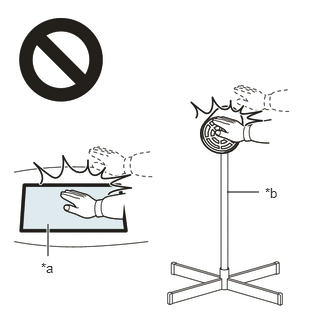 2.365,2 2.698,2 false 0.5,2.333 0.5,2.667 true 0.427,2.708 0.74,2.865 0.313,0.156 10 false *a 2.76,1.927 3.073,2.083 0.313,0.156 10 false *b
*a Heated Part *b Heat Light
- ·
Do not touch the heat light and heated parts, touching the heat light may result in burns.
·Touching heated parts for a long time may result in burns.
- NOTICE:
-
Do not heat the rear spoiler excessively.
Clean the rear spoiler surface.
Using a heat light, heat the rear spoiler surface.
Remove any remaining double-sided tape from the rear spoiler.
Wipe off any tape adhesive residue with cleaner.
Using a heat light, heat the rear spoiler.
Remove the release paper from 3 new No. 3 rear spoiler protectors.
- HINT:
-
After removing the release paper, keep the exposed adhesive free from foreign matter.
Install the 3 No. 3 rear spoiler protectors as shown in the illustration.
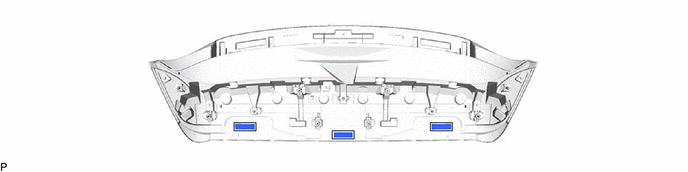
| *a | Line | - | - |
- HINT:
-
Install the No. 3 rear spoiler protector along the line on the rear spoiler.
76873
2.INSTALL NO. 2 REAR SPOILER PROTECTOR
- HINT:
-
When installing the No. 2 rear spoiler protector, heat the rear spoiler using a heat light.
| Item | Temperature |
|---|---|
| Rear Spoiler | 20 to 30°C (68 to 86°F) |
- CAUTION:
-
2.365,2 2.698,2 false 0.5,2.333 0.5,2.667 true 0.427,2.708 0.74,2.865 0.313,0.156 10 false *a 2.76,1.927 3.073,2.083 0.313,0.156 10 false *b
*a Heated Part *b Heat Light
- ·
Do not touch the heat light and heated parts, touching the heat light may result in burns.
·Touching heated parts for a long time may result in burns.
- NOTICE:
-
Do not heat the rear spoiler excessively.
Clean the rear spoiler surface.
Using a heat light, heat the rear spoiler surface.
Remove any remaining double-sided tape from the rear spoiler.
Wipe off any tape adhesive residue with cleaner.
Using a heat light, heat the rear spoiler.
Remove the release paper from 8 new No. 2 rear spoiler protectors.
- HINT:
-
After removing the release paper, keep the exposed adhesive free from foreign matter.
Install the 8 No. 2 rear spoiler protectors as shown in the illustration.
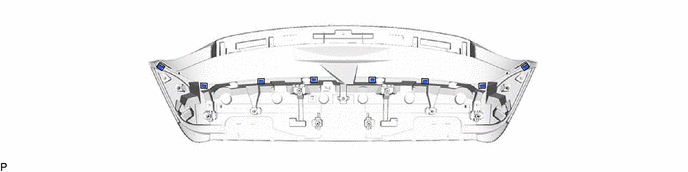
| *a | Line | - | - |
- HINT:
-
Install the No. 2 rear spoiler protector along the line on the rear spoiler.
76872
3.INSTALL NO. 1 REAR SPOILER PROTECTOR
- HINT:
-
When installing the No. 1 rear spoiler protector, heat the rear spoiler using a heat light.
| Item | Temperature |
|---|---|
| Rear Spoiler | 20 to 30°C (68 to 86°F) |
- CAUTION:
-
2.365,2 2.698,2 false 0.5,2.333 0.5,2.667 true 0.427,2.708 0.74,2.865 0.313,0.156 10 false *a 2.76,1.927 3.073,2.083 0.313,0.156 10 false *b
*a Heated Part *b Heat Light
- ·
Do not touch the heat light and heated parts, touching the heat light may result in burns.
·Touching heated parts for a long time may result in burns.
- NOTICE:
-
Do not heat the rear spoiler excessively.
Clean the rear spoiler surface.
Using a heat light, heat the rear spoiler surface.
Remove any remaining double-sided tape from the rear spoiler.
Wipe off any tape adhesive residue with cleaner.
Using a heat light, heat the rear spoiler.
Remove the release paper from 6 new No. 1 rear spoiler protectors.
- HINT:
-
After removing the release paper, keep the exposed adhesive free from foreign matter.
Install the 6 No. 1 rear spoiler protector as shown in the illustration.
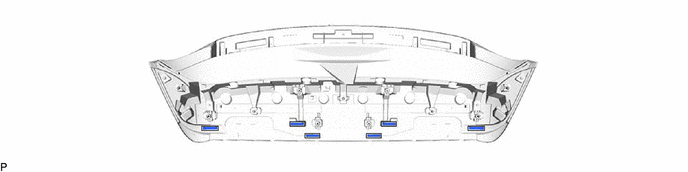
| *a | Line | - | - |
- HINT:
-
Install the No. 1 rear spoiler protector along the line on the rear spoiler.
81935D
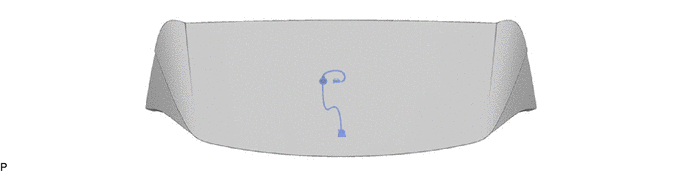
4.INSTALL CENTER STOP LIGHT CORD ASSEMBLY
Install the center stop light cord assembly.
81570
5.INSTALL CENTER STOP LIGHT ASSEMBLY
for Short Type:
for Long Type: