MIRROR (INT) DIGITAL INNER MIRROR ON-VEHICLE INSPECTION
PROCEDURE

 87810
1.INSPECT INNER REAR VIEW MIRROR ASSEMBLY
87810
1.INSPECT INNER REAR VIEW MIRROR ASSEMBLY
- NOTICE:
- ·
Perform this inspection indoors.
·When anti-glare is not operating, the mirror surface is bright. When anti-glare is operating, the mirror surface is darkened.
Turn the ignition switch to ON.
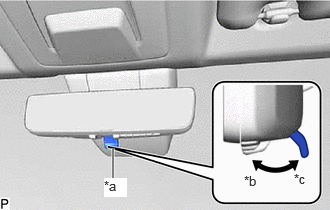
| *a | Mode Selection Lever |
| *b | Digital Mirror Mode |
| *c | Optical Mirror Mode |
Confirm that the mode selection lever is set to the optical mirror mode side.
- HINT:
-
If the mode selection lever is set to the digital mirror mode side, move it to the optical mirror mode side.
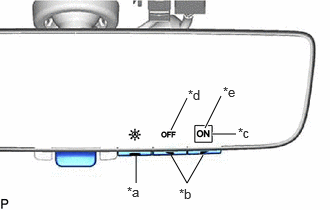
| *a | Menu Switch |
| *b | Cursor Operation Switch |
| *c | Cursor |
| *d | Automatic Anti-glare Mode OFF |
| *e | Automatic Anti-glare Mode ON |
Operate the menu switch and confirm that the cursor is in the location shown in the illustration and that anti-glare is not operating.
- HINT:
- ·
If the cursor is in the location shown in the illustration, automatic anti-glare mode is on and anti-glare is not operating.
·If the cursor is in a location other than that shown in the illustration, move the cursor to the location shown in the illustration using the menu and cursor operation switches.
·Depending on the ambient conditions, anti-glare may operate.
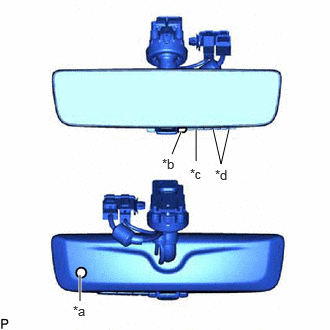
| *a | Ambient Light Sensor |
| *b | Rearward Facing Light Sensor |
| *c | Menu Switch |
| *d | Cursor Operation Switch |
Using the menu switch and cursor operation switches, turn off automatic anti-glare mode.
- HINT:
-
When automatic anti-glare mode is off, anti-glare does not operate regardless of the ambient conditions.
Using the menu switch and cursor operation switches, turn on automatic anti-glare mode.
While covering the ambient light sensor with your hand, shine a light on the rearward facing light sensor and confirm that anti-glare operates.
Remove your hand from the sensor and stop shining the light at the rearward facing light sensor and confirm that anti-glare stops operating.
- NOTICE:
-
If the system does not operate as indicated above, perform the test several times with the digital inner mirror at different angles or with different ambient conditions.