☰ Toyota RAV4☰ فهرستAudio / Visual / Telematics › NAVIGATION / MULTI INFO DISPLAY › NAVIGATION RECEIVER
RM36D0EC
_56
Audio / Visual / Telematics
_087044
NAVIGATION / MULTI INFO DISPLAY
_0416446
NAVIGATION RECEIVER
A
NAVIGATION / MULTI INFO DISPLAY NAVIGATION RECEIVER INSTALLATION
PROCEDURE

 86120L
1.INSTALL NAVIGATION RECEIVER ASSEMBLY
86120L
1.INSTALL NAVIGATION RECEIVER ASSEMBLY
86211
2.INSTALL NO. 1 RADIO BRACKET
a.
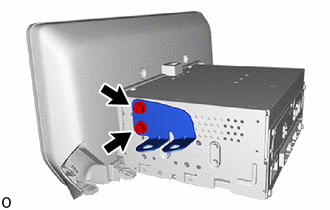
Install the No. 1 radio bracket with the 2 screws.
- Torque:
- 3.0 N*m (31 kgf*cm, 27 in.*lbf)
86212
3.INSTALL NO. 2 RADIO BRACKET
a.
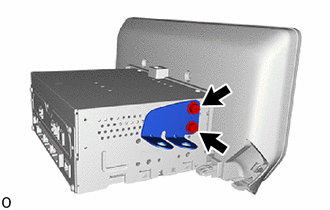
Install the No. 2 radio bracket with the 2 screws.
- Torque:
- 3.0 N*m (31 kgf*cm, 27 in.*lbf)
4.INSTALL NAVIGATION RECEIVER ASSEMBLY WITH BRACKET
a.
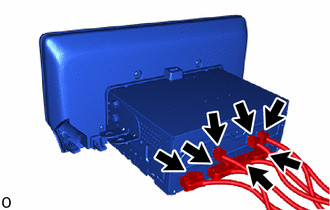
Connect the 7 connectors.
b.
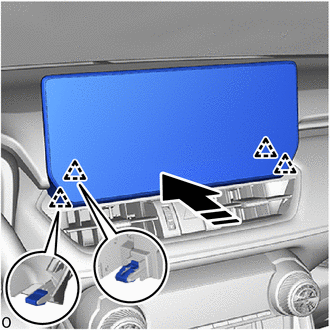
0,0 0,0
false

|
Install in this Direction |
Attach the clip to install the navigation receiver assembly with bracket as shown in the illustration.
c.
0.156,0.469 0.354,0.688
0.198,0.219
10
true
(1)
3.042,0.427 3.26,0.656
0.219,0.229
10
true
(2)
2.948,1.031 3.167,1.26
0.219,0.229
10
true
(3)
0.271,1.031 0.479,1.219
0.208,0.188
10
true
(4)
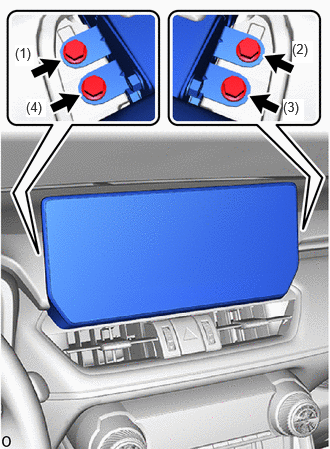
Install the 4 bolts in the order shown in the illustration.
- Torque:
- 12 N*m (122 kgf*cm, 9 ft.*lbf)
55422C
5.INSTALL CENTER UPPER INSTRUMENT CLUSTER FINISH PANEL