☰ Toyota RAV4☰ فهرستAudio / Visual / Telematics › NAVIGATION / MULTI INFO DISPLAY › NAVIGATION RECEIVER
RM36D0EC
_56
Audio / Visual / Telematics
_087044
NAVIGATION / MULTI INFO DISPLAY
_0416446
NAVIGATION RECEIVER
A
NAVIGATION / MULTI INFO DISPLAY NAVIGATION RECEIVER REMOVAL
CAUTION / NOTICE / HINT
The necessary procedures (adjustment, calibration, initialization or registration) that must be performed after parts are removed, installed or replaced during the navigation receiver assembly removal/installation are shown below.
| Replacement Part or Procedure | Necessary Procedures | Effect/Inoperative Function When Necessary Procedures are not Performed | Link |
|---|---|---|---|
| Navigation receiver assembly | Software update | - | See the Service Bulletin for the registration method. |
| Replacement Part or Procedure | Necessary Procedures | Effect/Inoperative Function When Necessary Procedures are not Performed | Link |
|---|---|---|---|
| Navigation receiver assembly | Software update | - | See the Service Bulletin for the registration method. |
PROCEDURE

 55422C
1.REMOVE CENTER UPPER INSTRUMENT CLUSTER FINISH PANEL
55422C
1.REMOVE CENTER UPPER INSTRUMENT CLUSTER FINISH PANEL
2.REMOVE NAVIGATION RECEIVER ASSEMBLY WITH BRACKET
a.
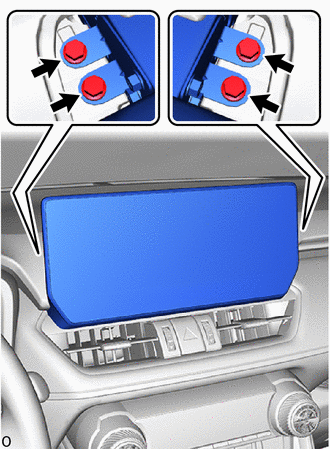
Remove the 4 bolts.
b.
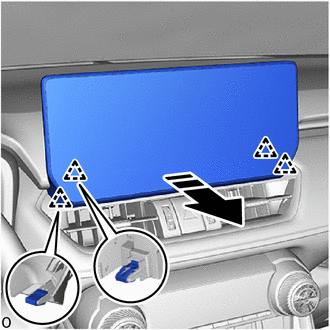
0,0 0,0
false

|
Remove in this Direction |
Detach the clip and remove the navigation receiver assembly with bracket as shown in the illustration.
c.
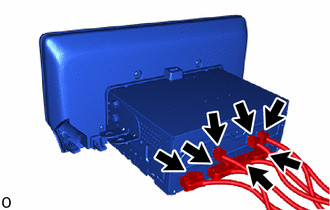
Disconnect the 7 connectors.
86212
3.REMOVE NO. 2 RADIO BRACKET
a.
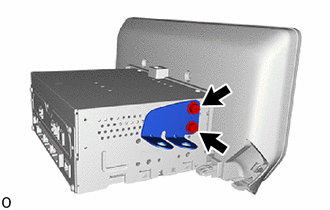
Remove the 2 screws and No. 2 radio bracket.
86211
4.REMOVE NO. 1 RADIO BRACKET
a.
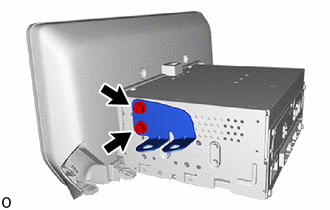
Remove the 2 screws and No. 1 radio bracket.
86120L
5.REMOVE NAVIGATION RECEIVER ASSEMBLY