POWER OUTLETS (INT) WIRELESS CHARGING SYSTEM OPERATION CHECK
WIRELESS CHARGING SYSTEM OPERATION CHECK (for Type A)
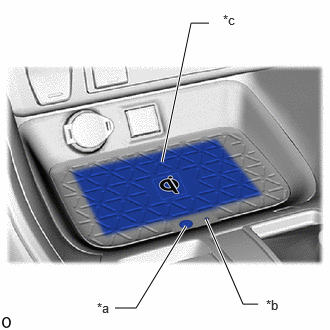
| *a | Mobile Wireless Charger Switch |
| *b | Indicator Light (Blue) |
| *c | Charging Area |
Turn the ignition switch to ACC or ON.
- HINT:
-
If the ignition switch is turned off when the wireless charging system is on, the wireless charging system will automatically turn on the next time the ignition switch is turned ACC or ON.
Turn the wireless charging system on and check that the indicator light (blue) illuminates.
Place a rechargeable device on the charging area and check that the indicator light (blue) illuminates, indicating charging is in progress.
- HINT:
-
Refer to system description for details about Qi-compatible rechargeable devices.
Check that the indicator light (blue) illuminates when charging is complete.
- HINT:
-
Some mobile devices, cases or accessories may not cause the indicator (blue) to illuminate when charging is complete, even though they are Qi-compatible. Check the mobile device to confirm the charge status.
Turn the wireless charging system off and check that the indicator light turns off.
WIRELESS CHARGING SYSTEM OPERATION CHECK (for Type B)
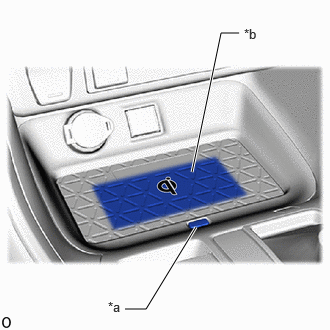
| *a | Mobile Wireless Charger Switch/Indicator Light (Green/Red) |
| *b | Charging Area |
Turn the ignition switch to ACC or ON.
- HINT:
-
If the ignition switch is turned off when the wireless charging system is on, the wireless charging system will automatically turn on the next time the ignition switch is turned ACC or ON.
Turn the wireless charging system on and check that the indicator light (green) illuminates.
Place a rechargeable device on the charging area and check that the indicator light (red) illuminates, indicating charging is in progress.
- HINT:
-
Refer to system description for details about Qi-compatible rechargeable devices.
Check that the indicator light (red) illuminates when charging is complete.
- HINT:
-
Some mobile devices, cases or accessories may not cause the indicator (green) to illuminate when charging is complete, even though they are Qi-compatible. Check the mobile device to confirm the charge status.
Turn the wireless charging system off and check that the indicator light turns off.