POWER OUTLETS (INT) POWER OUTLET SOCKET(for Console Box Front Side) INSTALLATION
PROCEDURE

 85532
1.INSTALL USB CHARGER SOCKET (w/ USB Charger)
85532
1.INSTALL USB CHARGER SOCKET (w/ USB Charger)
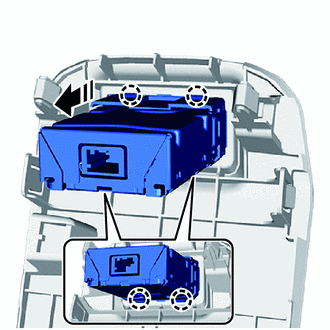

|
Install in this Direction |
Attach the claw and install the USB charger socket as shown in the illustration.
85535E
2.INSTALL NO. 2 POWER OUTLET SOCKET COVER (w/o USB Charger)
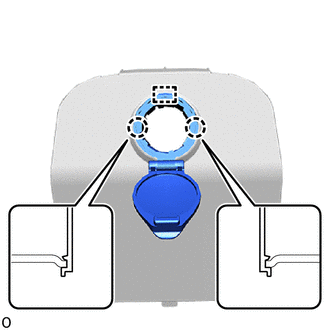
Attach the guide and claw to install the No. 2 power outlet socket cover.
85530D
3.INSTALL NO. 2 POWER OUTLET SOCKET ASSEMBLY (w/o USB Charger)
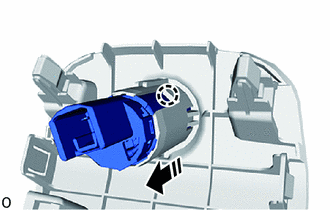
|
|
Install in this Direction |
Attach the claw and install the No. 2 power outlet socket assembly as shown in the illustration.
58913A
4.INSTALL NO. 3 BOX PANEL
Connect the connector.
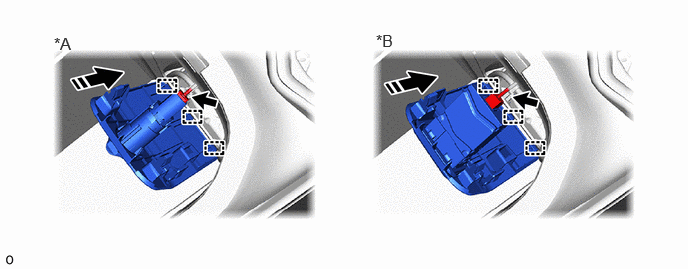
| *A | w/o USB Charger | *B | w/ USB Charger |
|
|
Install in this Direction | - | - |
Attach the guide as shown in the illustration.
Rotate the No. 3 box panel in the direction indicated by the arrow shown in the illustration.
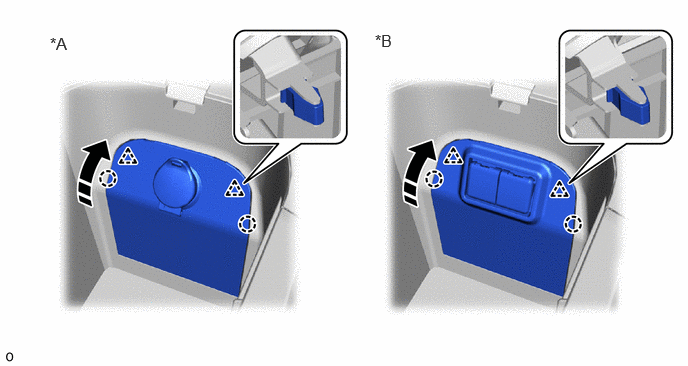
| *A | w/o USB Charger | *B | w/ USB Charger |
|
|
Install in this Direction | - | - |
Attach the clip and claw to install the No. 3 box panel.
58825A
5.INSTALL CONSOLE BOX POCKET (w/ Console Box Tray)