☰ Toyota RAV4☰ فهرستVehicle Interior › POWER OUTLETS (INT) › POWER OUTLET SOCKET(for Console Box Rear Side)
RM36D0EC
_58
Vehicle Interior
_083105
POWER OUTLETS (INT)
_0402364
POWER OUTLET SOCKET(for Console Box Rear Side)
A
POWER OUTLETS (INT) POWER OUTLET SOCKET(for Console Box Rear Side) REMOVAL
PROCEDURE

 58903A
1.REMOVE REAR CONSOLE END PANEL SUB-ASSEMBLY
58903A
1.REMOVE REAR CONSOLE END PANEL SUB-ASSEMBLY
85530E
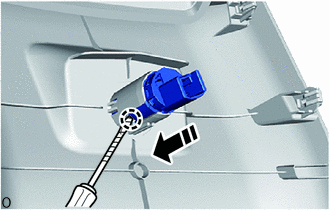
2.REMOVE NO. 3 POWER OUTLET SOCKET ASSEMBLY (w/o USB Charger)
a.
0,0 0,0
false

|
Remove in this Direction |

|
Protective Tape |
Using a screwdriver with its tip wrapped with protective tape, detach the claw and remove the No. 3 power outlet socket assembly as shown in the illustration.
85535H
3.REMOVE NO. 3 POWER OUTLET SOCKET COVER (w/o USB Charger)
a.
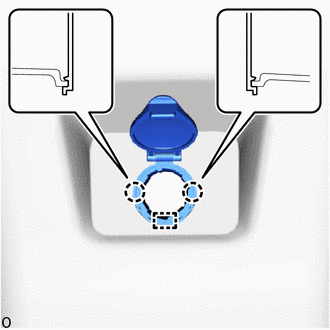
Detach the claw and guide to remove the No. 3 power outlet socket cover.
85532
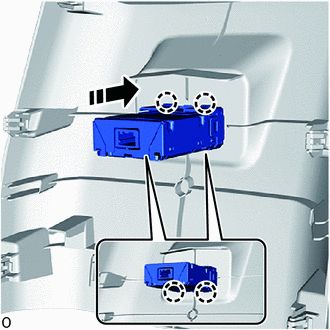
4.REMOVE USB CHARGER SOCKET (w/ USB Charger)
a.
0,0 0,0
false
|
|
Remove in this Direction |
Detach the claw and remove the USB charger socket as shown in the illustration.