RM36D0EC
_V1
General
_083136
MAINTENANCE
_0400711
BATTERY COOLING FILTER
A
MAINTENANCE BATTERY COOLING FILTER REMOVAL
PROCEDURE

 58441J
1.REMOVE BATTERY SERVICE HOLE COVER
58441J
1.REMOVE BATTERY SERVICE HOLE COVER
a.
0,0 0,0
false

|
Remove in this Direction |
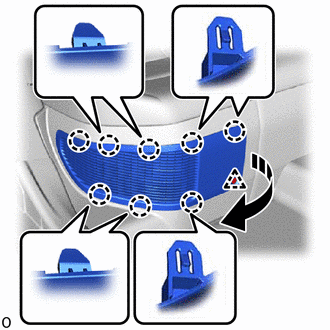
Remove the clip.
b.
Disengage the 8 claws as shown in the illustration.
c.
0,0 0,0
false
|
|
Remove in this Direction |
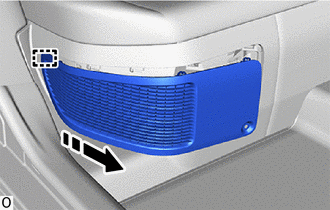
Disengage the guide to remove the battery service hole cover as shown in the illustration.
G92DH
2.REMOVE NO. 1 HV BATTERY INTAKE FILTER
- HINT:
-
If the message "Maintenance Required for Traction Battery Cooling Parts See Owner's Manual" is displayed on the multi-information display, inspect the No. 1 HV battery intake filter.
a.
2.375,1.625 2.615,1.813
0.24,0.188
10
true
*A
1.625,1.521 1.865,1.708
0.24,0.188
10
true
*A
1.656,0.552 1.896,0.74
0.24,0.188
10
true
*A
2.385,0.573 2.625,0.76
0.24,0.188
10
true
*A
3.125,1.271 3.365,1.458
0.24,0.188
10
true
*B
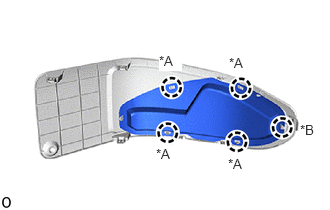
Disengage the 5 claws.
- HINT:
-
Disengage the 5 claws in the order of (A), (B).
b.
0,0 0,0
false
|
|
Remove in this Direction |
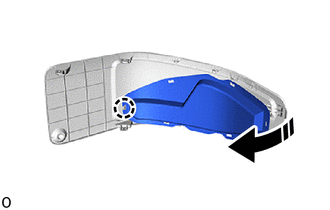
Disengage the claw to remove the No. 1 HV battery intake filter from the battery service hole cover as shown in the illustration.