RM3660EC
_58
Vehicle Interior
_080766
POWER OUTLETS (INT)
_0611796
WIRELESS CHARGING SYSTEM
D
POWER OUTLETS (INT) WIRELESS CHARGING SYSTEM OPERATION CHECK
WIRELESS CHARGING SYSTEM OPERATION CHECK
a.
1.396,2.51 1.99,2.177
1.99,2.177 2.344,2.177
true
1.198,2.635 1.948,2.99
1.948,2.99 2.344,2.99
true
0.375,0.26 0.667,0.26
0.667,0.26 1.438,0.917
true
2.417,2.094 2.729,2.25
0.313,0.156
10
false
*a
2.417,2.917 2.729,3.073
0.313,0.156
10
false
*b
0.156,0.167 0.469,0.323
0.313,0.156
10
true
*c
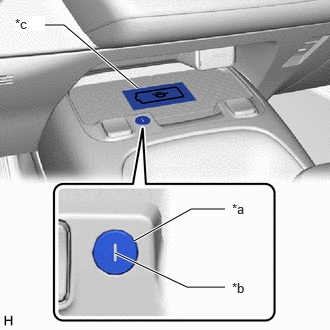
| *a | Mobile Wireless Charger Switch |
| *b | Indicator Light (Red/Green) |
| *c | Charging Area |
Turn the ignition switch to on (ON or ACC).
- HINT:
-
If the signal that between the wireless charging system and certification ECU (smart key ECU assembly) is abnormal, the indicator light (red) blinks at the frequency of pattern 2*.
b.
Turn the wireless charging system on and check that the indicator light (green) illuminates.
c.
Place a rechargeable device on the charging area and check that the indicator light (red) blinks at the frequency of pattern 1*.
- HINT:
-
Refer to Precaution for details about Qi-compatible rechargeable devices.
d.
Turn the wireless charging system off and check that the indicator light turns off.
- HINT:
-
*: For details about the indicator blinking patterns, refer to System Description.